The same template gets reused again and again: change the title and it becomes a new version. The framework slides of a quarterly report and the conclusion slide of a project review are often carried over from an earlier deck. Selecting a slide and copying it in desktop software is easy enough, but fitting that into a batch web workflow means moving files back and forth between the browser and a server.
This article shows how to copy PowerPoint slides in the browser with Spire.Presentation for JavaScript. It covers copying within the same presentation and copying to another presentation. Everything runs in the browser on WebAssembly, with no Office installation and no backend, and the files stay on the user's device.
It covers two core features:
For installation and project setup, see Integrate Spire.Presentation for JavaScript in a React project. The examples below assume Spire.Presentation is installed and the WebAssembly module is initialized.
Copy a slide within the same presentation
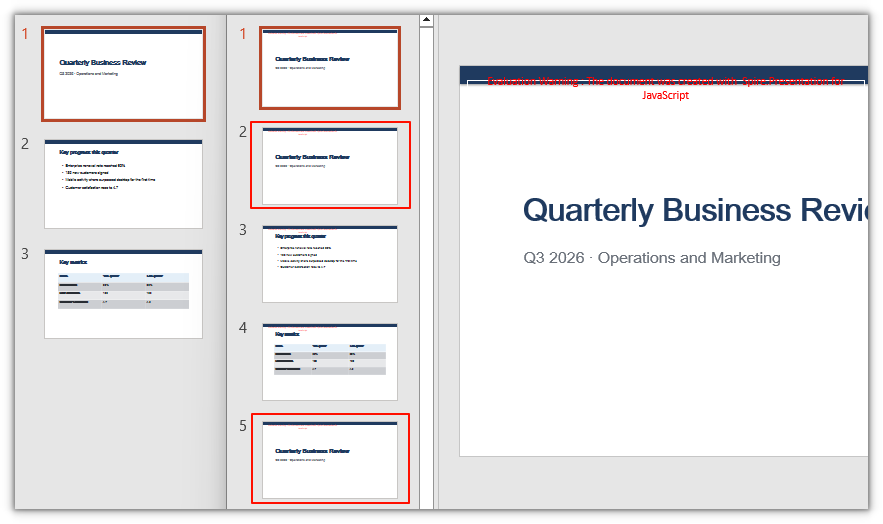
Spire.Presentation for JavaScript provides Slides.Append() and Slides.Insert() to duplicate an existing slide. Pass { slide } and that slide is copied, along with its content, shapes, and formatting; the copy and the original are independent of each other.
| Call | Effect |
|---|---|
Slides.Append({ slide }) |
Appends the copy to the end of the presentation |
Slides.Insert({ index, slide }) |
Inserts the copy at index; the slides after it shift down |
index is zero-based; pass 0 to insert at the very beginning.
The steps are:
- Get the Spire.Presentation WASM module and make sure it is ready.
- Load the source presentation and the font, create a
Presentationobject, and load the file. - Get the slide to copy with
Presentation.Slides.get_Item(). - Copy it to the end with
Slides.Append(), or to a specific position withSlides.Insert(). - Save the result with
Presentation.SaveToFile(), then read it from the VFS and trigger the browser download.
The code for copying a slide within the same presentation is:
function App() {
  const copySlide = async () => {
    // Get the Spire.Presentation WASM module
    const pptModule = window.wasmModule?.spirepresentation;

    // Check that the module is ready
    if (!pptModule) {
      alert('Spire.Presentation is not ready yet');
      return;
    }

    // Load the source presentation and the font
    await window.spire.FetchFileToVFS('SourcePresentation.pptx', "", `${process.env.PUBLIC_URL}/data/`);
    await window.spire.FetchFileToVFS('ARIALUNI.TTF', "/Library/Fonts/", `${process.env.PUBLIC_URL}/font/`);

    // Create a Presentation instance and load the source document
    const ppt = new pptModule.Presentation();
    ppt.LoadFromFile('SourcePresentation.pptx');

    // Get the first slide
    const slide = ppt.Slides.get_Item(0);

    // Copy it to the end
    ppt.Slides.Append({ slide: slide });

    // Copy it to the second position; the index is zero-based
    ppt.Slides.Insert({ index: 1, slide: slide });

    // Save the result
    const outputFileName = 'CopiedPresentation.pptx';
    ppt.SaveToFile({ file: outputFileName, fileFormat: pptModule.FileFormat.Pptx2013 });
    ppt.Dispose();

    // Read the generated file from the VFS and trigger the download
    const fileArray = window.dotnetRuntime.Module.FS.readFile(outputFileName);
    const blob = new Blob([fileArray], { type: 'application/vnd.openxmlformats-officedocument.presentationml.presentation' });
    const url = URL.createObjectURL(blob);
    const a = document.createElement('a');
    a.href = url;
    a.download = outputFileName;
    a.click();
    URL.revokeObjectURL(url);
  };

  return (
    <div style={{ textAlign: 'center', height: '300px' }}>
      <h1>Copy PowerPoint Slides</h1>
      <button onClick={copySlide}>
        Copy slides
      </button>
    </div>
  );
}

export default App;
The presentation after copying the first slide to the end and to the second position:
Copy a slide to another presentation
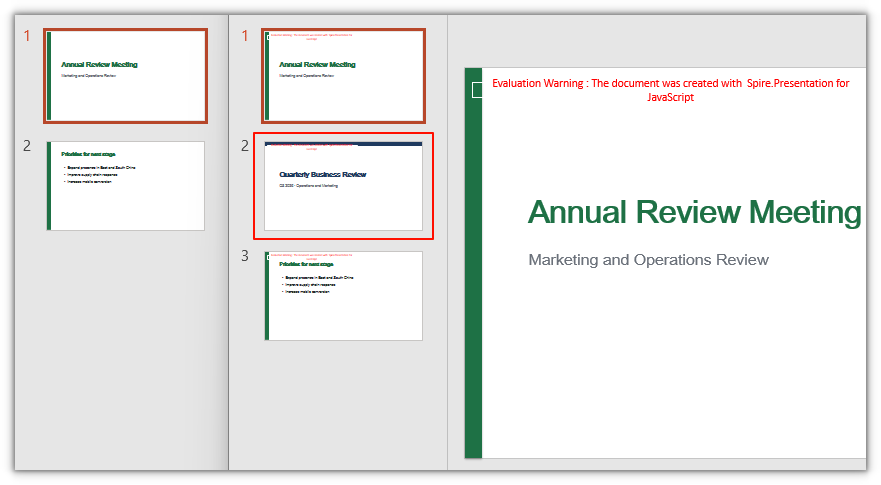
The slide passed to Append() and Insert() does not have to come from the same document. Hand an ISlide taken from the source document to the target document, and the copy lands in the target presentation together with the source document's master and layout; the target document's existing pages and masters are not affected.
The steps are:
- Get the Spire.Presentation WASM module and make sure it is ready.
- Load the source document, the target document, and the font, and create separate
Presentationobjects for them. - Get the slide to copy with the source document's
Slides.get_Item(). - Insert the slide at a specific position with the target document's
Slides.Insert(), or append it withSlides.Append(). - Save the target document with
Presentation.SaveToFile(), then read it from the VFS and trigger the browser download.
The code for copying a slide to another presentation is:
function App() {
  const copySlideToAnother = async () => {
    // Get the Spire.Presentation WASM module
    const pptModule = window.wasmModule?.spirepresentation;

    // Check that the module is ready
    if (!pptModule) {
      alert('Spire.Presentation is not ready yet');
      return;
    }

    // Load the source document, the target document, and the font
    await window.spire.FetchFileToVFS('SourcePresentation.pptx', "", `${process.env.PUBLIC_URL}/data/`);
    await window.spire.FetchFileToVFS('TargetPresentation.pptx', "", `${process.env.PUBLIC_URL}/data/`);
    await window.spire.FetchFileToVFS('ARIALUNI.TTF', "/Library/Fonts/", `${process.env.PUBLIC_URL}/font/`);

    // Create Presentation instances and load the source and target documents
    const ppt1 = new pptModule.Presentation();
    ppt1.LoadFromFile('SourcePresentation.pptx');
    const ppt2 = new pptModule.Presentation();
    ppt2.LoadFromFile('TargetPresentation.pptx');

    // Get the first slide from the source document
    const slide = ppt1.Slides.get_Item(0);

    // Insert it at the second position of the target document; the index is zero-based
    ppt2.Slides.Insert({ index: 1, slide: slide });

    // Save the target document
    const outputFileName = 'CopiedAcrossPresentations.pptx';
    ppt2.SaveToFile({ file: outputFileName, fileFormat: pptModule.FileFormat.Pptx2013 });
    ppt2.Dispose();
    ppt1.Dispose();

    // Read the generated file from the VFS and trigger the download
    const fileArray = window.dotnetRuntime.Module.FS.readFile(outputFileName);
    const blob = new Blob([fileArray], { type: 'application/vnd.openxmlformats-officedocument.presentationml.presentation' });
    const url = URL.createObjectURL(blob);
    const a = document.createElement('a');
    a.href = url;
    a.download = outputFileName;
    a.click();
    URL.revokeObjectURL(url);
  };

  return (
    <div style={{ textAlign: 'center', height: '300px' }}>
      <h1>Copy PowerPoint Slides Across Presentations</h1>
      <button onClick={copySlideToAnother}>
        Copy slides
      </button>
    </div>
  );
}

export default App;
The target presentation after inserting the first slide of the source document:
Copy all slides of a presentation at once
To carry over not one slide but every slide in the source document, call Append() in a loop. Iterate the indexes from 0 upward and the copies land at the end of the target document in their original order:
// Loop over every slide in the source document and append them to the target in order
for (let i = 0; i < ppt1.Slides.Count; i++) {
  ppt2.Slides.Append({ slide: ppt1.Slides.get_Item(i) });
}
FAQ
Do a copied slide and the original affect each other
No. Append({ slide }) and Insert({ index, slide }) copy the slide; the copy and the original are independent, so changing the text or shapes on one does not carry over to the other.
What is the difference between Append and Insert when copying a slide
Append() only puts the copy at the end, so you do not have to think about its position. Insert() takes an extra index, the copy goes to that index, and the slide at that position and all following slides shift down. index is zero-based.
Why do the layout and fonts change after copying between presentations
When you copy across documents, the copy brings the source document's master and layout with it, so the target document gains an extra master from the source. Existing pages keep their original master and are unaffected, and the copy looks the same as it did in the source. To make the copy use the target document's styling instead, adjust that slide's layout after copying, or use the same template in both documents. If a font is missing, load it into /Library/Fonts/ with FetchFileToVFS.
Will the page order get mixed up when copying several slides at once
With Append(), loop from index 0 to Slides.Count - 1 and the copies reach the end of the target in their original order. With Insert() in a loop, every insertion shifts the following indexes, so the positions have to be accumulated as you go.
Do I need to upload the file to a server to copy slides
No. Spire.Presentation for JavaScript runs in the browser on WebAssembly, and presentations are read and written locally through a virtual file system (VFS); copying and saving happen locally. Whether the file eventually leaves the device depends on other code you add to the page.
Get a free license
To remove the evaluation message from the result documents or lift feature restrictions, contact sales for a 30-day temporary license.