On a business page, users open the editor to edit a document and then need to close it. Many pages simply remove the editor from the page when the user closes it. The editor is no longer visible, but some of its listeners are still running in the background. If the editor is opened and closed repeatedly, the old listeners may still respond to operations on the new document, and the page becomes slower. When the editor is no longer needed, clean it up with destroyEditor(). This article uses Word as an example to explain how to destroy a Spire.OfficeJS editor.
Destroy process
Destroying the editor can be summarized in three steps: open the editor, call destroyEditor(), and restore the page to its original state.
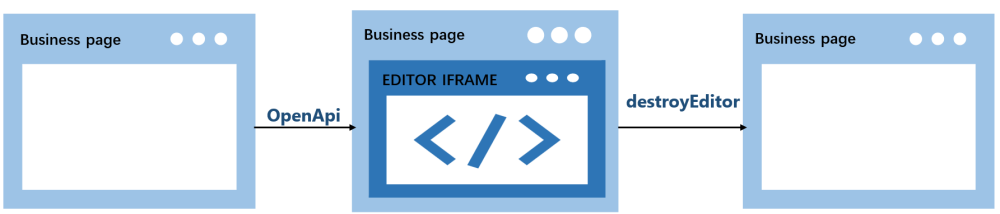
- The user opens the editor.
OpenApicreates the editor on the business page, and the original placeholder<div>is replaced. - Call
destroyEditor()to remove the editor. It unbinds themessagelistener and themouseuplistener on the business page, then replaces the editor iframe with the original placeholder<div>. - The page returns to its state before opening, and the placeholder
<div>appears again.
How to call it
destroyEditor() is not a global method, nor is it on the editor iframe element. It is a method on the object returned by new SpireCloudEditor.OpenApi(). Save the returned object when you create the editor, and call the method on that object when you destroy the editor.
Example code:
var editor = new SpireCloudEditor.OpenApi('editor', config);

editor.destroyEditor();
editor = null;
Note
Call destroyEditor() only once per editor instance; calling it again on the same instance throws an error. After a successful destroy, set editor to null to avoid using the stale object. To open the editor again, create a new instance.
Complete example
Below is a complete example: the page creates the editor and saves the returned object when the page loads, then calls destroyEditor() when the user clicks the "Destroy Editor" button. Replace LocalExample:3000 with the actual deployment address before running.
<!DOCTYPE html>
<html lang="en">
<head>
  <meta charset="UTF-8">
  <title>Spire.OfficeJS Destroy Editor</title>
  <style>
    html, body { height: 100%; margin: 0; background-color: #cbe4f3;}
    body { display: flex; flex-direction: column; }
    #editor { flex: 1; min-height: 0; }
    #editor iframe { width: 100%; height: 100%; border: 0; }
  </style>
</head>
<body>
  <button id="destroyBtn">Destroy Editor</button>
  <div id="editor"></div>
  <script src="http://LocalExample:3000/web/editors/spireapi/SpireCloudEditor.js"></script>
  <script>
    var SERVER = 'http://LocalExample:3000';

    var config = {
      fileAttrs: {
        fileInfo: { name: 'sample.docx', ext: 'docx' },
        sourceUrl: SERVER + '/samples/sample.docx'
      },
      user: { id: 'uid-1', name: 'Jonn' },
      editorAttrs: {
        editorMode: 'edit',
        editorType: 'document',
        viewLanguage: 'en',
        useWebAssemblyDoc: true,
        spireOfficeJsLicense: '',
        serverless: {
          useServerless: true,
          baseUrl: SERVER
        }
      }
    };

    var editor = new SpireCloudEditor.OpenApi('editor', config);

    document.getElementById('destroyBtn').addEventListener('click', function () {
      editor.destroyEditor();
      editor = null;
    });
  </script>
</body>
</html>
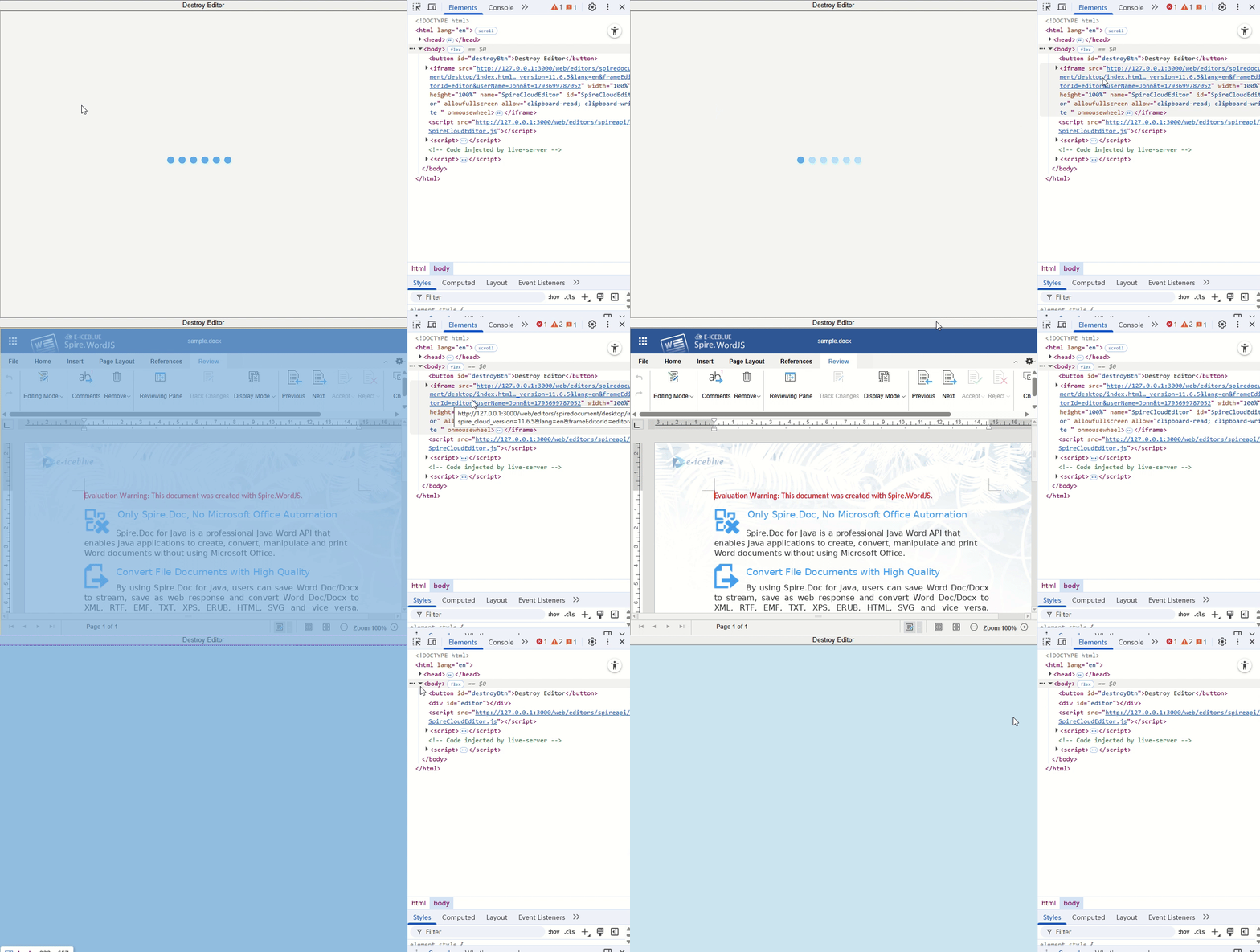
After you open the document and click the "Destroy Editor" button, the editor is destroyed:
Note
destroyEditor() does not save the document and does not cancel save or download requests that have already been sent. If you need to keep changes, save first and wait for the save to complete before destroying the editor.
FAQ
The container style changes after destroying the editor
Cause: The placeholder <div> restored by destroyEditor() has only its id set; its original class and inline style are not restored.
Solution: Put the container's size and styles in an ID selector, for example #editor { flex: 1; min-height: 0; }.
Can I still use methods such as downloadAs after calling destroyEditor()?
Cause: destroyEditor() unbinds the listeners on the business page, so the returned object no longer receives responses from the editor.
Solution: Do not use other methods on the returned object after calling destroyEditor().
Does destroyEditor() clear localStorage or the server-side cache?
Cause: destroyEditor() only performs cleanup on the business page; it does not clear browser storage or the server-side cache.
Solution: If cleanup is needed, handle it separately in the business system.
