PDF hyperlinks are supposed to be the easiest part of a document — one click and you are there, with no copying and no typing. But once they have to be maintained in bulk, the situation flips: a product document changes domain and every URL has to be fixed one by one; an old manual is about to be published and its external links have to be cleared first. In desktop software these jobs mean clicking through by hand, or cannot be done in bulk at all.
This article shows how to modify and delete hyperlinks with Spire.PDF for JavaScript. It is built on WebAssembly and loads, modifies and saves PDF documents directly in the browser; the whole process runs locally through a virtual file system (VFS), with no backend required.
This article covers two key operations:
For installation and project setup, refer to How to Integrate Spire.PDF for JavaScript in a React Project. The examples below assume Spire.PDF is installed and the WebAssembly module has been initialized.
Modify Hyperlinks
When a document's URLs change domain, resetting them one by one is tedious. An existing link annotation can be read and written through PdfUriAnnotationWidget, whose Uri property is the link's target address. Walking the annotation collection page by page and rewriting the matches changes links in bulk.
function App() {
  const updateHyperlinks = async () => {
    // Get the Spire.PDF WASM module
    const pdfModule = window.wasmModule?.spirepdf;

    // Check whether the module is ready
    if (!pdfModule) {
      alert('Spire.PDF is not ready yet');
      return;
    }

    // Load the PDF to be processed into the VFS
    const inputFileName = 'ProductManual.pdf';
    await window.spire.FetchFileToVFS(inputFileName, "", `${process.env.PUBLIC_URL}/data/`);

    // Create a PdfDocument object and load the PDF document
    let doc = new pdfModule.PdfDocument();
    doc.LoadFromFile(inputFileName);

    // The new link address
    const newUrl = 'https://www.e-iceblue.com/Introduce/pdf-for-javascript.html';

    // Walk the annotations page by page and rewrite the URI links
    for (let i = 0; i < doc.Pages.Count; i++) {
      const page = doc.Pages.get_Item(i);
      for (let j = 0; j < page.Annotations.Count; j++) {
        const annotation = page.Annotations.get_Item(j);
        // Handle only link annotations; leave other annotation types as they are
        if (annotation instanceof pdfModule.PdfUriAnnotationWidget) {
          annotation.Uri = newUrl;
        }
      }
    }

    // Save the resulting document
    const outputFileName = 'HyperlinksUpdated.pdf';
    doc.SaveToFile(outputFileName);
    doc.Close();

    // Read the generated file from the VFS and trigger a download
    const fileArray = window.dotnetRuntime.Module.FS.readFile(outputFileName);
    const blob = new Blob([fileArray], { type: 'application/pdf' });
    const downloadUrl = URL.createObjectURL(blob);
    const a = document.createElement('a');
    a.href = downloadUrl;
    a.download = outputFileName;
    a.click();
    URL.revokeObjectURL(downloadUrl);
  };

  return (
    <div style={{ textAlign: 'center', height: '300px' }}>
      <h1>Modify Hyperlinks</h1>
      <button onClick={updateHyperlinks}>
        Update Hyperlinks
      </button>
    </div>
  );
}

export default App;
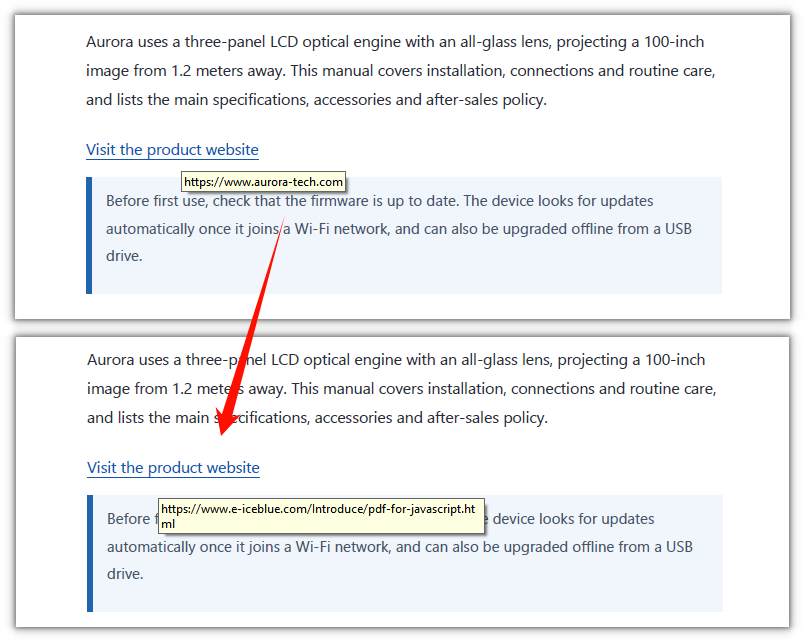
The three hyperlinks already in the document now point to the new address:
Delete Hyperlinks
Deleting hyperlinks is likewise a walk over the annotation collection, calling Remove on the matches. The difference is collecting first and deleting after: removing during the walk shifts the collection forward, and the loop then skips the entry right after the removed one.
function App() {
  const deleteHyperlinks = async () => {
    // Get the Spire.PDF WASM module
    const pdfModule = window.wasmModule?.spirepdf;

    // Check whether the module is ready
    if (!pdfModule) {
      alert('Spire.PDF is not ready yet');
      return;
    }

    // Load the PDF to be processed into the VFS
    const inputFileName = 'ProductManual.pdf';
    await window.spire.FetchFileToVFS(inputFileName, "", `${process.env.PUBLIC_URL}/data/`);

    // Create a PdfDocument object and load the PDF document
    let doc = new pdfModule.PdfDocument();
    doc.LoadFromFile(inputFileName);

    // Collect all link annotations first
    const links = [];
    for (let i = 0; i < doc.Pages.Count; i++) {
      const page = doc.Pages.get_Item(i);
      for (let j = 0; j < page.Annotations.Count; j++) {
        const annotation = page.Annotations.get_Item(j);
        if (annotation instanceof pdfModule.PdfUriAnnotationWidget) {
          links.push({ page, annotation });
        }
      }
    }

    // Remove them all after the collection is complete
    for (const link of links) {
      link.page.Annotations.Remove(link.annotation);
    }

    // Save the resulting document
    const outputFileName = 'HyperlinksRemoved.pdf';
    doc.SaveToFile(outputFileName);
    doc.Close();

    // Read the generated file from the VFS and trigger a download
    const fileArray = window.dotnetRuntime.Module.FS.readFile(outputFileName);
    const blob = new Blob([fileArray], { type: 'application/pdf' });
    const downloadUrl = URL.createObjectURL(blob);
    const a = document.createElement('a');
    a.href = downloadUrl;
    a.download = outputFileName;
    a.click();
    URL.revokeObjectURL(downloadUrl);
  };

  return (
    <div style={{ textAlign: 'center', height: '300px' }}>
      <h1>Delete Hyperlinks</h1>
      <button onClick={deleteHyperlinks}>
        Delete Hyperlinks
      </button>
    </div>
  );
}

export default App;
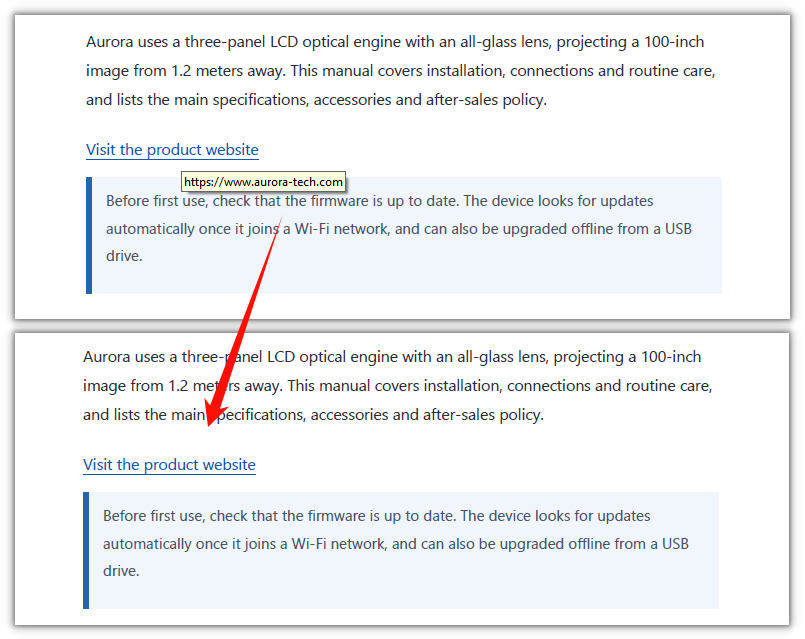
All hyperlinks in the document have been removed:
FAQ
I changed Uri, but the address is unchanged after saving
Cause: link annotations are not a single class. The Uri property exists only on PdfUriAnnotationWidget. A hyperlink exported from Word, or produced by Spire's PdfTextWebLink, is another class, PdfTextWebLinkAnnotationWidget, whose address property is called Url. Code that tests only one class skips the other entirely.
Solution: test both classes and set the matching property:
if (annotation instanceof pdfModule.PdfUriAnnotationWidget) {
  annotation.Uri = newUrl;
} else if (annotation instanceof pdfModule.PdfTextWebLinkAnnotationWidget) {
  annotation.Url = newUrl;
}
Why does deleting while iterating remove only some of the links?
Cause: page.Annotations is a mutable annotation collection. After item i is removed, the annotations behind it shift up by one, while the loop's i still increments as usual, so the entry immediately after the removed one is skipped. With several links on a page, several are missed.
Solution: collect the annotations to delete into an array first, then remove them all after the loop:
const links = [];
// ...collect while iterating...

// remove after the collection is complete
for (const link of links) {
  link.page.Annotations.Remove(link.annotation);
}
Does deleting hyperlinks also delete comments?
Cause: page.Annotations holds more than links — text box annotations, popups, form fields and so on all live in the same collection. Calling Clear(), or deleting everything without checking, wipes those out too.
Solution: delete only link annotations and leave the rest untouched:
if (annotation instanceof pdfModule.PdfUriAnnotationWidget) {
  page.Annotations.Remove(annotation);
}
Get a Free License
To remove the evaluation message from the generated documents, or to get rid of the function limitations, please contact sales for a temporary license valid for 30 days.