When a PDF reaches the review stage, feedback rarely lands in the body text — it shows up as margin notes: change this, confirm that, something still in doubt. Pulling those notes into a list by opening a reader and copying each one does not scale once there are many documents.
This article uses Spire.PDF for JavaScript to extract a specific annotation and all annotations from a PDF document. It loads and reads PDF documents in the browser with WebAssembly; everything runs locally, files are read and written through a virtual file system (VFS), and no backend is involved.
This article covers two core features:
For installation and project setup, see How to Integrate Spire.PDF for JavaScript in a React Project. The examples below assume Spire.PDF is installed and the WebAssembly module is initialized.
Extract a Specific Annotation
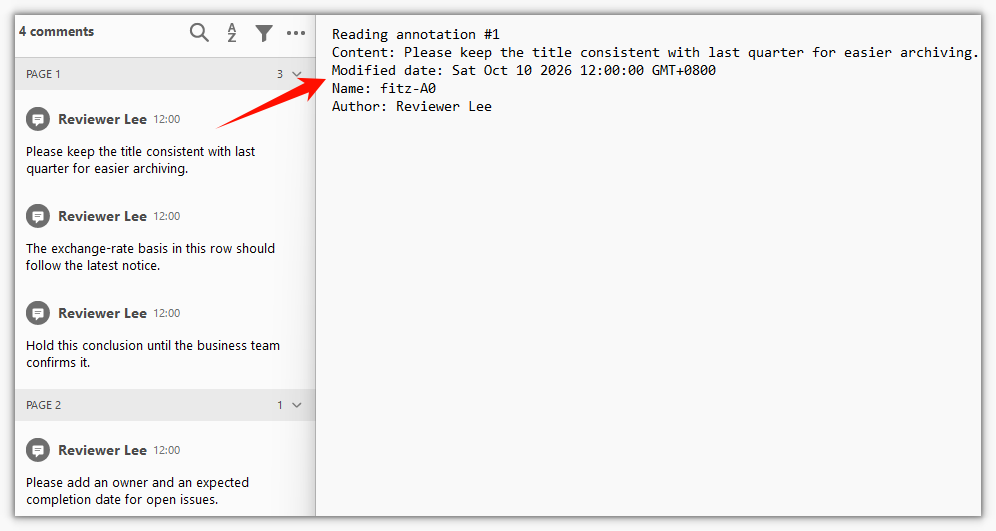
Spire.PDF for JavaScript exposes the PdfPage.Annotations collection for reading existing annotations on a page. Take a single annotation by index, check its type with instanceof, and you can read that annotation's content, author, name, and modified date.
function App() {
  const extractSpecificAnnotation = async () => {
    // Get the Spire.PDF WASM module
    const pdfModule = window.wasmModule?.spirepdf;

    // Check that the module is ready
    if (!pdfModule) {
      alert('Spire.PDF is not ready yet');
      return;
    }

    // Load the PDF with annotations into the VFS
    const inputFileName = 'Annotated_Report.pdf';
    await window.spire.FetchFileToVFS(inputFileName, "", `${process.env.PUBLIC_URL}/data/`);

    // Create a PdfDocument object and load the PDF document
    const doc = new pdfModule.PdfDocument();
    doc.LoadFromFile(inputFileName);

    // Get the annotation collection of the first page
    const page = doc.Pages.get_Item(0);
    const annotations = page.Annotations;

    // Pick the annotation to read; here, the first one in the collection
    const index = 0;
    const target = annotations.get_Item(index);

    let content = `Reading annotation #${index + 1}\r\n`;

    // Check the annotation type: only a text annotation carries an author and a name
    if (target instanceof pdfModule.PdfTextAnnotationWidget) {
      const styled = new pdfModule.PdfStyledAnnotationWidget(target.H);
      content += `Content: ${styled.Text}\r\n`;

      const annot = new pdfModule.PdfAnnotation(target.H);
      content += `Modified date: ${annot.ModifiedDate.toString()}\r\n`;
      content += `Name: ${annot.Name}\r\n`;

      const markup = new pdfModule.PdfMarkUpAnnotationWidget(target.H);
      content += `Author: ${markup.Author}\r\n`;
    } else {
      content += 'This annotation is not a text annotation.\r\n';
    }

    // Define the output file name and release the document
    const outputFileName = 'SpecificAnnotationInfo.txt';
    doc.Close();

    // Write the content to the VFS and trigger the download
    window.dotnetRuntime.Module.FS.writeFile(outputFileName, content);
    const fileArray = window.dotnetRuntime.Module.FS.readFile(outputFileName);
    const blob = new Blob([fileArray], { type: 'text/plain' });
    const url = URL.createObjectURL(blob);
    const a = document.createElement('a');
    a.href = url;
    a.download = outputFileName;
    a.click();
    URL.revokeObjectURL(url);
  };

  return (
    <div style={{ textAlign: 'center', height: '300px' }}>
      <h1>Extract a Specific Annotation</h1>
      <button onClick={extractSpecificAnnotation}>
        Extract
      </button>
    </div>
  );
}

export default App;
Content, author, name, and modified date read from a single annotation:
Extract All Annotations from the Document
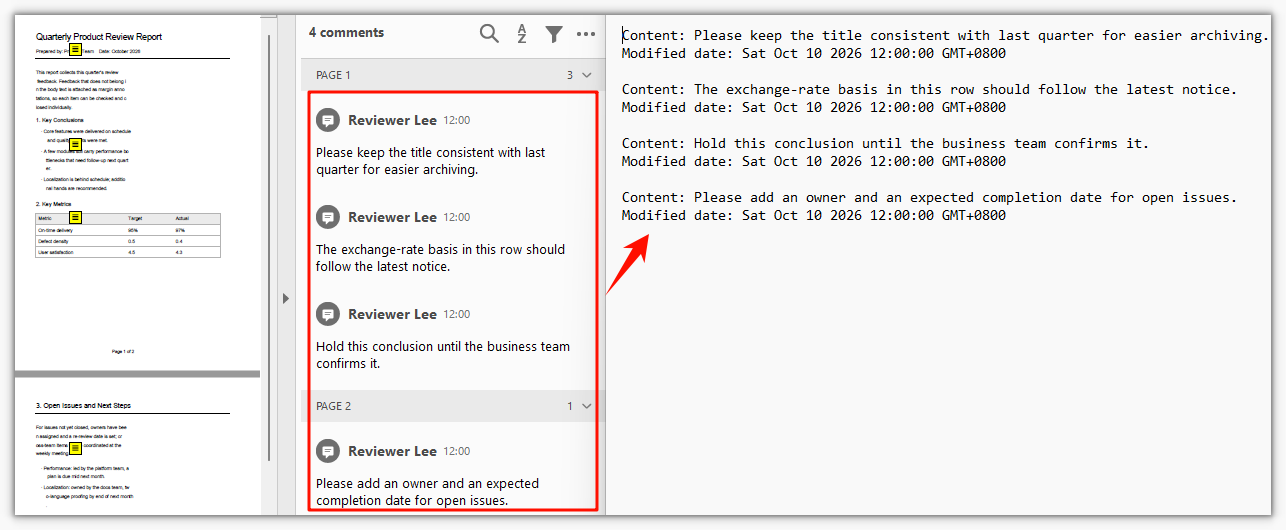
Spire.PDF for JavaScript also lets you walk the annotation collection in order to export a page's annotations in one pass. A text annotation comes with a popup child annotation, and the content lives on the text annotation; skip popups by type while iterating so the same mark is not recorded twice.
function App() {
  const extractAllAnnotations = async () => {
    // Get the Spire.PDF WASM module
    const pdfModule = window.wasmModule?.spirepdf;

    // Check that the module is ready
    if (!pdfModule) {
      alert('Spire.PDF is not ready yet');
      return;
    }

    // Load the PDF with annotations into the VFS
    const inputFileName = 'Annotated_Report.pdf';
    await window.spire.FetchFileToVFS(inputFileName, "", `${process.env.PUBLIC_URL}/data/`);

    // Create a PdfDocument object and load the PDF document
    const doc = new pdfModule.PdfDocument();
    doc.LoadFromFile(inputFileName);

    let content = '';

    // Walk the annotations page by page
    for (let p = 0; p < doc.Pages.Count; p++) {
      const annotations = doc.Pages.get_Item(p).Annotations;

      for (let i = 0; i < annotations.Count; i++) {
        const item = annotations.get_Item(i);

        // A text annotation derives a popup child; the content is on the text annotation, so skip popups to avoid duplicates
        if (item instanceof pdfModule.PdfPopupAnnotationWidget) {
          continue;
        }

        const annot = new pdfModule.PdfAnnotation(item.H);
        content += `Content: ${annot.Text}\r\n`;
        content += `Modified date: ${annot.ModifiedDate.toString()}\r\n\r\n`;
      }
    }

    // Define the output file name and release the document
    const outputFileName = 'AllAnnotationsInfo.txt';
    doc.Close();

    // Write the content to the VFS and trigger the download
    window.dotnetRuntime.Module.FS.writeFile(outputFileName, content);
    const fileArray = window.dotnetRuntime.Module.FS.readFile(outputFileName);
    const blob = new Blob([fileArray], { type: 'text/plain' });
    const url = URL.createObjectURL(blob);
    const a = document.createElement('a');
    a.href = url;
    a.download = outputFileName;
    a.click();
    URL.revokeObjectURL(url);
  };

  return (
    <div style={{ textAlign: 'center', height: '300px' }}>
      <h1>Extract All Annotations from the Document</h1>
      <button onClick={extractAllAnnotations}>
        Extract
      </button>
    </div>
  );
}

export default App;
Content and modified date collected from every page, with popup child annotations skipped:
FAQ
Why the loop finds more annotations than you see on the page
Cause: Every text annotation (sticky note) is made of two objects in the PDF — the annotation itself and a popup child. They are a parent-child pair, and the content exists only on the parent. The Annotations collection lists both, so the same mark gets counted twice.
Solution: Check the type while iterating and skip popups:
// The popup child annotation has empty content; skipping it avoids duplicates
if (item instanceof pdfModule.PdfPopupAnnotationWidget) {
  continue;
}
Why the annotation at a given index has no content or author
Cause: The order in the collection does not have to match what you see in a reader. Index 0 may point at a popup child annotation, or the annotation may not be a text annotation at all (a link or a stamp, say), so fields such as Author and Name come back empty.
Solution: Confirm the type with instanceof before reading values. To locate one particular mark, iterate the collection and filter by content or author instead of hard-coding an index:
if (target instanceof pdfModule.PdfTextAnnotationWidget) {
  const markup = new pdfModule.PdfMarkUpAnnotationWidget(target.H);
  console.log(markup.Author);
}
The output is empty when the input document has no annotations
Cause: When the document itself has no annotations, Annotations.Count is 0, the loop never runs, and the exported txt is empty. That is not a read failure — there is simply nothing to extract.
Solution: Check whether the collection is empty before reading and give the caller a clear signal:
const annotations = doc.Pages.get_Item(0).Annotations;
if (annotations.Count === 0) {
  alert('This document has no annotations');
  return;
}
Get a Free License
If you want to remove the evaluation message from the resulting documents, or to get rid of the functional limitations, please contact sales for a temporary license valid for 30 days.
