A PDF moving through a workflow carries markup from the previous review round: a highlighted point, a change request, a sticky note that says "to confirm". Passing those traces on as-is invites misreading, and can leak internal discussion along with them. Deleting them one by one in a reader does not scale once there are many documents.
This article uses Spire.PDF for JavaScript to delete annotations from a PDF document. It loads, modifies, and saves PDF documents in the browser with WebAssembly; everything runs locally, files are read and written through a virtual file system (VFS), and no backend is involved. Deletion works on the PdfPage.Annotations collection: remove one entry by index, or clear a whole page in a single call.
This article covers two core features:
For installation and project setup, see How to Integrate Spire.PDF for JavaScript in a React Project. The examples below assume Spire.PDF is installed and the WebAssembly module is initialized.
Delete a Specific Annotation
Spire.PDF for JavaScript exposes the PdfPage.Annotations collection for managing a page's annotations. RemoveAt() removes one entry by index, starting at 0. the collection is ordered, so once an entry is removed the indices of the annotations after it shift down by one.
function App() {
  const deleteSpecificAnnotation = async () => {
    // Get the Spire.PDF WASM module
    const pdfModule = window.wasmModule?.spirepdf;

    // Check that the module is ready
    if (!pdfModule) {
      alert('Spire.PDF is not ready yet');
      return;
    }

    // Load the PDF with annotations into the VFS
    const inputFileName = 'DocumentWithAnnotations.pdf';
    await window.spire.FetchFileToVFS(inputFileName, "", `${process.env.PUBLIC_URL}/data/`);

    // Create a PdfDocument object and load the PDF document
    let doc = new pdfModule.PdfDocument();
    doc.LoadFromFile(inputFileName);

    // Delete the annotation at index 0 on page 1
    doc.Pages.get_Item(0).Annotations.RemoveAt(0);

    const outputFileName = 'DeleteSpecificAnnotation.pdf';
    doc.SaveToFile(outputFileName);
    doc.Close();

    // Read the generated file from the VFS and trigger the download
    const fileArray = window.dotnetRuntime.Module.FS.readFile(outputFileName);
    const blob = new Blob([fileArray], { type: 'application/pdf' });
    const url = URL.createObjectURL(blob);
    const a = document.createElement('a');
    a.href = url;
    a.download = outputFileName;
    a.click();
    URL.revokeObjectURL(url);
  };

  return (
    <div style={{ textAlign: 'center', height: '300px' }}>
      <h1>Delete a Specific Annotation</h1>
      <button onClick={deleteSpecificAnnotation} id="btn-1">
        Delete
      </button>
    </div>
  );
}

export default App;
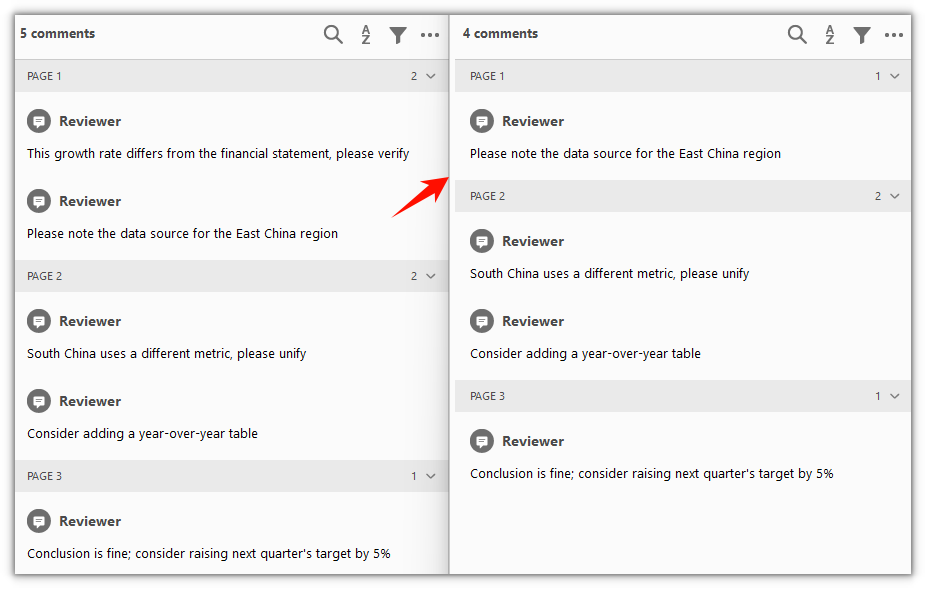
The annotation at index 0 on page 1 is removed and the remaining annotations are unchanged
Delete All Annotations from the Document
Spire.PDF for JavaScript also provides the PdfAnnotationCollection.Clear() method, which wipes every annotation on a page at once. It does not distinguish by type or count — the whole page is cleared together. To clear an entire document, walk doc.Pages and call it once per page.
function App() {
  const deleteAllAnnotations = async () => {
    // Get the Spire.PDF WASM module
    const pdfModule = window.wasmModule?.spirepdf;

    // Check that the module is ready
    if (!pdfModule) {
      alert('Spire.PDF is not ready yet');
      return;
    }

    // Load the PDF with annotations into the VFS
    const inputFileName = 'DocumentWithAnnotations.pdf';
    await window.spire.FetchFileToVFS(inputFileName, "", `${process.env.PUBLIC_URL}/data/`);

    // Create a PdfDocument object and load the PDF document
    let doc = new pdfModule.PdfDocument();
    doc.LoadFromFile(inputFileName);

    // Walk every page and clear all its annotations
    for (let i = 0; i < doc.Pages.Count; i++) {
      doc.Pages.get_Item(i).Annotations.Clear();
    }

    const outputFileName = 'DeleteAllAnnotations.pdf';
    doc.SaveToFile(outputFileName);
    doc.Close();

    // Read the generated file from the VFS and trigger the download
    const fileArray = window.dotnetRuntime.Module.FS.readFile(outputFileName);
    const blob = new Blob([fileArray], { type: 'application/pdf' });
    const url = URL.createObjectURL(blob);
    const a = document.createElement('a');
    a.href = url;
    a.download = outputFileName;
    a.click();
    URL.revokeObjectURL(url);
  };

  return (
    <div style={{ textAlign: 'center', height: '300px' }}>
      <h1>Delete All Annotations from the Document</h1>
      <button onClick={deleteAllAnnotations} id="btn-2">
        Clear
      </button>
    </div>
  );
}

export default App;
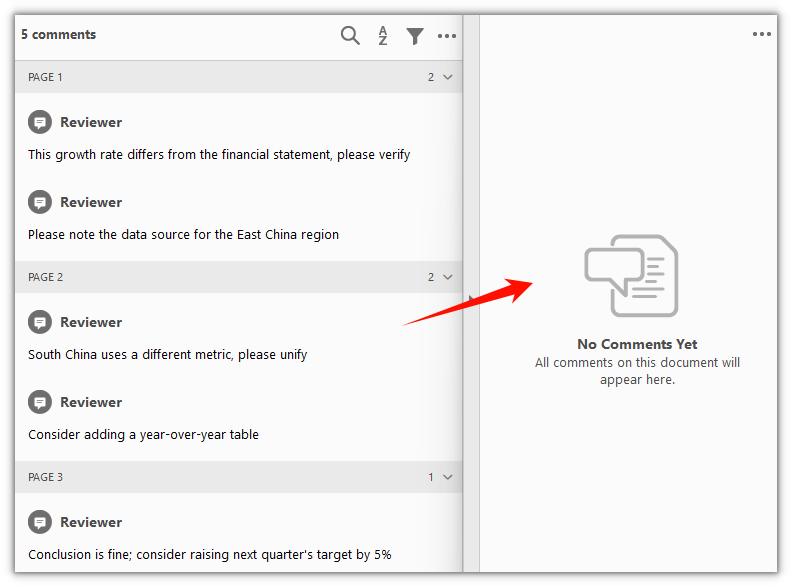
Annotations are cleared from every page and the body content is left untouched
FAQ
The wrong annotation got deleted
Cause: RemoveAt(index) locates an entry by index, and a text annotation or free-text annotation often generates a popup child annotation automatically. Both count in the Annotations collection, so the actual index does not line up with the number of notes you see on the page.
Solution: Walk the collection first, check each entry's index and type, then decide which one to remove. To remove only the text annotation itself, skip the popup child:
const annotations = doc.Pages.get_Item(0).Annotations;
for (let i = 0; i < annotations.Count; i++) {
  // A popup annotation is a child derived from a text annotation; skip it
  if (annotations.get_Item(i) instanceof pdfModule.PdfPopupAnnotationWidget) continue;
  annotations.RemoveAt(i);
  break;
}
Forward loop deletion skips half the annotations
Cause: After RemoveAt() removes one entry, the indices of every annotation after it drop by one. Deleting with a forward loop for (let i = 0; i < annotations.Count; i++) skips the entry right after each removed one.
Solution: Delete in reverse order, or just call Clear() on the page:
// Delete in reverse to avoid skipping entries as indices shift down
const annotations = doc.Pages.get_Item(0).Annotations;
for (let i = annotations.Count - 1; i >= 0; i--) {
  annotations.RemoveAt(i);
}
Does Clear() wipe the body content too
Cause: Clear() operates on the current page's Annotations collection, and that collection holds annotation objects only — no body text, images, or form fields.
Solution: Clear() removes annotations only and leaves the page body as it is. To clear just some pages, call it per page instead of walking the whole document:
// Clear annotations on page 2 (index 1) only
doc.Pages.get_Item(1).Annotations.Clear();
Get a Free License
If you want to remove the evaluation message from the resulting documents, or to get rid of the functional limitations, please contact sales for a temporary license valid for 30 days.
