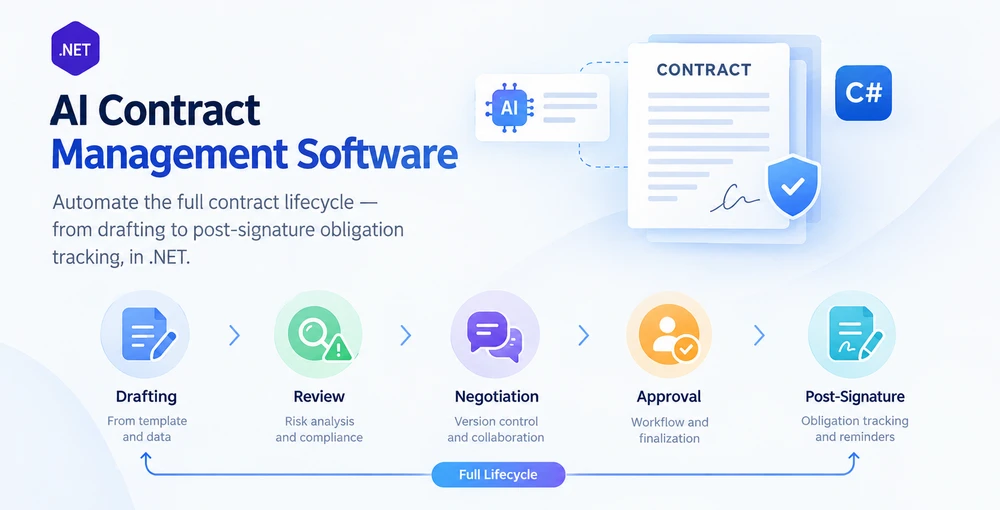
AI 계약 관리 소프트웨어는 AI 언어 이해와 .NET 애플리케이션 내의 결정적 문서 처리를 결합하여 초안 작성부터 검토, 협상, 승인, 최종 확정, 서명 후 의무 추적에 이르기까지 전체 계약 라이프사이클을 자동화합니다. 단일 작업 계약 자동화와의 차이는 라이프사이클 범위입니다. 계약 검토 도구는 위험한 조항을 표시하지만, 계약 관리 시스템은 계약을 모든 단계로 이동시키고 버전 전반에 걸쳐 감사 추적을 유지하며 서명 후 의무를 추적합니다.
Spire.Agent.Office는 언어 이해와 문서 처리 계층을 모두 제공하는 문서 AI 에이전트 SDK입니다. 이 문서에서는 다섯 단계를 하나의 파이프라인으로 연결하고, 단계별 오류 격리, PDF 및 Word용 형식 디스패치, 적절한 상태 추적을 갖춘 C# 기반 계약 라이프사이클 관리 시스템을 구축하는 방법을 보여줍니다. 이는 단일 작업 예제가 다루지 않는 패턴입니다.
이 문서는 .NET에서 AI 지원 계약 라이프사이클 파이프라인의 참조 구현을 제시합니다. 프로덕션 CLM 시스템에는 추가로 워크플로 지속성, ID 및 액세스 제어, 전자 서명 통합, 문서 저장 및 버전 보존, 알림, 감사 인프라가 필요합니다.
1. 계약 라이프사이클: AI가 작동하는 다섯 단계
계약 라이프사이클은 단일 문서 작업이 아닙니다. 각기 다른 입력, 출력, 실패 모드를 가진 일련의 단계입니다. 각 단계에서 AI가 가치를 더하는 지점과 결정적 코드가 경계를 지켜야 하는 지점을 이해하는 것이 프로덕션에서 견고한 시스템의 기반입니다.
| 단계 | 발생하는 일 | AI 역할 | 결정적 코드 역할 |
|---|---|---|---|
| 초안 작성 | 템플릿과 구조화된 데이터로 계약 생성 | 요청을 해석하고 템플릿 필드를 선택 및 채움 | 템플릿 로드, 서식 유지, .docx 또는 .pdf로 저장 |
| 검토 | 계약을 읽고 위험한 조항을 표시하며 핵심 조건 추출 | 조항 언어의 의미 분석, 위험 점수 산정 | 구조화된 검토 보고서 작성, 검토 체크리스트 적용 |
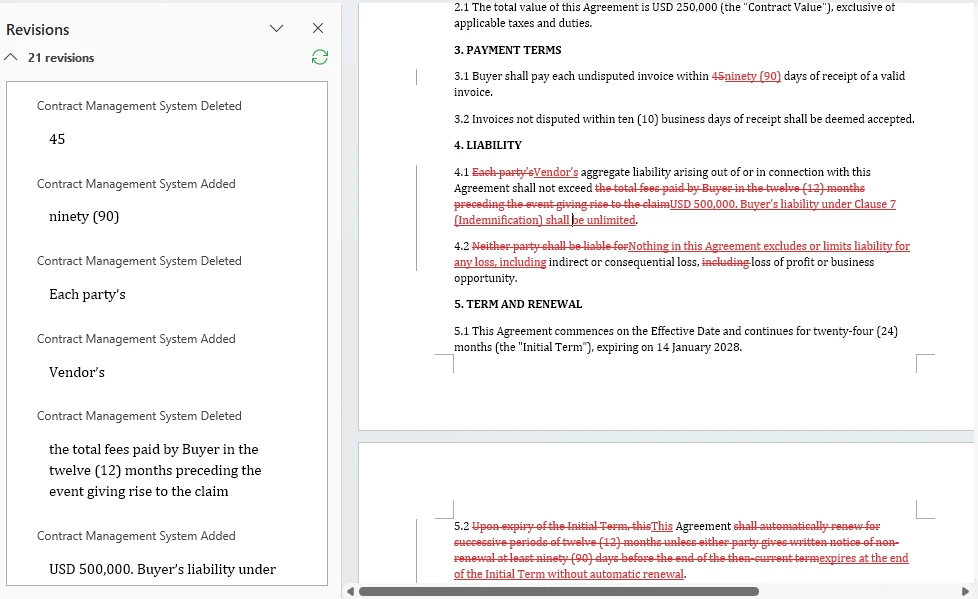
| 협상 | 버전 비교, 수정 내역 추적, 변경 사항 병합 | 차이 요약, 실질적 변경과 서식 변경 구분 표시 | 변경 내용 추적 켜기/끄기, 문서 비교, 수정 내용 수락/거부 |
| 승인 | 이해관계자에게 라우팅하고 승인 수집 | 계약 유형과 가액에 따라 승인자 제안 | 라우팅 규칙 적용, 감사 추적 기록, 최종본 생성 |
| 서명 후 | 의무, 기한, 갱신 추적 | 최종 확정 계약에서 의무와 주요 날짜 추출 | 구조화된 메타데이터 저장, 알림 트리거, 보고서 생성 |
실제에서 라이프사이클은 선형적이지 않습니다. 협상은 검토로 되돌아가고, 수정은 초안 작성을 다시 시작하게 합니다. 그러나 파이프라인 아키텍처는 고정된 순서가 아니라 단계 라우팅을 통해 이를 처리합니다.
계약 검토만과 다른 점
계약 검토 자동화 — C#에서의 AI 계약 검토의 주제 — 는 한 단계를 다룹니다. 즉, 계약을 읽고 문제를 표시하는 것입니다. 계약 관리 시스템은 다음을 수행해야 합니다.
- 단계를 함께 연결하여 데이터가 다음 단계로 흐르게 합니다(초안 작성의 출력이 검토의 입력이 됨).
-
여러 문서 형식 처리 — 템플릿은
.docx로 도착하고, 상대방은.pdf를 보낼 수 있으며, 형식 디스패치가 있는 단계는 예외를 던지지 않고 둘 다 처리합니다. - 단계 전반에 걸쳐 상태 유지 — 계약의 검토 상태, 협상 버전 수, 승인 체인은 파이프라인 실행 간에 지속되어야 합니다.
- 계약별 실패 격리 — 200개 배치 중 하나의 손상된 파일이 전체 파이프라인을 중단시켜서는 안 됩니다.
이러한 요구 사항이 아래 아키텍처를 형성합니다.
2. 계약 라이프사이클 자동화를 위한 시스템 아키텍처
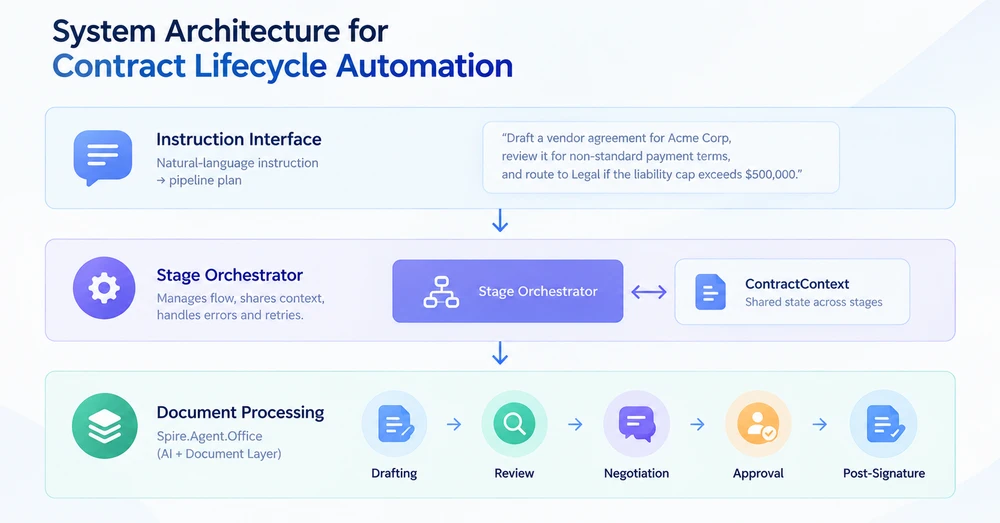
계약 라이프사이클 관리 시스템에는 세 개의 계층이 있습니다. 각 계층은 특정 책임을 가지며, 계층 간의 경계에서 프로덕션 실패가 잡히거나 빠져나갑니다.
계층 1: 지시 인터페이스
진입점은 기계적 단계가 아니라 원하는 결과를 설명하는 자연어 지시입니다. "표준 템플릿을 사용하여 Acme Corp용 공급업체 계약 초안을 작성하고, 비표준 결제 조건이 있는지 검토하며, 책임 한도가 $500,000를 초과하면 법무로 라우팅하세요." 지시 계층은 이를 파이프라인 계획으로 구문 분석합니다. 즉, 어떤 단계를 어떤 순서로 실행할지, 각 단계에 어떤 매개변수가 필요한지를 파악합니다.
계층 2: 단계 오케스트레이터
오케스트레이터는 단계 간 흐름을 관리합니다. 계약 메타데이터, 현재 문서, 단계 결과를 한 단계에서 다음 단계로 전달하는 공유 ContractContext 객체를 보유합니다. 각 단계는 컨텍스트를 받아 작업을 수행하고 업데이트된 컨텍스트와 단계 결과를 반환합니다. 오케스트레이터는 결과에 따라 계속 진행할지, 재시도할지, 예외 처리기로 라우팅할지 결정합니다.
계층 3: 문서 처리
각 단계는 Spire.Agent.Office를 호출하여 실제 문서 작업을 수행합니다. 에이전트는 AI 추론(지시 이해, 정보 추출)을 처리하고 문서 계층은 파일 작업(로드, 수정, 저장)을 처리합니다. 여러 문서 형식이 예상되는 단계에서는 형식 디스패치가 적용됩니다. .pdf 입력은 PdfDocument를 사용하고, .docx 입력은 Document를 사용합니다.
계약 컨텍스트
파이프라인을 통해 흐르는 공유 상태 객체입니다.
/// <summary>
/// Shared state that flows through every lifecycle stage.
/// Each stage reads from and writes to this context.
/// </summary>
public class ContractContext
{
    // Identity
    public string ContractId { get; set; } = string.Empty;
    public string ContractType { get; set; } = string.Empty;  // "NDA", "MSA", "Vendor", etc.

    // Document state
    public string CurrentFilePath { get; set; } = string.Empty;
    public string WorkDir { get; set; } = string.Empty;
    public int VersionNumber { get; set; } = 1;

    // Stage results
    public DraftResult? Draft { get; set; }
    public ReviewResult? Review { get; set; }
    public NegotiationResult? Negotiation { get; set; }
    public ApprovalResult? Approval { get; set; }
    public ObligationResult? Obligations { get; set; }

    // Pipeline metadata
    public string Status { get; set; } = PipelineStages.Pending;
    public List<string> StageLog { get; set; } = new();
    public string? ErrorMessage { get; set; }
}

/// <summary>
/// Stage status constants. Using named constants instead of raw strings
/// prevents the "Status never set" bug where results fall through all
/// reporting buckets and silently disappear from batch summaries.
/// </summary>
public static class PipelineStages
{
    public const string Pending    = "Pending";
    public const string Drafted    = "Drafted";
    public const string Reviewed   = "Reviewed";
    public const string Negotiated = "Negotiated";
    public const string Approved   = "Approved";
    public const string Executed   = "Executed"; // In this sample: finalized post-approval PDF, not e-signature
    public const string Monitored  = "Monitored";
    public const string Failed     = "Failed";
    public const string NeedsReview = "NeedsReview";
}
Status 필드는 원시 문자열 대신 명명된 상수를 사용합니다. 이는 상태가 명시적으로 설정되지 않아 문서가 모든 보고 버킷에서 누락되고 배치 요약에서 사라지는 일반적인 실패 모드를 방지합니다.
3. 1단계: 템플릿과 데이터로 초안 작성
초안 작성 단계는 템플릿({{Placeholder}} 표시자가 있는 .docx)과 데이터 소스(Excel 스프레드시트 또는 구조화된 입력)를 받아 채워진 계약을 생성합니다. AI 에이전트는 템플릿 구조를 읽고 데이터 소스의 데이터로 자리 표시자를 채웁니다. 하나의 지시가 기존 SDK에 필요한 필드 매핑 코드를 대체합니다.
using Spire.Agent.Office.AI;
using Spire.Agent.Office.Extensions;
using Spire.Doc;

public class DraftResult
{
    public string OutputPath { get; set; } = string.Empty;
    public int ContractsGenerated { get; set; }
    public List<string> PlaceholdersFilled { get; set; } = new();
}

public class DraftingStage
{
    private readonly AIOptions _options;

    public DraftingStage(AIOptions options) => _options = options;

    public DraftResult Execute(ContractContext context, string templatePath, string dataSourcePath)
    {
        // Format dispatch: verify the template is .docx before loading
        if (!templatePath.EndsWith(".docx", StringComparison.OrdinalIgnoreCase))
            throw new NotSupportedException(
                $"Drafting requires a .docx template. Received: {templatePath}");

        string[] attachments = { dataSourcePath };

        using (Document template = new Document())
        {
            template.LoadFromFile(templatePath);

            string draftPath = Path.Combine(context.WorkDir, $"{context.ContractId}-v1-draft.docx");

            string draftInstruction =
                "Read the data source and fill every {{Placeholder}} field in this template " +
                "with the corresponding data. Preserve the template's layout, styling, and " +
                "clause numbering. Save the completed contract to: " +
                $"{draftPath}. Contract type: {context.ContractType}.";

            AIResult result = template.AI(_options).ExecuteInstruction(
                template, draftInstruction, draftPath, attachments);

            if (result == null || !result.Success)
                throw new InvalidOperationException(
                    $"Drafting failed: {result?.ErrorMessage ?? "Unknown error"}");

            // Collect the generated file: prefer the explicit output path,
            // fall back to AIResult.OutputFiles (unreliable for some product types).
            string? generated = File.Exists(draftPath)
                ? draftPath
                : result.OutputFiles?.FirstOrDefault(p => File.Exists(p));

            if (generated == null)
                throw new InvalidOperationException(
                    "Drafting completed but no output file was found (neither at the requested " +
                    $"path '{draftPath}' nor in AIResult.OutputFiles).");

            context.CurrentFilePath = generated;
            context.VersionNumber = 1;
            context.Status = PipelineStages.Drafted;
            context.StageLog.Add($"Draft: generated contract at {generated}");

            return new DraftResult
            {
                OutputPath = generated,
                ContractsGenerated = 1,
                PlaceholdersFilled = ExtractPlaceholderNames(templatePath)
            };
        }
    }

    private static List<string> ExtractPlaceholderNames(string templatePath)
    {
        // Quick scan of the template for {{...}} markers to report what was filled
        var placeholders = new List<string>();
        using (Document doc = new Document())
        {
            doc.LoadFromFile(templatePath);
            string text = doc.GetText();
            var matches = System.Text.RegularExpressions.Regex.Matches(
                text, @"\{\{(\w+)\}\}");
            foreach (System.Text.RegularExpressions.Match m in matches)
                if (!placeholders.Contains(m.Groups[1].Value))
                    placeholders.Add(m.Groups[1].Value);
        }
        return placeholders;
    }
}
주요 API 호출
-
Document.LoadFromFile()— 자리 표시자가 있는.docx템플릿을 로드합니다 -
template.AI(_options)— AI 문서 프로세서를 연결합니다 -
ExecuteInstruction(doc, instruction, outputPath, attachments)— 데이터 소스에서 자리 표시자를 채웁니다. 에이전트가 알려진 위치에 결과물을 쓰도록 명시적 절대 경로를 전달하세요 - 결과물 수집: 먼저
File.Exists(outputPath)를 확인하세요.AIResult.OutputFiles는 일부 결과물 유형에서 신뢰할 수 없으므로 대체 수단으로만 사용해야 합니다
형식 디스패치
이 단계는 처리 전에 입력 형식을 검증합니다. .pdf 템플릿 또는 지원되지 않는 형식은 에이전트 내부에서 불투명한 예외로 실패하는 대신 명확한 메시지와 함께 명시적으로 거부됩니다. 이 패턴은 형식 디스패치 누락으로 인해 PDF 입력이 처리 파이프라인 깊은 곳에서 처리되지 않은 예외를 발생시키는 일반적인 실패 모드를 방지합니다.
계약 하나를 작성하는 것은 단순한 경우입니다. 신규 채용, 공급업체, 갱신 등 수십 개의 레코드에 동일한 템플릿을 채워야 할 때도 지시 패턴은 변경 없이 배치 출력으로 확장됩니다. Spire.Agent.Office를 사용한 배치 계약 생성은 메일 병합과 자리 표시자 교체 경로를 모두 다루고 각각이 어디에 적합한지 비교합니다.
SDK 참고: 명시적
outputPath가ExecuteInstruction에 전달되면 SDK는 같은 디렉터리에output-<filename>복사본도 쓸 수 있습니다. 이 중복 파일은 내용이 동일하며 처리 후 안전하게 정리할 수 있습니다. 출력 경로를 지정하는 모든 단계가 영향을 받습니다.
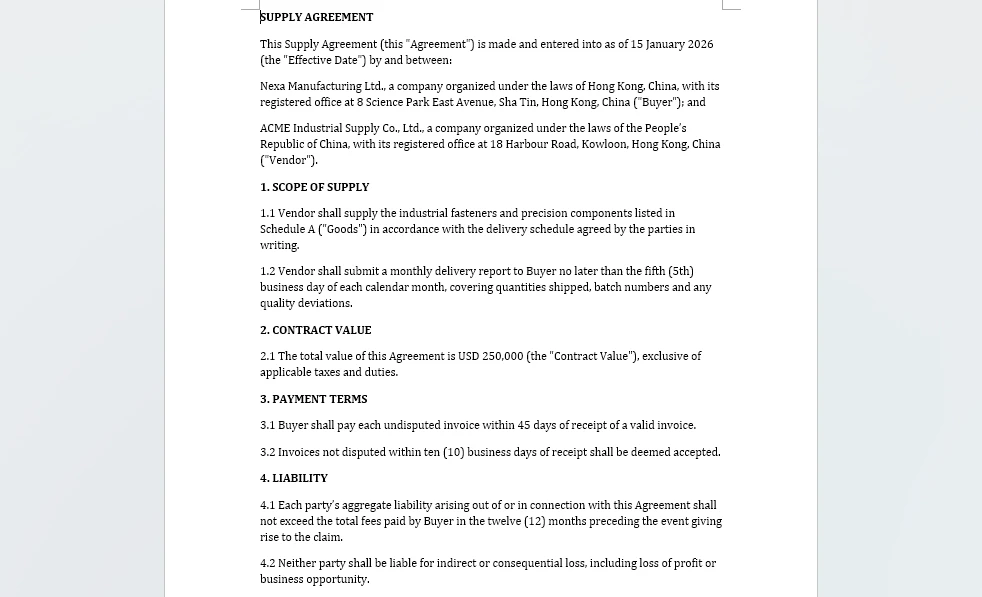
이 단계의 결과물은 채워진 문서 자체입니다. 즉, 공급업체 마스터 워크북에서 모든 자리 표시자가 교체된 공급업체 계약 템플릿입니다.
4. 2단계: 검토 및 위험 분석
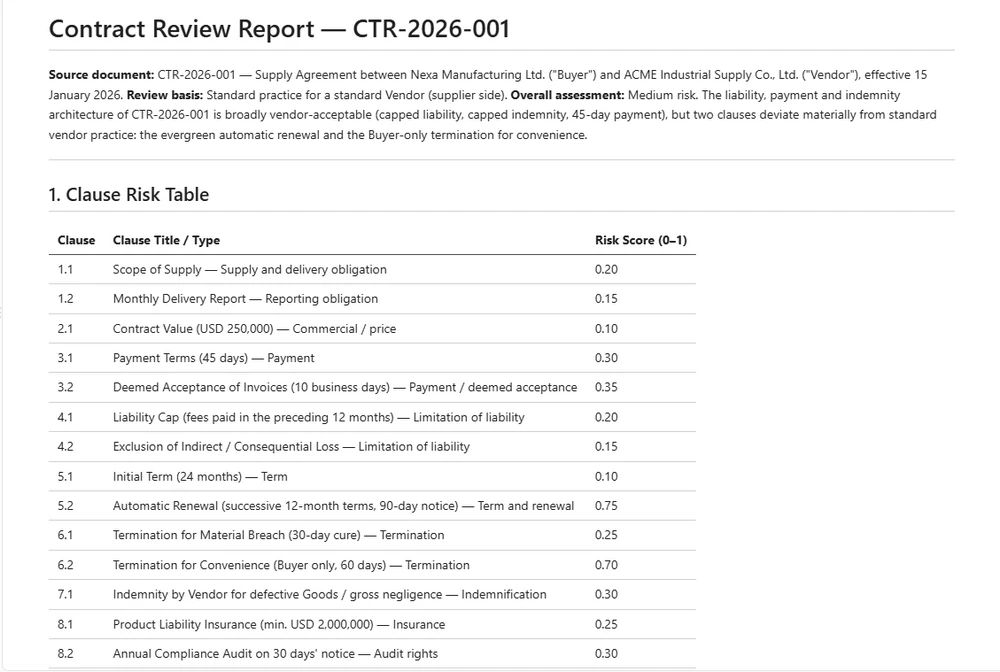
검토 단계는 작성된 계약을 읽고 위험하거나 비표준적인 조항을 식별하며 구조화된 검토 보고서를 생성합니다. 초안 작성 단계와 달리 입력은 .docx(내부 초안) 또는 .pdf(상대방 문서)일 수 있으므로 이 단계는 올바른 문서 유형으로 디스패치해야 합니다.
using Spire.Agent.Office.AI;
using Spire.Agent.Office.Extensions;
using Spire.Doc;
using Spire.Pdf;

public class ReviewResult
{
    public string ReportPath { get; set; } = string.Empty;
    public int ClausesAnalyzed { get; set; }
    public int RiskFlags { get; set; }
    public double RiskScore { get; set; }     // ratio of flagged clauses to total (0.0 = none flagged, 1.0 = all flagged)
    public List<string> FlaggedClauses { get; set; } = new();
}

public class ReviewStage
{
    private readonly AIOptions _options;

    // Risk threshold: contracts above this score require manual review.
    // Using a named constant prevents the "threshold always passes" bug
    // where a miscalculated score boundary lets everything auto-approve.
    public const double AutoApproveThreshold = 0.3;
    public const double ManualReviewThreshold = 0.6;

    public ReviewStage(AIOptions options) => _options = options;

    public ReviewResult Execute(ContractContext context)
    {
        string filePath = context.CurrentFilePath;
        string reportPath = Path.Combine(context.WorkDir, $"{context.ContractId}-review.md");

        string reviewInstruction =
            "Review this contract and write a Markdown report with two sections:\n" +
            "1. A table listing each major clause, its type, and a risk score (0-1).\n" +
            "2. A bullet list of clauses that deviate from standard practice for a " +
            $"standard {context.ContractType}. " +
            "Flag any of: uncapped liability, automatic renewal without notice, " +
            "broad indemnification, unilateral termination, or payment terms exceeding 60 days. " +
            "Prefix each flagged clause bullet with 'FLAG:' so the parser can identify it. " +
            $"Reference the source document as '{context.ContractId}', not as 'input.docx'.\n" +
            $"Save the report to: {reportPath}";

        AIResult result = DispatchByFormat(filePath, reviewInstruction, reportPath);

        if (result == null || !result.Success)
            throw new InvalidOperationException(
                $"Review failed: {result?.ErrorMessage ?? "Unknown error"}");

        // Parse the review report to extract structured data
        string reportContent = File.ReadAllText(reportPath);
        var review = ParseReviewReport(reportContent, reportPath);

        // Route based on risk score (three-tier classification)
        if (review.RiskScore >= ManualReviewThreshold)
            context.Status = PipelineStages.NeedsReview;
        else if (review.RiskScore >= AutoApproveThreshold)
        {
            // Middle zone: not clean enough to auto-approve, not risky enough to block
            context.Status = PipelineStages.Reviewed;
            context.StageLog.Add(
                $"Review: risk score {review.RiskScore:F2} in warning zone " +
                $"({AutoApproveThreshold}-{ManualReviewThreshold}); reviewed with warning");
        }
        else
            context.Status = PipelineStages.Reviewed;

        context.StageLog.Add(
            $"Review: {review.ClausesAnalyzed} clauses, {review.RiskFlags} flags, " +
            $"score {review.RiskScore:F2}, status={context.Status}");

        return review;
    }

    /// <summary>
    /// Dispatch to the correct document type based on file extension.
    /// This prevents the "PDF throws exception" bug where a stage
    /// only handles .docx and fails on counterparty PDFs.
    /// </summary>
    private AIResult DispatchByFormat(string filePath, string instruction, string outputPath)
    {
        string ext = Path.GetExtension(filePath).ToLowerInvariant();

        return ext switch
        {
            ".docx" or ".doc" => ProcessWord(filePath, instruction, outputPath),
            ".pdf"            => ProcessPdf(filePath, instruction, outputPath),
            _ => throw new NotSupportedException(
                $"Review stage does not support format: {ext}")
        };
    }

    private AIResult ProcessWord(string filePath, string instruction, string outputPath)
    {
        using (Document doc = new Document())
        {
            doc.LoadFromFile(filePath);
            return doc.AI(_options).ExecuteInstruction(
                doc, instruction, outputPath, Array.Empty<string>());
        }
    }

    private AIResult ProcessPdf(string filePath, string instruction, string outputPath)
    {
        using (PdfDocument pdf = new PdfDocument())
        {
            pdf.LoadFromFile(filePath);
            return pdf.AI(_options).ExecuteInstruction(
                pdf, instruction, outputPath, Array.Empty<string>());
        }
    }

    private static ReviewResult ParseReviewReport(string markdown, string reportPath)
    {
        var result = new ReviewResult { ReportPath = reportPath };

        // Count table rows as clauses analyzed
        var tableLines = markdown.Split('\n')
            .Where(l => l.StartsWith("|") && !l.StartsWith("|---") && !l.StartsWith("| --"))
            .Skip(1); // skip header
        result.ClausesAnalyzed = tableLines.Count();

        // Count bullet points prefixed with "FLAG:" as risk flags
        var flagLines = markdown.Split('\n')
            .Select(l => l.TrimStart())
            .Where(l => l.StartsWith("-") || l.StartsWith("*"))
            .Where(l => l.Substring(1).TrimStart()
                .StartsWith("FLAG:", StringComparison.OrdinalIgnoreCase));
        result.FlaggedClauses = flagLines.Select(l => l.Trim()).ToList();
        result.RiskFlags = result.FlaggedClauses.Count;

        // Risk score: ratio of flagged clauses to total, clamped to [0, 1]
        result.RiskScore = result.ClausesAnalyzed > 0
            ? Math.Min(1.0, (double)result.RiskFlags / result.ClausesAnalyzed)
            : 0.0;

        return result;
    }
}
DispatchByFormat 메서드가 핵심 추가 사항입니다. 이전 파이프라인 구현에서는 .docx만 처리하는 단계가 상대방이 .pdf를 보냈을 때 InvalidOperationException을 던졌습니다. switch 식은 에이전트가 실행되기 전에 올바른 문서 유형으로 디스패치하므로 두 형식 모두 일급 입력입니다.
위험 임계값(AutoApproveThreshold, ManualReviewThreshold)은 문서화된 의미를 가진 명명된 상수입니다. 0.3과 0.6 사이의 간격은 명시적인 "검토 필요" 영역을 만듭니다. 즉, 자동 승인하기에는 충분히 깨끗하지 않고 차단하기에는 위험하지 않은 계약입니다. 이는 모든 계약이 동일한 검사를 통과하는 임계값 데드 로직 버그를 방지합니다.
검토 결과는 메모리에서 반환되지 않고 보고서로 유지되므로 조항 수준 감사가 이를 생성한 실행과 독립적으로 유지됩니다.
5. 3단계: 협상 및 버전 관리
협상은 계약이 여러 손을 거치는 단계입니다. 상대방은 조항을 수정하고, 조건을 조정하고, 조건을 추가하며 문서를 마크업합니다. 시스템은 버전을 비교하고, 변경 사항을 추적하며, 팀이 무엇을 수락할지 결정하도록 도와야 합니다.
이 단계는 AI 에이전트의 ExecuteInstruction을 넘어서는 Spire.Doc 문서 계층의 두 가지 기능을 사용합니다.
- 변경 내용 추적 — 모든 편집이 표시되고 귀속될 수 있도록 수정 추적을 활성화합니다
- 문서 비교 — 두 버전을 비교하고 차이 문서를 생성합니다
using Spire.Agent.Office.AI;
using Spire.Agent.Office.Extensions;
using Spire.Doc;
using Spire.Doc.Documents;
using System.Text.RegularExpressions;

public class NegotiationResult
{
    public string ComparisonPath { get; set; } = string.Empty;
    public int ChangesDetected { get; set; }
    public int SubstantiveChanges { get; set; }  // changes to clause text, not formatting
    public int FormattingChanges { get; set; }
    public string NegotiatedFilePath { get; set; } = string.Empty;
}

public class NegotiationStage
{
    private readonly AIOptions _options;

    public NegotiationStage(AIOptions options) => _options = options;

    /// <summary>
    /// Compare the current version with a counterparty's revised version.
    /// Produces a diff document with all changes marked.
    /// </summary>
    public NegotiationResult CompareVersions(
        ContractContext context, string counterpartyFilePath)
    {
        string comparisonPath = Path.Combine(
            context.WorkDir, $"{context.ContractId}-v{context.VersionNumber}-comparison.docx");

        // Load both versions
        using (Document ourVersion = new Document())
        using (Document theirVersion = new Document())
        {
            ourVersion.LoadFromFile(context.CurrentFilePath);
            theirVersion.LoadFromFile(counterpartyFilePath);

            // Compare: marks every difference in ourVersion as a tracked change
            ourVersion.Compare(theirVersion, "Contract Management System");

            // Save the comparison document
            ourVersion.SaveToFile(comparisonPath, FileFormat.Docx2013);
        }

        // Use the AI agent to analyze the comparison and categorize changes
        string analysisPath = Path.Combine(
            context.WorkDir, $"{context.ContractId}-negotiation-analysis.md");

        using (Document comparison = new Document())
        {
            comparison.LoadFromFile(comparisonPath);

            string analyzeInstruction =
                "Analyze this document comparison and write a Markdown report:\n" +
                "1. On the first line, write 'Total changes: <N>' where N is the total count " +
                "of categorized changes (substantive + formatting).\n" +
                "2. List each change as a bullet line prefixed with 'SUBSTANTIVE:' or 'FORMATTING:' " +
                "followed by the clause affected and the nature of the change.\n" +
                "3. SUBSTANTIVE changes: clause text, numbers, dates. " +
                "FORMATTING changes: style, spacing, font.\n" +
                $"Save to: {analysisPath}";

            AIResult result = comparison.AI(_options).ExecuteInstruction(
                comparison, analyzeInstruction, analysisPath, Array.Empty<string>());

            if (result == null || !result.Success)
                throw new InvalidOperationException(
                    $"Negotiation analysis failed: {result?.ErrorMessage}");
        }

        var negotiation = ParseNegotiationReport(analysisPath);
        negotiation.ComparisonPath = comparisonPath;
        negotiation.NegotiatedFilePath = counterpartyFilePath;

        context.VersionNumber++;
        context.CurrentFilePath = counterpartyFilePath;
        context.Status = PipelineStages.Negotiated;
        context.StageLog.Add(
            $"Negotiation: {negotiation.ChangesDetected} changes " +
            $"({negotiation.SubstantiveChanges} substantive, " +
            $"{negotiation.FormattingChanges} formatting), v{context.VersionNumber}");

        return negotiation;
    }

    /// <summary>
    /// Enable track changes on a contract before sending it for negotiation.
    /// This ensures every edit by the counterparty is visible and attributable.
    /// </summary>
    public string PrepareForRedlining(ContractContext context)
    {
        string redlineReadyPath = Path.Combine(
            context.WorkDir, $"{context.ContractId}-v{context.VersionNumber}-redline.docx");

        using (Document doc = new Document())
        {
            doc.LoadFromFile(context.CurrentFilePath);

            // Enable track changes so all edits are recorded as revisions
            doc.TrackChanges = true;

            doc.SaveToFile(redlineReadyPath, FileFormat.Docx2013);
        }

        context.StageLog.Add("Negotiation: track changes enabled for redlining");
        return redlineReadyPath;
    }

    /// <summary>
    /// Accept all tracked changes to produce a clean final version.
    /// Optional post-review operation: not automatically invoked by the pipeline
    /// because acceptance should occur only after human review of the changes.
    /// </summary>
    public string AcceptAllChanges(ContractContext context)
    {
        string cleanPath = Path.Combine(
            context.WorkDir, $"{context.ContractId}-v{context.VersionNumber}-final.docx");

        using (Document doc = new Document())
        {
            doc.LoadFromFile(context.CurrentFilePath);
            doc.AcceptChanges();
            doc.SaveToFile(cleanPath, FileFormat.Docx2013);
        }

        context.CurrentFilePath = cleanPath;
        context.StageLog.Add("Negotiation: all changes accepted, clean version produced");
        return cleanPath;
    }

    private static NegotiationResult ParseNegotiationReport(string reportPath)
    {
        string content = File.ReadAllText(reportPath);
        var result = new NegotiationResult();

        // Parse total changes from the report (try multiple patterns for robustness)
        var totalMatch = Regex.Match(content, @"Total changes:\s*(\d+)", RegexOptions.IgnoreCase);
        if (!totalMatch.Success)
            totalMatch = Regex.Match(content, @"(\d+)\s+(?:tracked\s+)?changes", RegexOptions.IgnoreCase);
        if (totalMatch.Success)
            result.ChangesDetected = int.Parse(totalMatch.Groups[1].Value);

        // Count changes by prefix: SUBSTANTIVE: or FORMATTING:
        result.SubstantiveChanges = CountByPrefix(content, "SUBSTANTIVE:");
        result.FormattingChanges = CountByPrefix(content, "FORMATTING:");

        return result;
    }

    private static int CountByPrefix(string content, string prefix)
    {
        return content.Split('\n')
            .Select(l => l.TrimStart())
            .Where(l => l.StartsWith("-") || l.StartsWith("*"))
            .Count(l => l.Substring(1).TrimStart()
                .StartsWith(prefix, StringComparison.OrdinalIgnoreCase));
    }
}
주요 API 호출
-
Document.Compare(otherDoc, authorName)— 모든 변경이 추적된 수정으로 표시된 차이 문서를 생성합니다(Spire.Doc 비교 데모에서) -
Document.TrackChanges = true— 모든 편집이 표시되고 귀속될 수 있도록 수정 추적을 활성화합니다 -
Document.AcceptChanges()— 깨끗한 최종 버전을 생성하기 위해 모든 추적된 변경을 수락합니다 -
doc.AI(_options).ExecuteInstruction(...)— 비교를 분석하고 변경 사항을 분류합니다
협상 단계는 결정적 문서 작업(비교, 변경 내용 추적, 수락)과 AI 분석(변경 사항을 실질적 또는 서식으로 분류)을 결합합니다. 결정적 작업은 Spire.Doc 계층에서 제공됩니다. 즉, 코드 참조 디렉터리에서 사용할 수 있는 동일한 API이며, AI 에이전트는 그렇지 않으면 수동 검토가 필요했을 의미론적 분류를 처리합니다.
이 예제는 버전을 비교하고 현재 파일 경로를 추적합니다. 프로덕션 시스템은 일반적으로 각 버전을 별도로 유지하고 어떤 수정이 수락되었는지 명시적으로 기록합니다. AcceptAllChanges()는 협상 후 선택적 최종 확정 작업으로 제공되지만, 수락은 사람이 변경 사항을 검토한 후에만 이루어져야 하므로 샘플 파이프라인에서 자동으로 호출되지는 않습니다.
Document.Compare가 반환하는 것은 요약이 아니라 문서입니다. 아래의 추적된 수정은 검토자가 그렇지 않으면 직접 조립해야 했을 수정 내역입니다.
6. 4단계: 승인 및 최종 확정
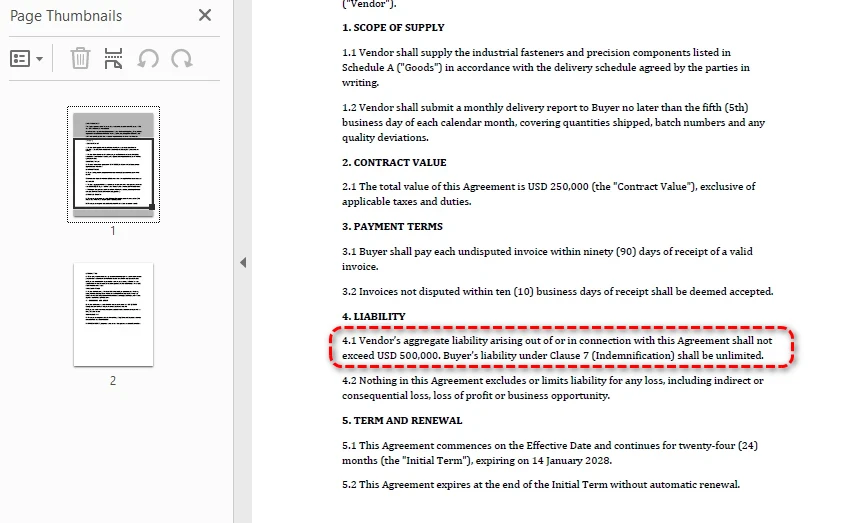
승인 단계는 계약 유형과 가액에 따라 계약을 올바른 이해관계자에게 라우팅하고, 그들의 승인을 기록하며, 필요한 모든 승인이 기록된 후 최종 PDF 사본을 생성합니다. 라우팅 로직은 결정적입니다. 즉, AI가 아니라 비즈니스 규칙을 사용합니다. 하지만 에이전트는 승인자를 제안하고 승인 요약을 생성하여 지원합니다.
using Spire.Agent.Office.AI;
using Spire.Agent.Office.Extensions;
using Spire.Doc;

public class ApprovalResult
{
    public List<ApprovalRecord> Approvals { get; set; } = new();
    public bool AllApproved { get; set; }
    public string ExecutedFilePath { get; set; } = string.Empty; // Finalized PDF path, not a signed contract
    public DateTime? ExecutionDate { get; set; }                // Finalization timestamp, not a signing date
}

public class ApprovalRecord
{
    public string Approver { get; set; } = string.Empty;
    public string Role { get; set; } = string.Empty;
    public bool Approved { get; set; }
    public DateTime Timestamp { get; set; }
    public string? Comments { get; set; }
}

public class ApprovalStage
{
    private readonly AIOptions _options;

    public ApprovalStage(AIOptions options) => _options = options;

    /// <summary>
    /// Route the contract for approval based on type and value.
    /// Routing rules are deterministic business logic, not AI.
    /// </summary>
    public ApprovalResult Execute(
        ContractContext context, double contractValue,
        Dictionary<string, bool>? approvalDecisions = null)
    {
        var routingPlan = DetermineApprovers(context.ContractType, contractValue);
        var result = new ApprovalResult();

        // Generate an approval summary for each approver
        string summaryPath = Path.Combine(
            context.WorkDir, $"{context.ContractId}-approval-summary.md");

        using (Document doc = new Document())
        {
            doc.LoadFromFile(context.CurrentFilePath);

            string summaryInstruction =
                "Write a one-page approval summary for this contract: parties, value, " +
                "key terms, risk flags from review, and changes from negotiation. " +
                $"Save to: {summaryPath}";

            AIResult aiResult = doc.AI(_options).ExecuteInstruction(
                doc, summaryInstruction, summaryPath, Array.Empty<string>());

            if (aiResult == null || !aiResult.Success)
                throw new InvalidOperationException(
                    $"Approval summary generation failed: {aiResult?.ErrorMessage}");
        }

        // In a real system, this would integrate with an approval workflow API.
        // approvalDecisions maps approver name → approved/rejected. A missing key
        // means no decision was recorded — which is not the same as a rejection.
        int approvedCount = 0, rejectedCount = 0, pendingCount = 0;

        foreach (var approver in routingPlan)
        {
            bool decision = false;
            bool hasDecision = approvalDecisions != null
                && approvalDecisions.TryGetValue(approver.Name, out decision);
            bool approved = hasDecision && decision;

            // Three states, all distinguishable in the audit record
            string comment = !hasDecision ? "Pending approval"
                : approved ? "Approved by approver"
                : "Rejected by approver";

            if (!hasDecision) pendingCount++;
            else if (approved) approvedCount++;
            else rejectedCount++;

            result.Approvals.Add(new ApprovalRecord
            {
                Approver = approver.Name,
                Role = approver.Role,
                Approved = approved,
                Timestamp = DateTime.UtcNow,
                Comments = comment
            });
        }

        result.AllApproved = result.Approvals.All(a => a.Approved);

        if (result.AllApproved)
        {
            // Produce the finalized copy as PDF
            string executedPath = Path.Combine(
                context.WorkDir, $"{context.ContractId}-executed.pdf");

            using (Document doc = new Document())
            {
                doc.LoadFromFile(context.CurrentFilePath);
                doc.SaveToFile(executedPath, FileFormat.PDF);
                result.ExecutedFilePath = executedPath;
                result.ExecutionDate = DateTime.UtcNow;
            }

            context.CurrentFilePath = result.ExecutedFilePath;
            context.Status = PipelineStages.Executed;
        }
        else
        {
            context.Status = PipelineStages.NeedsReview;
        }

        context.StageLog.Add(
            $"Approval: {result.Approvals.Count} approvers, " +
            $"approved={approvedCount}, rejected={rejectedCount}, " +
            $"pending={pendingCount}, all approved={result.AllApproved}");

        return result;
    }

    /// <summary>
    /// Deterministic routing rules. These are business logic, not AI.
    /// </summary>
    private static List<(string Name, string Role)> DetermineApprovers(
        string contractType, double value)
    {
        var approvers = new List<(string, string)>();

        // All contracts need Legal sign-off (example business rule)
        approvers.Add(("Legal Team", "Legal Counsel"));

        // Contracts over $100K need VP approval (example business rule)
        if (value > 100_000)
            approvers.Add(("VP Operations", "VP"));

        // Contracts over $500K need CFO approval (example business rule)
        if (value > 500_000)
            approvers.Add(("CFO", "CFO"));

        // Vendor contracts need Procurement sign-off
        if (contractType.Equals("Vendor", StringComparison.OrdinalIgnoreCase))
            approvers.Add(("Procurement", "Procurement Manager"));

        return approvers;
    }
}
DetermineApprovers의 라우팅 규칙은 의도적으로 결정적입니다. AI는 제안하고 요약합니다. 계약에 누가 서명할지는 결정하지 않습니다. 승인 체인은 감사 가능하고 일관성이 있어야 하는 비즈니스 규칙입니다. 이는 언어 모델이 아니라 코드에 속하는 결정 유형입니다.
참고: 이 샘플의
Executed상태는 서명된 계약이 아니라 승인 후 생성된 최종 PDF를 의미합니다. 실제 전자 서명(서명 봉투, 서명자 신원 확인, 서명 필드 삽입)은 별도로 통합된 전용 전자 서명 워크플로에서 처리해야 합니다.
모든 승인자의 결정이 기록되면 이 단계는 최종 확정 계약을 PDF로 작성합니다. 그리고 5단계가 소비하는 것은 원본 초안이 아니라 바로 그 PDF입니다.
7. 5단계: 서명 후 모니터링
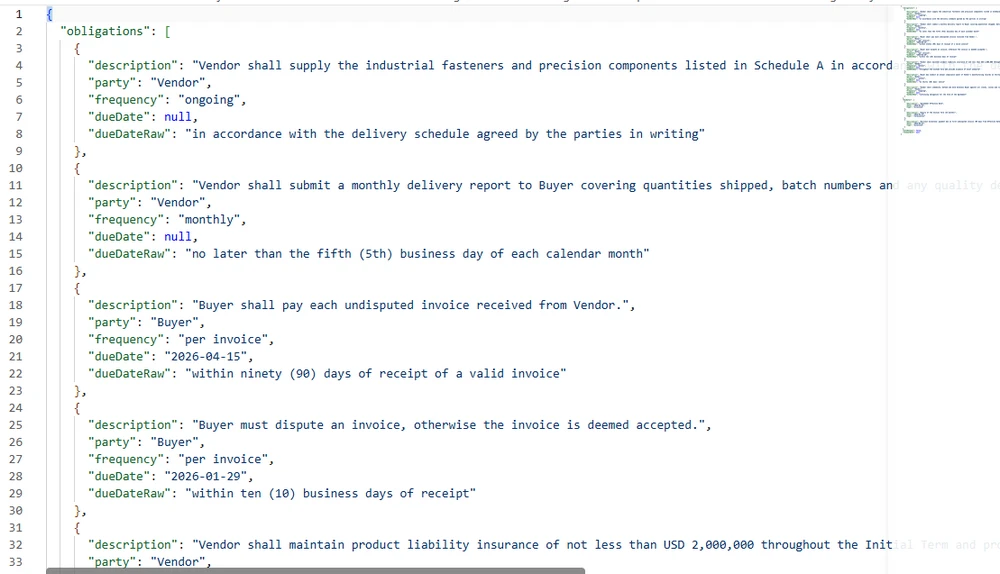
프로덕션 워크플로에서 서명 후 모니터링은 계약이 전자적으로 또는 다른 방식으로 공식 서명된 후 시작됩니다. 이 참조 구현에서는 4단계에서 생성된 최종 PDF가 모니터링 입력으로 사용됩니다. 서명 후 모니터링은 계약에서 의무, 주요 날짜, 갱신 조건을 추출한 다음, 다운스트림 시스템이 알림과 보고에 사용하는 구조화된 메타데이터로 저장합니다.
using Spire.Agent.Office.AI;
using Spire.Agent.Office.Extensions;
using Spire.Doc;
using Spire.Pdf;

public class ObligationResult
{
    public List<Obligation> Obligations { get; set; } = new();
    public List<KeyDate> KeyDates { get; set; } = new();
    public bool AutoRenewal { get; set; }
    public DateTime? RenewalDate { get; set; }
    public string MetadataPath { get; set; } = string.Empty;
}

public class Obligation
{
    public string Description { get; set; } = string.Empty;
    public string Party { get; set; } = string.Empty;  // who must fulfill
    public string Frequency { get; set; } = string.Empty;  // "monthly", "annual", "one-time"
    public DateTime? DueDate { get; set; }
    public string DueDateRaw { get; set; } = string.Empty;  // original deadline text from the contract
}

public class KeyDate
{
    public string Description { get; set; } = string.Empty;
    public DateTime Date { get; set; }
    public string Type { get; set; } = string.Empty;  // "renewal", "termination", "milestone"
}

public class MonitoringStage
{
    private readonly AIOptions _options;

    public MonitoringStage(AIOptions options) => _options = options;

    public ObligationResult Execute(ContractContext context)
    {
        string metadataPath = Path.Combine(
            context.WorkDir, $"{context.ContractId}-obligations.json");

        string extractInstruction =
            "Extract all post-signature obligations and key dates from this contract. " +
            "Write a JSON file with:\n" +
            "1. \"obligations\": array of {description, party, frequency, dueDate, dueDateRaw} " +
            "where dueDate is an ISO-8601 date (YYYY-MM-DD). If the obligation has a relative " +
            "deadline (e.g., 'Within 90 days of receipt'), convert it to an absolute date based " +
            "on the contract effective date. Use null only for ongoing obligations with no " +
            "fixed deadline. Always put the original deadline text in dueDateRaw.\n" +
            "2. \"keyDates\": array of {description, date, type} where date is ISO-8601 " +
            "(YYYY-MM-DD) and type is 'renewal', 'termination', or 'milestone'\n" +
            "3. \"autoRenewal\": boolean\n" +
            "4. \"renewalDate\": ISO-8601 date (YYYY-MM-DD) or null\n" +
            $"Save to: {metadataPath}";

        // Dispatch by format — executed contracts may be PDF or DOCX
        AIResult result = DispatchExtraction(
            context.CurrentFilePath, extractInstruction, metadataPath, _options);

        if (result == null || !result.Success)
            throw new InvalidOperationException(
                $"Obligation extraction failed: {result?.ErrorMessage}");

        var obligations = ParseObligationMetadata(metadataPath);
        obligations.MetadataPath = metadataPath;

        context.Obligations = obligations;
        context.Status = PipelineStages.Monitored;

        // Diagnostics: bucket every obligation by how its deadline came out, so that a
        // field the agent writes but the parser fails to read cannot pass unnoticed.
        int datesParsed = obligations.Obligations.Count(o => o.DueDate != null);
        int datesUnparsed = obligations.Obligations.Count(
            o => o.DueDate == null && !string.IsNullOrEmpty(o.DueDateRaw));
        int datesOngoing = obligations.Obligations.Count(
            o => o.DueDate == null && string.IsNullOrEmpty(o.DueDateRaw));
        int datesNoSourceText = obligations.Obligations.Count(
            o => o.DueDate != null && string.IsNullOrEmpty(o.DueDateRaw));
        context.StageLog.Add(
            $"Monitoring: {obligations.Obligations.Count} obligations, " +
            $"{obligations.KeyDates.Count} key dates, " +
            $"auto-renewal={obligations.AutoRenewal}, " +
            $"dates parsed={datesParsed}, unparsed={datesUnparsed}, ongoing={datesOngoing}, " +
            $"parsed-without-source-text={datesNoSourceText}");

        return obligations;
    }

    private static AIResult DispatchExtraction(
        string filePath, string instruction, string outputPath, AIOptions options)
    {
        string ext = Path.GetExtension(filePath).ToLowerInvariant();

        return ext switch
        {
            ".docx" or ".doc" => ProcessWordExtraction(filePath, instruction, outputPath, options),
            ".pdf"            => ProcessPdfExtraction(filePath, instruction, outputPath, options),
            _ => throw new NotSupportedException(
                $"Obligation extraction does not support format: {ext}")
        };
    }

    private static AIResult ProcessWordExtraction(
        string filePath, string instruction, string outputPath, AIOptions options)
    {
        using (Document doc = new Document())
        {
            doc.LoadFromFile(filePath);
            return doc.AI(options).ExecuteInstruction(
                doc, instruction, outputPath, Array.Empty<string>());
        }
    }

    private static AIResult ProcessPdfExtraction(
        string filePath, string instruction, string outputPath, AIOptions options)
    {
        using (PdfDocument pdf = new PdfDocument())
        {
            pdf.LoadFromFile(filePath);
            return pdf.AI(options).ExecuteInstruction(
                pdf, instruction, outputPath, Array.Empty<string>());
        }
    }

    private static ObligationResult ParseObligationMetadata(string jsonPath)
    {
        string json = File.ReadAllText(jsonPath);
        using var doc = System.Text.Json.JsonDocument.Parse(json);
        var root = doc.RootElement;

        var result = new ObligationResult();

        if (TryGetPropertyIgnoreCase(root, "obligations", out var obs))
            foreach (var ob in obs.EnumerateArray())
            {
                string dueDateRaw = TryGetPropertyIgnoreCase(ob, "dueDateRaw", out var dr)
                    && dr.ValueKind == System.Text.Json.JsonValueKind.String
                    ? dr.GetString() ?? "" : "";

                result.Obligations.Add(new Obligation
                {
                    Description = TryGetPropertyIgnoreCase(ob, "description", out var d) ? d.GetString() ?? "" : "",
                    Party = TryGetPropertyIgnoreCase(ob, "party", out var p) ? p.GetString() ?? "" : "",
                    Frequency = TryGetPropertyIgnoreCase(ob, "frequency", out var f) ? f.GetString() ?? "" : "",
                    DueDate = TryGetDate(TryGetPropertyIgnoreCase(ob, "dueDate", out var dd2), dd2),
                    DueDateRaw = dueDateRaw
                });
            }

        if (TryGetPropertyIgnoreCase(root, "keyDates", out var kds))
            foreach (var kd in kds.EnumerateArray())
                result.KeyDates.Add(new KeyDate
                {
                    Description = TryGetPropertyIgnoreCase(kd, "description", out var d) ? d.GetString() ?? "" : "",
                    Date = TryGetDate(TryGetPropertyIgnoreCase(kd, "date", out var dt), dt) ?? default,
                    Type = TryGetPropertyIgnoreCase(kd, "type", out var t) ? t.GetString() ?? "" : ""
                });

        result.AutoRenewal = TryGetBool(TryGetPropertyIgnoreCase(root, "autoRenewal", out var ar), ar);
        result.RenewalDate = TryGetDate(TryGetPropertyIgnoreCase(root, "renewalDate", out var rd), rd);

        return result;
    }

    /// <summary>
    /// Case-insensitive property lookup. Prevents silent data loss when
    /// the AI agent outputs PascalCase or snake_case instead of camelCase.
    /// </summary>
    private static bool TryGetPropertyIgnoreCase(
        System.Text.Json.JsonElement element, string name,
        out System.Text.Json.JsonElement value)
    {
        foreach (var prop in element.EnumerateObject())
        {
            if (string.Equals(prop.Name, name, StringComparison.OrdinalIgnoreCase))
            {
                value = prop.Value;
                return true;
            }
        }
        value = default;
        return false;
    }

    /// <summary>
    /// Safe date parsing: handles null, non-string values, and invalid formats
    /// without throwing. Returns null on any parse failure.
    /// </summary>
    private static DateTime? TryGetDate(bool exists, System.Text.Json.JsonElement element)
    {
        if (!exists || element.ValueKind != System.Text.Json.JsonValueKind.String)
            return null;
        string? s = element.GetString();
        return DateTime.TryParse(s, out var date) ? date : null;
    }

    /// <summary>
    /// Safe boolean parsing: handles string "true"/"false" and actual booleans
    /// without throwing on type mismatch.
    /// </summary>
    private static bool TryGetBool(bool exists, System.Text.Json.JsonElement element)
    {
        if (!exists) return false;
        if (element.ValueKind == System.Text.Json.JsonValueKind.True) return true;
        if (element.ValueKind == System.Text.Json.JsonValueKind.False) return false;
        if (element.ValueKind == System.Text.Json.JsonValueKind.String)
            return bool.TryParse(element.GetString(), out var b) && b;
        return false;
    }
}
의무 메타데이터는 문서가 아니라 JSON으로 저장됩니다. 따라서 다운스트림 시스템에서 쿼리할 수 있습니다. 갱신 대시보드는 문서를 하나도 열지 않고 모든 계약에서 autoRenewal == true 및 renewalDate < DateTime.Now.AddDays(90)를 스캔할 수 있습니다. 구조화된 dueDate 값이 있는 의무는 자동으로 추적할 수 있으며, 기한이 절대 날짜로 변환되지 않은 의무는 수동 검토를 위해 dueDateRaw에 원문을 보존합니다. AI 에이전트는 정보를 추출하고, 결정적 계층은 비즈니스 시스템이 소비할 수 있는 형식으로 저장합니다.
추출 패턴은 .NET에서 AI 에이전트로 인보이스 처리 자동화의 인보이스에 사용된 것과 동일합니다. 들어오는 문서에서 구조화된 필드를 추출하고, 결정적 규칙에 대해 검증하며, 불확실한 값을 검토로 라우팅합니다. 계약은 주로 이후에 발생하는 일에서 다릅니다. 의무는 거래보다 오래 살아남는 장기 레코드가 되는 반면, 인보이스 필드는 한 번 소비됩니다.
추출된 데이터는 산문이 아니라 JSON으로 저장되므로 각 의무와 주요 날짜가 파서가 도출한 값과 함께 원본 계약 문구를 보유합니다.
8. 전체 파이프라인 오케스트레이션
오케스트레이터는 단계를 함께 연결하고 ContractContext를 한 단계에서 다음 단계로 전달합니다. 두 가지 중요한 책임은 계약별 오류 격리(하나의 실패한 계약이 배치를 중단시켜서는 안 됨)와 상태 보존(모든 계약이 정확히 하나의 보고 버킷에 들어가야 함)입니다.
using Spire.Agent.Office.AI;

public class PipelineResult
{
    public string ContractId { get; set; } = string.Empty;
    public string Status { get; set; } = PipelineStages.Pending;
    public List<string> StageLog { get; set; } = new();
    public string? ErrorMessage { get; set; }
}

public class BatchResult
{
    public int Total { get; set; }
    public int Successful { get; set; }
    public int Flagged { get; set; }    // needs review
    public int Errored { get; set; }
    public List<PipelineResult> Results { get; set; } = new();
}

public class ContractLifecyclePipeline
{
    private readonly DraftingStage _drafting;
    private readonly ReviewStage _review;
    private readonly NegotiationStage _negotiation;
    private readonly ApprovalStage _approval;
    private readonly MonitoringStage _monitoring;

    public ContractLifecyclePipeline(AIOptions options)
    {
        _drafting = new DraftingStage(options);
        _review = new ReviewStage(options);
        _negotiation = new NegotiationStage(options);
        _approval = new ApprovalStage(options);
        _monitoring = new MonitoringStage(options);
    }

    /// <summary>
    /// Run a single contract through the full lifecycle.
    /// Each stage is wrapped in its own try-catch so that a failure
    /// in one stage produces a clear error without corrupting the
    /// context for subsequent contracts in the batch.
    /// </summary>
    public PipelineResult RunSingle(
        ContractContext context,
        string templatePath,
        string dataSourcePath,
        double contractValue,
        string? counterpartyFilePath = null,
        Dictionary<string, bool>? approvalDecisions = null)
    {
        try
        {
            // Stage 1: Drafting
            try
            {
                context.Draft = _drafting.Execute(context, templatePath, dataSourcePath);
            }
            catch (Exception ex)
            {
                return Fail(context, "Drafting", ex);
            }

            // Stage 2: Review
            try
            {
                context.Review = _review.Execute(context);
            }
            catch (Exception ex)
            {
                return Fail(context, "Review", ex);
            }

            // If review flagged for manual review, stop here
            if (context.Status == PipelineStages.NeedsReview)
                return Flag(context, "Review flagged for manual review");

            // Stage 3: Negotiation (only when a counterparty version exists)
            if (counterpartyFilePath != null)
            {
                try
                {
                    context.Negotiation = _negotiation.CompareVersions(context, counterpartyFilePath);
                }
                catch (Exception ex)
                {
                    return Fail(context, "Negotiation", ex);
                }
            }

            // Stage 4: Approval and Finalization
            try
            {
                context.Approval = _approval.Execute(context, contractValue, approvalDecisions);
            }
            catch (Exception ex)
            {
                return Fail(context, "Approval", ex);
            }

            if (context.Status == PipelineStages.NeedsReview)
                return Flag(context, "Approval incomplete");

            // Stage 5: Post-signature monitoring
            try
            {
                context.Obligations = _monitoring.Execute(context);
            }
            catch (Exception ex)
            {
                return Fail(context, "Monitoring", ex);
            }

            return new PipelineResult
            {
                ContractId = context.ContractId,
                Status = context.Status,
                StageLog = context.StageLog
            };
        }
        catch (Exception ex)
        {
            return Fail(context, "Pipeline", ex);
        }
    }

    /// <summary>
    /// Process a batch of contracts with per-file error isolation.
    /// One corrupt file does not halt the batch.
    /// Approval decisions are keyed by contract id; a contract with no
    /// entry keeps its approvers pending and stops at NeedsReview.
    /// </summary>
    public BatchResult RunBatch(
        List<(ContractContext context, string template, string data, double value)> contracts,
        Dictionary<string, Dictionary<string, bool>>? approvalDecisions = null)
    {
        var results = new List<PipelineResult>();

        foreach (var (context, template, data, value) in contracts)
        {
            // Per-contract try-catch: one failure does not stop the batch
            try
            {
                Dictionary<string, bool>? decisions = null;
                if (approvalDecisions != null &&
                    approvalDecisions.TryGetValue(context.ContractId, out var d))
                    decisions = d;

                results.Add(RunSingle(context, template, data, value, null, decisions));
            }
            catch (Exception ex)
            {
                results.Add(Fail(context, "Batch", ex));
            }
        }

        // Status conservation: every result must land in exactly one bucket.
        // Using the remainder method ensures that any result with an unexpected
        // status lands in "Flagged" (conservative) rather than vanishing.
        int successful = results.Count(r => r.Status == PipelineStages.Monitored
                                         || r.Status == PipelineStages.Executed);
        int errored = results.Count(r => r.Status == PipelineStages.Failed);

        return new BatchResult
        {
            Total = results.Count,
            Successful = successful,
            Flagged = results.Count - successful - errored,  // remainder → conservative
            Errored = errored,
            Results = results
        };
    }

    private static PipelineResult Fail(ContractContext context, string stage, Exception ex)
    {
        context.Status = PipelineStages.Failed;
        context.ErrorMessage = $"{stage}: {ex.Message}";
        context.StageLog.Add($"ERROR at {stage}: {ex.Message}");
        return new PipelineResult
        {
            ContractId = context.ContractId,
            Status = PipelineStages.Failed,
            StageLog = context.StageLog,
            ErrorMessage = context.ErrorMessage
        };
    }

    private static PipelineResult Flag(ContractContext context, string reason)
    {
        context.StageLog.Add($"FLAGGED: {reason}");
        return new PipelineResult
        {
            ContractId = context.ContractId,
            Status = context.Status,
            StageLog = context.StageLog
        };
    }
}
단계별 오류 격리
각 단계는 자체 try-catch 블록으로 감싸집니다. AI 에이전트가 특히 복잡한 조항을 구문 분석하지 못해 검토 단계가 실패하면 파이프라인은 실패를 기록하고 중단합니다. 그러나 배치의 다음 계약에 대한 ContractContext는 영향을 받지 않습니다. 이는 200개 배치 중 하나의 손상된 파일이 부분 결과 없이 전체 파이프라인을 중단시키는 일반적인 실패 모드를 방지합니다.
상태 보존
배치 요약은 나머지 방식을 사용하여 Flagged 수를 계산합니다. Flagged = Total - Successful - Errored. 이는 구조적 속성입니다. 즉, 명시적으로 성공 또는 오류가 아닌 모든 결과는 "flagged"(수동 검토로의 보수적 라우팅)에 들어갑니다. 이는 예상치 못한 상태 값을 가진 결과가 세 보고 버킷 모두에서 조용히 사라지는 버그를 방지합니다.
파이프라인 실행
// Configure the agent
AIOptions options = new AIOptions
{
    WorkDir = @"C:\contract-mgmt\work",
    SpireToken = Environment.GetEnvironmentVariable("SPIRE_TOKEN")!
};

// Create the pipeline
var pipeline = new ContractLifecyclePipeline(options);

// Prepare a batch of contracts
var batch = new List<(ContractContext, string, string, double)>
{
    new(new ContractContext
    {
        ContractId = "CTR-2026-001",
        ContractType = "Vendor",
        WorkDir = @"C:\contract-mgmt\work\CTR-2026-001"
    },
    @"C:\templates\vendor-agreement.docx",
    @"C:\data\vendors-q1.xlsx",
    250_000)
};

// Run the batch. Approval decisions are supplied per contract id —
// a contract with no recorded decision stays in NeedsReview and
// never reaches Stage 5.
BatchResult result = pipeline.RunBatch(batch, new Dictionary<string, Dictionary<string, bool>>
{
    ["CTR-2026-001"] = new Dictionary<string, bool>
    {
        ["Legal Team"] = true,
        ["VP Operations"] = true,
        ["Procurement"] = true
    }
});

Console.WriteLine($"Total: {result.Total}");
Console.WriteLine($"Successful: {result.Successful}");
Console.WriteLine($"Flagged: {result.Flagged}");
Console.WriteLine($"Errored: {result.Errored}");

foreach (var r in result.Results)
{
    Console.WriteLine($"  {r.ContractId}: {r.Status}");
    foreach (var log in r.StageLog)
        Console.WriteLine($"    {log}");
}
승인 결정은 파이프라인이 추론하는 것이 아니라 배치 호출에 제공됩니다. 기록된 결정이 없는 계약은 승인자를 보류 상태로 유지하고, Flagged에 들어가며, 5단계 전에 중단됩니다. 이는 아직 누구도 승인하지 않은 계약에 대해 의도된 결과입니다.
소수의 계약에 대해 한 번 실행하는 것은 단순한 경우입니다. 동일한 단계를 문서 큐 뒤에 두면 오케스트레이션 질문이 달라집니다. 즉, 동시성 제한, 문서별 오류 격리, 재시도 정책, 배치 보고서로의 집계입니다. .NET에서의 지능형 문서 처리: IDP 파이프라인 구축은 파이프라인 수준에서 이러한 문제를 다루며, 이 문서의 배치 섹션은 동일한 패턴의 계약 관련 인스턴스입니다.
9. AI가 끝나고 거버넌스가 시작되는 곳
위 아키텍처는 AI 에이전트에 특정 책임을, 결정적 코드에 특정 책임을 할당합니다. 경계는 임의적이지 않습니다. 이는 원칙을 따릅니다. AI는 해석하고 제안하며, 결정적 코드는 결정하고 기록합니다.
AI가 생성한 위험 평가와 추출된 의무는 법적 또는 상업적 결정에 사용되기 전에 자격을 갖춘 검토자의 검증을 받아야 합니다.
| 책임 | 처리 주체 | 이유 |
|---|---|---|
| 자연어 지시 이해 | AI 에이전트 | 언어 모델의 핵심 목적 |
| 비정형 텍스트에서 정보 추출 | AI 에이전트 | 의미 이해 필요 |
| 변경 사항을 실질적 또는 서식으로 분류 | AI 에이전트 | 의미에 대한 판단 필요 |
| 계약 유형에 따라 승인자 제안 | 비즈니스 규칙 | 감사 가능성과 일관성 |
| 누가 서명해야 하는지 결정 | 비즈니스 규칙 | 감사 가능성과 일관성 |
| 승인 체인 기록 | 결정적 코드 | 법적 감사 추적은 변조 방지되어야 함 |
| 위험 임계값 설정 | 비즈니스 규칙 | 위험 정책은 거버넌스 결정 |
| 의무 메타데이터 저장 | 결정적 코드 | 다운스트림 시스템은 신뢰할 수 있는 구조 필요 |
| 갱신 알림 트리거 | 결정적 코드 | 추론이 아니라 일정에 따라 실행되어야 함 |
검토 단계의 위험 임계값(AutoApproveThreshold = 0.3, ManualReviewThreshold = 0.6)은 AI가 아니라 비즈니스에서 설정합니다. 애플리케이션은 표시된 조항 수에서 검토 비율을 도출하고, 비즈니스는 임계값을 정의합니다. 이러한 분리가 시스템을 감사에서 방어 가능하게 만듭니다. 모든 자동화 결정은 모델 추론이 아니라 사람이 정의한 규칙으로 거슬러 올라갑니다.
기존 시스템과의 통합
계약 라이프사이클 시스템은 고립되어 존재하지 않습니다. 서명 후 메타데이터(의무, 주요 날짜, 갱신 조건)는 다운스트림 시스템에서 소비되도록 설계됩니다.
- ERP / 재무: 지불 마일스톤 및 인보이스 조정
- CRM: 계정 관리자를 위한 갱신 알림
- 조달: 계약 SLA 대비 공급업체 성과 추적
- 법무: 컴플라이언스 모니터링 및 감사 준비
5단계의 JSON 메타데이터 형식은 이러한 통합을 간단하게 만듭니다. 다운스트림 시스템은 계약 문서를 구문 분석할 필요 없이 구조화된 데이터를 쿼리할 수 있습니다.
10. 자주 묻는 질문
이것은 AI 계약 검토와 어떻게 다른가요?
계약 검토는 라이프사이클의 한 단계입니다. 즉, 계약을 읽고 위험한 조항을 표시하는 것입니다. 계약 관리 시스템은 초안 작성, 검토, 협상, 승인, 최종 확정, 서명 후 모니터링의 전체 라이프사이클을 다룹니다. 기존 C#에서의 AI 계약 검토 문서는 검토 단계를 깊이 다루며, 이 문서는 검토가 속한 전체 파이프라인을 다룹니다.
파이프라인은 PDF와 Word 입력을 모두 처리할 수 있나요?
예, 형식 디스패치를 구현한 단계에서는 가능합니다. 검토 및 모니터링 단계에는 파일 확장자에 따라 .docx를 Document로, .pdf를 PdfDocument로 라우팅하는 switch가 포함됩니다. 초안 작성 단계는 .docx 템플릿이 필요하고, 협상 단계는 Word 문서에서 작동합니다(문서 비교는 Spire.Doc.Document 사용). 이는 현실 세계의 패턴을 반영합니다. 즉, 형식 디스패치는 모든 단계에 균일하게 적용되는 것이 아니라 상대방 PDF가 예상되는 곳에 적용됩니다.
배치에서 하나의 계약이 실패하면 어떻게 되나요?
배치 프로세서는 각 계약을 자체 try-catch 블록으로 감쌉니다. 한 계약의 실패는 오류 메시지와 발생한 단계와 함께 기록되고 배치는 다음 계약으로 계속됩니다. 배치 요약은 상태 보존을 위해 나머지 방식을 사용합니다. Flagged = Total - Successful - Errored를 통해 모든 결과가 정확히 하나의 보고 버킷에 들어가도록 보장합니다.
AI 에이전트가 계약을 누가 승인할지 결정하나요?
아니요. 승인 라우팅 규칙은 결정적 비즈니스 로직입니다. 이 예에서 $100K를 초과하는 계약은 VP 승인이 필요하고, $500K를 초과하는 계약은 CFO 승인이 필요하며, 공급업체 계약은 조달 승인이 필요합니다. AI 에이전트는 승인자가 읽는 승인 요약을 생성하지만 라우팅 자체는 코드입니다. 이는 승인 체인을 감사 가능하고 일관되게 유지합니다.
협상 단계는 어떻게 작동하나요?
협상 단계는 Spire.Doc 문서 계층의 두 가지 기능을 사용합니다. Document.Compare()로 버전 간 차이를 생성하고, Document.TrackChanges로 수정 추적을 활성화합니다. 그런 다음 AI 에이전트가 비교 문서를 분석하고 각 변경을 실질적(조항 텍스트, 숫자, 날짜) 또는 서식(스타일, 간격)으로 분류합니다. 결정적 비교와 AI 분류의 이러한 조합이 협상 단계를 법무 팀에 유용하게 만듭니다.
서명 후 모니터링이란 무엇인가요?
계약이 최종 확정된 후(프로덕션에서는 서명됨), 시스템은 최종 확정 문서에서 의무(누가 무엇을 언제까지 해야 하는지), 주요 날짜(갱신, 종료, 마일스톤), 갱신 조건(자동 갱신, 통지 기간)을 추출합니다. 이 메타데이터는 다운스트림 시스템(ERP, CRM, 조달)이 계약 문서를 열지 않고 쿼리할 수 있는 구조화된 JSON으로 저장됩니다. 이는 대부분의 계약 검토 도구가 다루지 않는 단계이며, 수동 프로세스에서 가장 많은 가치가 손실되는 곳입니다. 즉, 의무는 잊히고, 갱신은 놓치고, 기한은 통지 없이 지나갑니다.
어떤 .NET 종속성이 필요한가요?
Spire.Agent.Office NuGet 패키지가 필요하며, 이는 Spire.Doc, Spire.Pdf, Spire.XLS, Spire.Presentation을 전이적으로 가져옵니다. 샘플은 .NET 6 이상을 대상으로 합니다. 배포 전에 패키지 버전이 지원하는 대상 프레임워크를 확인하세요. AI 에이전트가 언어 모델 서비스와 통신하려면 SpireToken(API 키)이 필요합니다.
계약 라이프사이클을 자동화할 준비가 되셨나요?
애플리케이션이 계약을 작성, 검토 또는 추적한다면, 문서 AI 에이전트는 유지 관리해야 하는 추출 및 재구성 파이프라인 대신 하나의 자연어 지시를 실제 서식이 지정된 파일로 바꿔줍니다. 시작 가이드를 따라 SDK를 .NET 프로젝트에 연결하고 첫 지시를 실행한 다음, 위의 다섯 단계 패턴을 자체 계약 유형, 승인 규칙, 의무 추적에 재사용하세요.
추가 읽을거리
- Spire.Agent.Office를 사용한 배치 계약 생성 -- 초안 작성 단계 심층 분석: 수십 개의 템플릿에 대해 한 번에 메일 병합 및 자리 표시자 교체
- .NET에서 AI 에이전트로 인보이스 처리 자동화 -- 각 문서가 한 번 소비되는 인보이스에 적용된 동일한 추출-검증-검토 패턴
- .NET에서의 지능형 문서 처리: IDP 파이프라인 구축 -- 파이프라인 수준 오케스트레이션: 동시성, 문서별 오류 격리, 배치 보고
- Spire.Agent.Office 제품 개요 -- 모든 Office 문서 형식을 위한 AI 에이전트 SDK