Spire.PDF is a professional PDF library applied to creating, writing, editing, handling and reading PDF files without any external dependencies. Get free and professional technical support for Spire.PDF for .NET, Java, Android, C++, Python.

Wed Nov 02, 2022 8:25 am

Hi.
I use a PDF Template file which contains only one page to fill some labels texts inside.
Which is weird is that all fields are replaced correctly, only one doesn't.
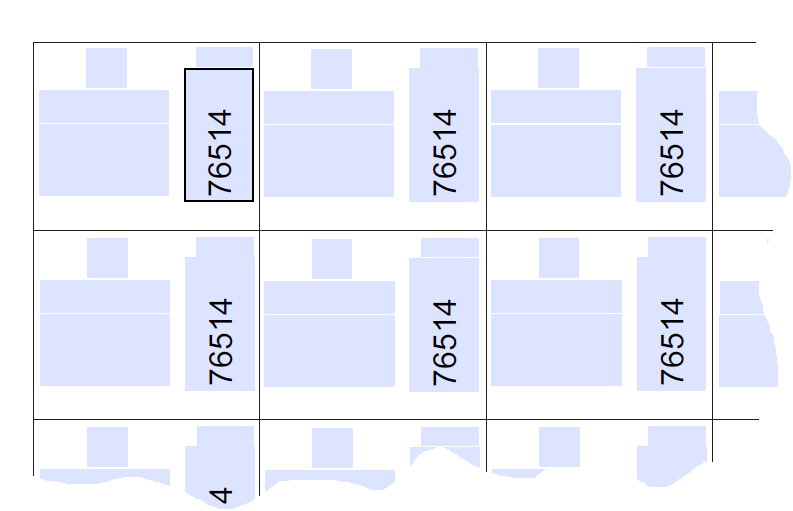
Image

Here on the picture I write a text in the first left-top label text box directly in PDF file, and it will show the text on all TextBoxes. But on my code behind (csharp) when I set the Text value for the PdfTextBoxFieldWidget it replaces only the first one in the left-top label. Why is happening this?

valimaties
 
Posts: 13
Joined: Sat May 08, 2021 5:19 pm

Wed Nov 02, 2022 10:43 am

Hello,

Thanks for your inquiry.
According to your message, I can't do exactly investigation. To help us reproduce your issue and work out a solution for you, please offer the following message, thanks for your assistance in advance.

1) Your pdf file, you can attach here or send it to us via email ([email protected]).
2) Your full test code that can reproduce your issue.
3) Application type, such as Console App, .NET Framework 4.8.
4) Your test environment, such as OS info (E.g. Windows 7, 64-bit) and region setting (E.g. China, Chinese).

Sincerely
Abel
E-iceblue support team
User avatar

Abel.He
 
Posts: 1010
Joined: Tue Mar 08, 2022 2:02 am

Thu Nov 03, 2022 9:28 am

Abel.He wrote:Hello,

...
2) Your full test code that can reproduce your issue.
...

Sincerely
Abel
E-iceblue support team


I've debugged the problem and I've managed to find why this happens. It is because the textbox must rotate the text to 270 degrees, which I've made it by using the following code
Code: Select all
var fw2 = ((PdfFormWidget)doc.Form).FieldsWidget.OfType<PdfTextBoxFieldWidget>();
var fw = fw2.Where(x => x.Name.Trim().Equals(field)).FirstOrDefault();
var page = doc.Pages[0];
PdfGraphicsState state = page.Canvas.Save();
page.Canvas.TranslateTransform(fw.Location.X + 10, fw.Location.Y);
page.Canvas.RotateTransform(textRotation, new Point(10,20));
page.Canvas.DrawString(value, fieldFont, brush, 0, 0);
page.Canvas.Restore(state);

which works fine, but it will replace only one textboxfieldwidget, because all those textboxfields have the same name. In this case, I must find a way to be able to find all the others textboxfields position and to replace them also, or maybe there is another way to set the rotation of text inside a textboxfieldwidget.

Regards,
Vali
Last edited by valimaties on Thu Nov 03, 2022 11:13 am, edited 1 time in total.

valimaties
 
Posts: 13
Joined: Sat May 08, 2021 5:19 pm

Thu Nov 03, 2022 9:47 am

I've solved the issue by using this code:
Code: Select all
foreach(var fi in fw.WidgetItems)
{
    var x = ((PdfTexBoxWidgetItem)fi).Location.X;
    var y = ((PdfTexBoxWidgetItem)fi).Location.Y;
    var page = doc.Pages[0];
    PdfGraphicsState state = page.Canvas.Save();
    page.Canvas.TranslateTransform(x + 10, y);
    page.Canvas.RotateTransform(textRotation, new Point(10, 20));
    page.Canvas.DrawString(value, fieldFont, brush, 0, 0);
    page.Canvas.Restore(state);
}


However, you have a misspelling in PdfTexBoxWidgetItem class, as it might be PdfTextBoxWidgetItem .
Regards,
Vali

valimaties
 
Posts: 13
Joined: Sat May 08, 2021 5:19 pm

Fri Nov 04, 2022 3:29 am

Hello,

Thank you for sharing your solution and pointing out the fault in the our product.
If you have any other issue, just feel free to contact us.

Sincerely
Abel
E-iceblue support team
User avatar

Abel.He
 
Posts: 1010
Joined: Tue Mar 08, 2022 2:02 am

Return to Spire.PDF

cron