Choosing a JavaScript PDF library usually starts with a small job: generate an invoice, show a contract, stamp a page. Months later the same project has to read PDFs, print Chinese text or turn a Word template into a PDF, and the library picked for the first job covers only part of the second.
We ran seven libraries through one browser test bench to see where each holds up: pdf-lib, jsPDF, PDFKit, PDF.js, @react-pdf/renderer, pdfmake and Spire.PDF for JavaScript. Below you will find measured timings, output sizes, font behavior and conversion results, followed by a recommendation for each scenario.
Disclosure: Spire.PDF for JavaScript is a product of E-iceblue, the publisher of this article, and E-iceblue ran the tests. Versions, fixtures and method are listed in How We Tested. Results that count against our own product are reported alongside the ones that favor it.
Which JavaScript PDF Library Should You Choose?
Start from the task. Every library in this comparison leads in some rows of the table below, and none leads in all of them.
| Task | Best fit in this test | Why |
|---|---|---|
| Generate a PDF from code, small and fast | jsPDF, PDFKit | jsPDF had the lowest 10-page median (3.9 ms) |
| Generate tables and long reports with automatic page breaks | pdfmake | Declarative layout with table support |
| Generate PDFs from React components | @react-pdf/renderer | Component API, PDFKit underneath |
| Read text, display PDFs | PDF.js | Parser, display API and viewer in one project |
| Modify an existing PDF | pdf-lib | Edits files that already exist |
| Convert PDFs to other formats, or combine several of the jobs above in one package | Spire.PDF for JavaScript | 12 output targets exercised in our tests |
The first five rows are single jobs, and a specialist open-source library does each of them well. The last row is the other case: a project that needs several of those jobs, or any conversion between formats, where the arithmetic changes. The sections on single-library limits and on Spire explain why.
What Each Library Does Best
Two of the three phrases people search for here describe jobs rather than libraries. A JavaScript PDF parser reads files, and a JavaScript PDF editor changes files that already exist. That split decides a lot, so each entry below ends with what the library cannot do.
pdf-lib (1.17.1) creates PDFs and modifies existing ones, which makes it the usual open-source JavaScript PDF editor.
import { PDFDocument, StandardFonts } from 'pdf-lib'

const doc = await PDFDocument.create()
const page = doc.addPage([595.28, 841.89])
const font = await doc.embedFont(StandardFonts.Helvetica)
page.drawText('Hello', { x: 40, y: 800, size: 12, font })
const bytes = await doc.save()
Pick it when a PDF arrives from somewhere else and you need to add a page, overlay text or fill in values. It has no text extraction API: it read the page count of our 10-page fixture in 8 ms, and that is the extent of its reading support. Its latest release, 1.17.1, dates from 2021-11-06. If you are searching for a pdf-lib alternative because of that, the community fork @cantoo/pdf-lib continues the code.
jsPDF (4.2.1) generates documents in the browser with imperative calls.
import { jsPDF } from 'jspdf'

const doc = new jsPDF()
doc.text('Hello', 10, 10)
const buffer = doc.output('arraybuffer')
It suits quick exports where a few lines of code produce a receipt or a report page. It only creates files, so it cannot open and edit an existing PDF, which is the usual pdf-lib vs jsPDF dividing line. Its compress option also damages Chinese text, covered in the font section below. Anyone looking for a jsPDF alternative should first decide whether the missing piece is editing (pdf-lib), tables (pdfmake) or React (React-PDF).
PDFKit (0.20.2) generates documents in Node and, with a bundler, in the browser. The browser build needs standard fonts registered by hand.
import PDFDocument, { registerStdFonts } from 'pdfkit'
import Helvetica from 'pdfkit/standard-fonts/Helvetica'
registerStdFonts(Helvetica)

const doc = new PDFDocument()
doc.font('Helvetica').text('Hello')
You place text and graphics yourself, because PDFKit is a drawing API and not an HTML/CSS renderer, so a web page cannot simply be handed to it. That control suits documents with a fixed layout, such as labels, certificates and statements. It cannot read existing PDFs.
PDF.js (6.5.438) is a parser core, a display API and a ready-made viewer. It is the open-source choice for reading and showing PDFs, and it handles text extraction.
import * as pdfjsLib from 'pdfjs-dist'

const doc = await pdfjsLib.getDocument({ data: bytes }).promise
const page = await doc.getPage(1)
const content = await page.getTextContent()
Developers who search for a JavaScript PDF parser usually end up here, because it returns structured text and page data instead of raw bytes. It cannot create a PDF from scratch, and its editing stays within what saveDocument covers, such as page selection and annotation changes. It is not a general-purpose PDF editor.
@react-pdf/renderer (4.9.0) turns React components into PDFs. It sits on PDFKit, so it hits the same unregistered standard font error in the browser.
import { Document, Page, Text, pdf } from '@react-pdf/renderer'

const blob = await pdf(
  <Document><Page><Text>Hello</Text></Page></Document>
).toBlob()
It fits teams that already describe their UI in React and want invoices or reports to share components with it. It produces output only. Reading or editing an existing file requires another library.
pdfmake (0.3.14) takes a declarative document definition and handles tables and page breaks. Since 0.3, getBuffer returns a Promise. Code that passes a callback never gets called back.
import pdfMake from 'pdfmake/build/pdfmake'
import pdfFonts from 'pdfmake/build/vfs_fonts'
pdfMake.vfs = pdfFonts.vfs

const buffer = await pdfMake.createPdf({ content: ['Hello'] }).getBuffer()
It is the most comfortable of the open-source six for long, table-heavy output, because you describe the content and the library decides where pages break. It generates documents from a definition object and cannot parse or edit existing PDFs.
Spire.PDF for JavaScript (11.7.0) is the one entry here that does not own a slice.
Each library above specialises in one job, and the next section shows what that costs when a project needs two of them. This one runs the same four jobs through a single API, generation, text extraction, page operations and rendering to image, and adds twelve conversion targets none of the others have. Its limits are the ones we measured and report below: it is not a viewer component, and production use requires a commercial licence. Code samples and the full conversion results are in its own section.
Where a Single Library Stops
None of the six open-source libraries generates, parses, modifies and renders PDFs. Each owns a slice.
Take a workflow that sounds ordinary: read a customer's DOCX template, fill in order data, produce a PDF, then password-protect it. None of the six opens a Word file, so one package handles the DOCX step, usually on a server. A layout library then writes the PDF, and a third package applies the protection. That is three packages and two handoffs.
The roles also blur in conversation. People say "render a PDF" when they mean three different things: draw a document from code, display an existing file to a user, or turn a page into an image. PDF.js displays, the generators draw, and none of the six does all three. Writing down which meaning your project needs removes half of the shortlist.
Every handoff is an ArrayBuffer to validate, and every package brings its own rules for fonts and encodings. The pieces are individually good, and the glue between them is where the maintenance cost builds up. Teams usually feel it the first time a requirement crosses a boundary, such as "also export the result as Word".
What Spire.PDF for JavaScript Adds
Spire.PDF for JavaScript runs as WebAssembly in the browser, so documents can be processed on the client without a server round trip. We tested it through the spire.office package, version 11.7.0.
Its API covers merging, splitting, compressing, page operations, form fields, annotations, bookmarks, attachments and layers; the Spire.PDF for JavaScript program guide lists the full surface. The part we measured here is conversion. We converted a 2-page Chinese PDF (13.1 KB) to ten of the FileFormat enum's thirteen values, plus PNG export and a PDF/A conversion.
| Output | Size |
|---|---|
| DOCX | 5,132,598 B |
| XLSX | 9,594 B |
| PPTX | 27,827 B |
| HTML | 89,687 B |
| Markdown | 558 B |
| XPS | 24,202 B |
| OFD | 17,281 B |
| PCL | 47,272 B |
| PostScript | 87,159 B |
| PNG (page 1, 184 ms) | 19,789 B |
| PDF/A-1b | 57,581 B |
| SVG (one file per page) | 44,777 B per page |
All twelve targets converted the Chinese file. SVG export writes one file per page, named output_1.svg, output_2.svg and so on. The 5.1 MB DOCX comes from the Chinese font being carried into the Word file, and English documents do not behave that way.
import * as spire from '/spire.pdf.js'
const { PdfDocument, PdfFont, PdfFontFamily, PdfBrushes } = spire.spirepdf

const doc = new PdfDocument()
const page = doc.Pages.Add()
const font = new PdfFont({ fontFamily: PdfFontFamily.Helvetica, size: 12 })
page.Canvas.DrawString({ s: 'Hello', font, brush: PdfBrushes.get_Black(), x: 40, y: 60 })
doc.SaveToFile({ fileName: 'out.pdf' })
Parameters go in as one object literal. Positional arguments raise an Ambiguous call error. Conversion needs one more step, because WebAssembly has no system fonts:
PdfDocument.LoadCustomFontFolder('/Library/Fonts')   // skipping this raises "Cannot found font"

const doc = new PdfDocument()
doc.LoadFromFile({ fileName: 'in.pdf' })
doc.SaveToFile({ fileName: 'out.docx', fileFormat: spire.spirepdf.FileFormat.DOCX })
Copy a font file into that folder of the virtual file system before calling it.
Because everything runs in one WebAssembly package, a single page can open a PDF, change it and save it in another format without handing bytes to a second library. Teams that process user-uploaded files in the browser, where sending documents to a server is a privacy or compliance question, tend to benefit most.
Three numbers belong in any deployment plan. The first load took 1,900.7 ms (2,756 ms on another cold run), and most of it is CPU: the runtime downloads roughly 19 MB of WebAssembly archives and unpacks them with JSZip before the first document opens. The two archives are Spire.Common.Wasm (10.1 MB) and Spire.Pdf.Wasm (8.6 MB). The JavaScript glue adds about 1.3 MB raw but compresses to roughly 117 KB over the wire; the archives themselves are already deflated and gain nothing from gzip.
Office to PDF in One Package
The six open-source libraries start from a PDF. Word, Excel and PowerPoint files fall outside their scope, which is why the workflow in the previous section needed a fourth package.
Spire.Office for JavaScript is one npm package family with four entry points for Word, Excel, PowerPoint and PDF. Each entry has its own WebAssembly module, and a common module sits underneath all of them. Word to PDF, Excel to PDF and PowerPoint to PDF run in the browser with no server, and PDF to Word, Excel, PowerPoint and HTML run through the same family.
For a walkthrough with working code, see converting Word to PDF with JavaScript in React.
One limit applies to every claim in this section: our benchmark timed PDF operations only. Office-to-PDF conversion was not measured here, so there are no speed or fidelity numbers for it in this article. Anyone who plans to depend on that path should time it with their own Word and Excel files, because layout complexity changes conversion cost far more than file size does. What we can say is structural. A template workflow that needed three packages can be written against one package family, and the file handoffs between libraries disappear.
Performance and Load Cost
Every library finished a 10-page English document in under 100 ms. jsPDF was quickest at 3.9 ms and Spire took 90.7 ms, a gap that is measurable but unlikely to matter in a click-triggered export.
| Library | First run | Median (10 pages) | Output size |
|---|---|---|---|
| jsPDF | 12.1 ms | 3.9 ms | 6,609 B |
| PDFKit | 45.7 ms | 6.8 ms | 6,194 B |
| pdf-lib | 86.1 ms | 9.2 ms | 3,123 B |
| pdfmake | 75.6 ms | 25.4 ms | 16,823 B |
| React-PDF | 125.5 ms | 36.3 ms | 7,395 B |
| Spire | 486.0 ms | 90.7 ms | 7,723 B |
The first-run column is worth a glance. It includes one-time initialization, so it shows what a user sees on the first click after the page loads. Open-source libraries range from 12.1 to 125.5 ms there, and Spire takes 486.0 ms. All of them settle quickly on repeat calls.
The real cost sits in loading: Spire took 1,900.7 ms against 13 to 211 ms for the others.
| Library | First import |
|---|---|
| jsPDF | 13.0 ms |
| React-PDF | 53.2 ms |
| PDFKit | 119.2 ms |
| pdf-lib | 191.7 ms |
| pdfmake | 197.0 ms |
| PDF.js | 211.2 ms |
| Spire.PDF for JavaScript | 1,900.7 ms |
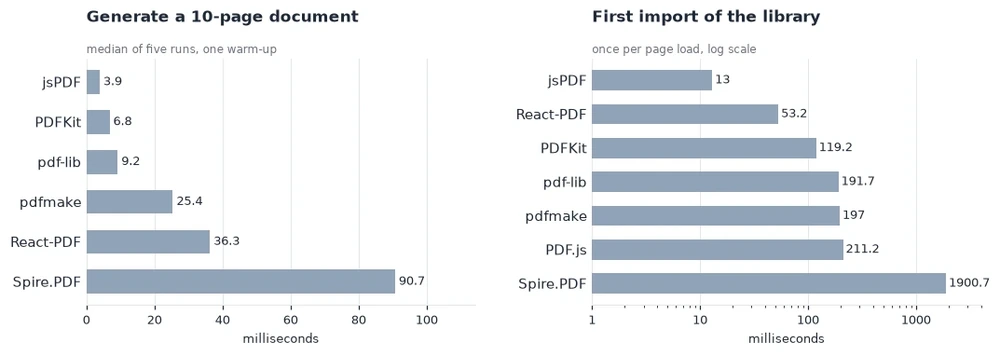
Treat the two numbers as different budgets. Generation time is spent per document, and load time is spent once per visit. A tool that exports hundreds of files in one session pays the 1.9 seconds a single time, while a landing page that exports one file pays all of it for that file.
That delay hurts on a page where PDF work happens during first paint. When conversion starts after a click, loading the module ahead of time or on demand hides most of it.
Output size depends on settings more than on the library. With an 800x800 PNG, jsPDF produced 1,923,288 B by default and 32,044 B with compress: true. pdf-lib (128.1 ms) and PDFKit (189.6 ms) inserted the same image faster than jsPDF (257.8 ms), at 26,846 B and 27,993 B.
Reading is a separate benchmark, run on a 10-page PDF:
| Library | Read page count | Extract text |
|---|---|---|
| pdf-lib | 8 ms | Not supported |
| Spire | 94 ms | 284 ms |
| PDF.js | 200 ms | 190 ms |
Compare the times only. Spire was configured to preserve whitespace and returned 1,381 characters, while PDF.js joins text items and returned 521, so the character counts are not comparable.
Chinese Text and Font Handling
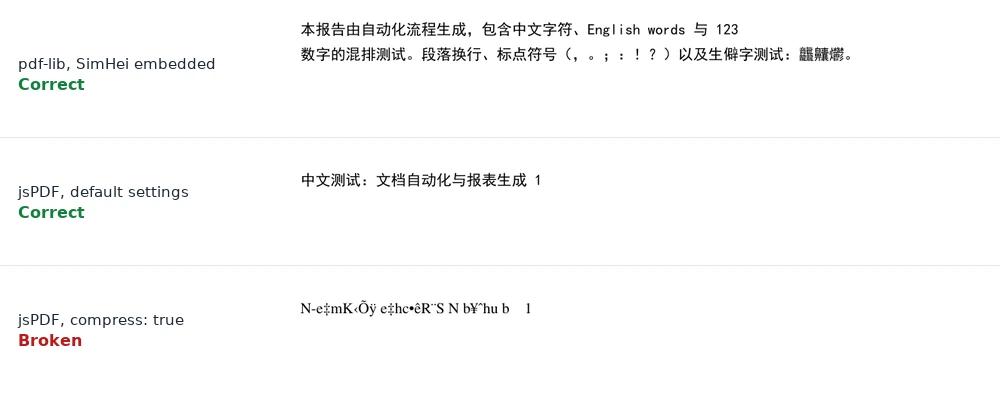
All six open-source libraries need a Chinese font file that you supply. We used SimHei (9.7 MB TrueType). Once supplied, every one of them embedded the font and rendered the text correctly, which we confirmed by rendering the output with PyMuPDF.
| Library | Median, 1 page Chinese | Output size |
|---|---|---|
| jsPDF | 1.1 ms (first call 479.8 ms) | 3,160 B |
| React-PDF | 7.3 ms | 11,286 B |
| pdfmake | 10.7 ms | 5,323 B |
| PDFKit | 11.3 ms | 10,743 B |
| pdf-lib | 32.7 ms | 9,693 B |
| Spire (embedded TTF) | 169.3 ms | 12,289 B |
The font file itself is 9.7 MB, which your page has to ship or fetch, so plan to load it on demand and cache it. jsPDF's 1.1 ms applies after the font is registered. The first call, which includes registration, took 479.8 ms, so the figure should not be read as a speed advantage.
The trap is in jsPDF. A Chinese page generated with default settings came to 184,355 B and rendered correctly. With compress: true the file shrank to 3,168 B, contained zero Chinese characters and rendered as Latin gibberish. The font had vanished from the font table, and rendering confirmed it, so extraction was not the problem. Leave compression off for Chinese documents and check the rendered page. Image-only pages compress safely (1,923,288 B down to 32,044 B), so this is a per-document decision.
Spire offers built-in CJK font families that need no font file, and they produce the smallest output we saw (2,262 B) because the font is not embedded. Coverage depends on the family: SinoTypeSongLight rendered every character in our sample, while MonotypeHeiMedium and MonotypeSungLight dropped 报 and 数. Check your character set against the family you choose, or embed a TTF, which rendered correctly in our test.
PDF/A and Licensing
PDF/A is the archival profile of PDF, and many records and compliance workflows ask for it. A file can look correct in a viewer and still fail the standard, so we checked output with a validator rather than by eye. We validated archival output with veraPDF 1.30.3. Spire's PDF/A-1b and PDF/A-2b files both passed. PDFKit called through its documented subset: 'PDF/A-1b' option failed with five violations: fonts not embedded (6.3.4), a missing metadata key (6.7.2) and Info and XMP metadata that disagree (6.7.3). The Spire source file, unconverted, also failed 1b, which shows the validator separates good files from bad ones. We did not test the other libraries for PDF/A.
Spire.PDF for JavaScript comes in three editions. The free edition, at free-pdf-for-javascript, covers generating and converting PDF files and carries no watermark. The evaluation build used for this benchmark protects its output with a watermark and a page limit. A free temporary licence lifts both while you assess the product, and a commercial licence covers production use, which is the normal arrangement for a commercial SDK.
A practical way to evaluate is to pick three of your real documents: the longest one, one with Chinese or other non-Latin text, and one that has to leave as PDF/A or Word. Request a free temporary licence for that run, so document length is not a factor, then compare against whichever open-source library you would otherwise use, on load time as well as output.
How We Tested
The tests ran in a Vite project in a Chromium-based browser on Windows 11 Pro (10.0.26300), with Node v26.12.1 and npm 12.0.1. Each measurement used one warm-up run and five repeats, and we report the median. The image fixture was an 800x800 PNG generated on a canvas at run time, and the Chinese tests used SimHei.
Library versions were pdf-lib 1.17.1, jsPDF 4.2.1, PDFKit 0.20.2, PDF.js 6.5.438, @react-pdf/renderer 4.9.0, pdfmake 0.3.14 and spire.office 11.7.0. Fonts were verified by rendering with PyMuPDF, and PDF/A files with veraPDF.
The bench project and its analysis scripts are reproducible, so a team can rerun the same cases on its own hardware and compare. Timings will differ by machine, and the ratios between libraries are the more useful signal.
Test documents were 10 pages or fewer. Rendered-pixel comparison across libraries, and PDF/A output for libraries other than Spire and PDFKit, were outside this run. As noted at the start, E-iceblue ran this benchmark and publishes Spire.PDF for JavaScript.
Frequently Asked Questions
Can I render PDFs in the browser? Use PDF.js, which includes a display API and a viewer. We did not compare rendered pixels across libraries. Spire.PDF for JavaScript converts a page to PNG (184 ms for page 1 in our test) but is not a viewer component; for in-browser viewing and editing, Spire.OfficeJS is the front-end suite built for that job.
Which library is best for Chinese text? Any of the six open-source libraries works once you supply a font, apart from jsPDF with compress: true. Spire's built-in CJK families need no font file; SinoTypeSongLight covered our full Chinese sample, while the two Monotype families dropped a few characters.
What if I need to process Word or Excel files? The six open-source libraries start from PDF. Spire.Office for JavaScript handles Word, Excel and PowerPoint in the same package family.
Will the bundle size be a problem? The open-source libraries initialized in 13 to 211 ms. Spire took 1.9 seconds and totals about 19.6 MB of files, which is not the same as download size. Load it on demand if first paint matters.
Do I need a license in production? The free edition covers generating and converting PDF files without a watermark. The evaluation build protects its output with a watermark and a page cap, which a free temporary licence removes while you assess the product. A commercial licence is required for production.
Our Recommendation by Scenario
The split comes down to how many jobs your project has.
One job: take the specialist.
- Invoices and receipts, speed first: jsPDF or PDFKit, with a font check for Chinese.
- Tables and long reports: pdfmake.
- React applications: @react-pdf/renderer.
- Editing an existing PDF: pdf-lib, keeping its 2021 release date in mind.
- Reading and viewing: PDF.js.
- Archival output that has to pass a validator: Spire.PDF for JavaScript. Its PDF/A-1b and PDF/A-2b files passed veraPDF, while PDFKit's documented
subsetoption failed five rules. - Chinese output without shipping a font file: Spire's built-in CJK families. SinoTypeSongLight covered our full sample, and the six open-source libraries each need a font file you distribute yourself, 9.7 MB in our test.
Two or more jobs, or any conversion between formats: the arithmetic changes. A project that reads a DOCX template, writes a PDF and converts the result onwards needs two or three of the libraries above, plus a fourth package for Word, and every handoff between them is an ArrayBuffer to validate and a separate font pipeline to configure. That is the case Spire.PDF for JavaScript is built for: one API spanning the four jobs above and twelve conversion targets, running in the browser with no server.
The cost is measurable and we have reported it: 1.9 seconds on first load, because the runtime unpacks about 19 MB of WebAssembly before the first document opens. Load it ahead of the first click and the user never sees it. The free edition covers generation and conversion without a watermark, and a temporary licence removes the evaluation limits while you compare against your own documents.