In tendering, the technical bid response is a step every bid must go through, and one of the easiest to get wrong. A tender document runs to dozens or hundreds of pages, and its "Technical Requirements" chapter holds anywhere from dozens to hundreds of clauses. A bidder has to respond to each clause and state the deviation, and a single unanswered clause can invalidate the bid. The responses must also line up with the bidder's own product parameters, test reports and project references — content that is too generic is scored as non-responsive, while inventing parameters or references to pad out a "fully compliant" answer creates far worse contractual and compliance risk if the bid wins. Traditionally a bidding specialist reads clause by clause, looks up the materials and fills in the table row by row. That takes days per bid, and the depth and wording of the responses vary widely between projects and between people.
Compared with the Traditional SDK API
| Traditional Spire.Office for .NET API | Spire.Agent.Office | |
|---|---|---|
| Driving method | Code handles every clause: load the tender document → split clauses with regex → match enterprise materials by keyword → fill the response table row by row, each step controlled in code | Describe the response requirements in natural language; the AI splits the clauses and matches responses clause by clause |
| Code volume | Substantial code to maintain clause-splitting rules, material-matching logic and table filling | Configuration code plus one natural language instruction |
| Clause splitting | Relies on clause numbers and ★▲ symbols as regex anchors; cross-page tables and multi-level numbering are easily split wrongly or dropped | The AI reads semantics together with numbering, so hierarchy and page breaks lose no clauses |
| Material matching | Keyword hits only; two different wordings of the same capability never match | Semantic matching; a capability description in the product manual maps onto a specific clause |
| Deviation assessment | Assessment rules must be hard-coded; better-than / equal / missing is hard to formalize | Each clause is judged against the criteria given in the instruction, and the AI downgrades when evidence is thin |
| Maintainability | A change in tender format or assessment criteria means code changes and a new release | Assessment criteria and chapter structure are adjusted in natural language at any time |
This article shows how to use the Word AI capability of Spire.Agent.Office to hand the tender document and your enterprise technical materials to the AI together and generate, in one pass, a complete technical bid response document containing the technical response table and the technical proposal body. Both single-lot and multi-lot batch usage are covered.
- Single lot: one tender document, one complete technical bid
- Multiple lots: batch output from several tender documents, one consistent standard
For product installation and SpireToken configuration, see Integrating Spire.Agent.Office into a .NET project. The examples below assume Spire.Agent.Office is installed and SpireToken is configured.
Technical Bid Response Generation
Technical bid response generation is the process of extracting the technical requirement clauses from a tender document, writing a response for each clause against the bidder's own technical materials, assessing the deviation, and organizing the result into a submittable technical bid document. The core approach: pass the tender document and the enterprise technical materials to the AI as attachments, have the AI generate a "technical response table" clause by clause under the tender document's original numbering, then continue into the technical proposal body based on those responses — producing the complete technical bid response document in one pass.
This addresses three difficulties the traditional approach cannot get around:
- Semantic correspondence: the tender says "supports deployment in a domestic xinchuang environment" while the enterprise materials say "adaptation for Kylin and UOS completed" — different wording for the same thing, and only semantic understanding maps the two. Keyword matching cannot.
- No omissions: the number of response clauses matches the technical requirements in the tender document exactly, with no merging and nothing dropped, which removes the risk of an invalid bid at the source.
- No fabrication: any clause without support in the enterprise materials is assessed as "Partially Compliant" with the missing items noted, instead of writing extra content to reach "Fully Compliant".
Single lot: one tender document, one complete technical bid
using Spire.Agent.Office.AI;
using Spire.Agent.Office.Extensions;
using Spire.Doc;

// Tender document and enterprise technical materials (data source files)
string[] attachmentPaths = new string[] {
    @"E:\Input\XX-Project-Tender-Document.docx",
    @"E:\Input\Enterprise-Technical-Materials.docx"
};
// Save path
string savePath = @"E:\Output\XX-Project-Technical-Bid-Response.docx";
// SpireToken key
string key = "**************************";
// Natural language instruction
string instruction =
    "Based on the attached tender document and enterprise technical materials, write a technical bid response document: generate a Technical Response Table clause by clause under the tender document's original numbering (No. | Tender Requirement | Our Response | Deviation | Notes), one to one with the requirements and with none omitted; " +
    "deviation takes only Fully Compliant / Partially Compliant / Non-Compliant, and the response must cite the matching model, parameters or project reference from the materials, while any clause without support is assessed Partially Compliant with the missing items noted and nothing invented; " +
    "after the table, continue with a five-chapter technical proposal body: project understanding, technical solution, implementation plan, quality assurance and after-sales service.";

// Call the Word document processing function
AIResult result = ExecuteDemoWord(instruction, savePath, key, attachmentPaths);


// Run the Word document AI processing
static AIResult ExecuteDemoWord(string instruction, string savePath, string key, string[] attachmentPaths)
{
    // Create the AIOptions configuration object
    AIOptions options = new AIOptions();
    // Set the single-call timeout budget (ms)
    options.TimeoutMs = 3600000;
    // Set the SpireToken key
    options.SpireToken = key;

    // Process the Word document with a Document object
    using (Document doc = new Document())
    {
        // Create the AI document processor
        AIDocumentProcessor processor = doc.AI(options);

        // Execute the AI instruction
        return processor.ExecuteInstruction(doc, instruction, savePath, attachmentPaths);
    }
}
The technical bid response document generated by the AI (technical response table + technical proposal body):
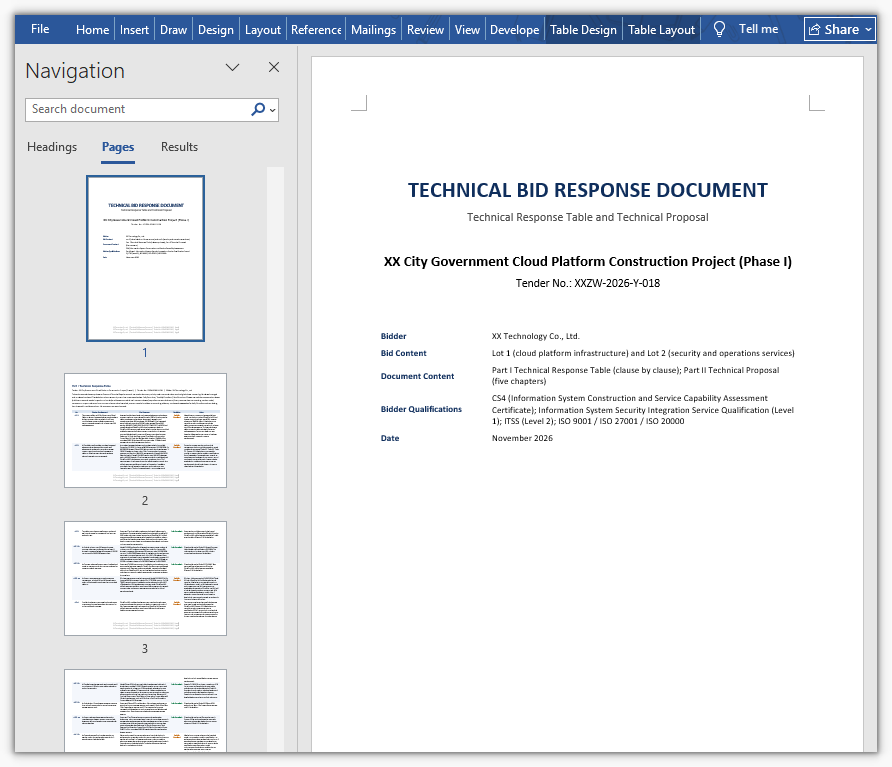
In the generated document the technical response table follows the tender document's original clause numbers one by one, and each row states the response and the deviation. Clauses with matching evidence cite specific product models and project references; the proposal body expands from the response table into the five chapters on project understanding, technical solution, implementation plan, quality assurance and after-sales service. The bidding specialist only has to check that the deviation assessments match reality and supply the materials that are missing, then move on to internal sign-off.
Multiple lots: batch output from several tender documents, one consistent standard
When a project is divided into several lots, each lot's tender document carries different technical requirements, but all lots use the same enterprise technical materials, which makes a single batch call a good fit. Set options.WorkDir to the output directory, pass null as savePath, and hand in every lot's tender document as an attachment — one call then produces several files, each named by the AI after its lot. Because all lots share the same materials and the same instruction, the assessment standard stays consistent by construction.
One caveat: a single call runs against a timeout budget (about 300 seconds by default), so a multi-lot batch should raise options.TimeoutMs; otherwise the call is cut off when the budget runs out.
using Spire.Agent.Office.AI;
using Spire.Agent.Office.Extensions;
using Spire.Doc;

// Tender documents for the lots (data source files)
string[] lotFiles = new string[] {
    @"E:\Input\Lot-1-Technical-Requirements.docx",  // Lot 1 tender document
    @"E:\Input\Lot-2-Technical-Requirements.docx"   // Lot 2 tender document
};
// All lots share the same enterprise technical materials
string materialPath = @"E:\Input\Enterprise-Technical-Materials.docx";
// Output directory
string OutDir = @"E:\Output";
// SpireToken key
string key = "**************************";
// Natural language instruction
string instruction =
    "Based on the attached tender documents and enterprise technical materials, generate a Technical Response Table clause by clause under that lot's original numbering (No. | Tender Requirement | Our Response | Deviation | Notes), one to one with that lot's requirements and with none omitted; " +
    "deviation takes only Fully Compliant / Partially Compliant / Non-Compliant, assessed as met or better → Fully Compliant, differences that do not affect use → Partially Compliant, cannot be met → Non-Compliant; " +
    "the response must cite the matching model, parameters or project reference from the materials, while any clause without support is assessed Partially Compliant with the missing items noted and nothing invented; " +
    "after the table, continue with a five-chapter technical proposal body: project understanding, technical solution, implementation plan, quality assurance and after-sales service; " +
    "the attachments hold two lots, so produce one document per lot, 2 files in total, each named with an 'output' prefix plus the lot and written directly into the working directory with no .csx script.";

// Attachments: two lot tender documents + the shared enterprise technical materials
string[] attachmentPaths = new string[] { lotFiles[0], lotFiles[1], materialPath };

// Call the Word document processing function
AIResult result = ExecuteDemoWordMultiLot(instruction, null, key, OutDir, attachmentPaths);


// Run the Word document AI processing
static AIResult ExecuteDemoWordMultiLot(string instruction, string? savePath, string key, string output, string[] attachmentPaths)
{
    // Create the AIOptions configuration object
    AIOptions options = new AIOptions();
    // Set the working directory to the output directory
    options.WorkDir = output;
    // Set the single-call timeout budget (ms)
    options.TimeoutMs = 3600000;
    // Set the SpireToken key
    options.SpireToken = key;

    // Process the Word document with a Document object
    using (Document doc = new Document())
    {
        // Create the AI document processor
        AIDocumentProcessor processor = doc.AI(options);

        // Execute the AI instruction
        return processor.ExecuteInstruction(doc, instruction, savePath, attachmentPaths);
    }
}
The technical bid response documents generated in batch by the AI (one per lot, named after the lot)
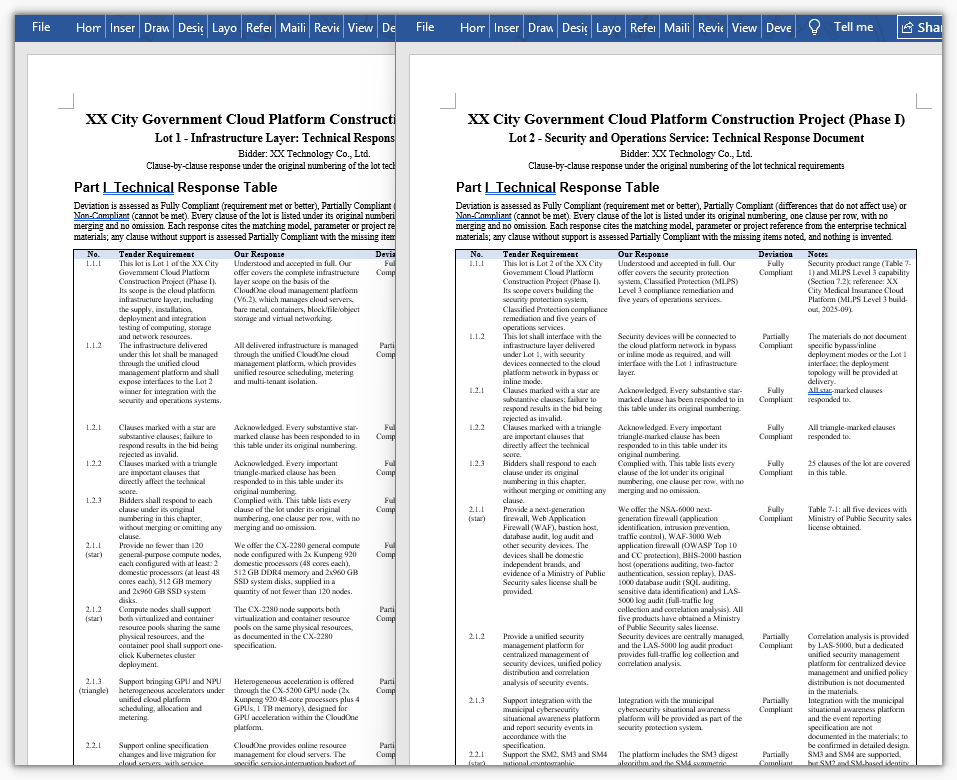
One call produces one independent response document per lot, named after the lot so that each can be submitted separately. Because all lots share the same deviation criteria and the same technical materials, the response standard stays consistent across lots — the same capability is not assessed "Fully Compliant" in one lot and "Partially Compliant" in another.
Common Questions
Response clauses are missing and the count does not match the tender document
Cause: the technical requirements in a tender document are often laid out as multi-level numbering, cross-page tables or even images, and the AI may merge adjacent clauses when splitting, or miss the entries that continue on the following page.
Solution: state in the instruction that each clause must be extracted individually and never merged or summarized, and require that the number of response clauses match the technical requirements in the tender document. For projects with many clauses, first have the AI output a clause list on its own (number + original text), check the count manually, and only then generate the responses — a two-step flow of "split first, respond second".
Responses are generic and do not reflect the company's actual capability
Cause: only the tender document was attached and no enterprise technical materials, so the AI can only write generic wording.
Solution: attach product manuals, test reports, qualification certificates and references for similar projects, and require in the instruction that "clauses with matching evidence must cite the specific product model, technical parameters or project reference".
Invented parameters, certificates or project references appear
Cause: when tender requirements and enterprise materials diverge, the AI tends to write extra content to fill the response table.
Solution: state in the instruction that "inventing parameters, certificates or project references to reach full compliance is forbidden; anything that cannot be confirmed is left blank and marked for manual confirmation", and write "any clause with no corresponding content in the materials is assessed as Partially Compliant" in as a hard rule.
Every deviation is assessed as "Fully Compliant"
Cause: no deviation criteria were given, so the AI sets its own standard, which usually leans lenient.
Solution: write the assessment standard into the instruction, for example "tender requirements fully met or better → Fully Compliant; differences that do not affect use → Partially Compliant; cannot be met → Non-Compliant". For stricter assessment, add "Fully Compliant may be assessed only when the enterprise materials provide explicit parameters or project references".
The response table layout breaks down and long clauses run together
Cause: a response table has many columns and long cell contents, so the AI may reorder columns or produce abnormal row heights when laying it out.
Solution: fix the column names and column order in the instruction (No. | Tender Requirement | Our Response | Deviation | Notes), and add layout requirements as needed (table centered, header row bold, body 12 pt, 1.5 line spacing); for very long clauses, require that "the Tender Requirement column keeps the original sentence, truncated at 80 characters with a trailing ellipsis".
Get the SpireToken Key
- Contact [email protected] or visit https://www.e-iceblue.com/TemLicense.html for a trial or commercial API key
Configure it in code:
AIOptions options = new AIOptions();
options.SpireToken = key;
