Demos
Demos (40)
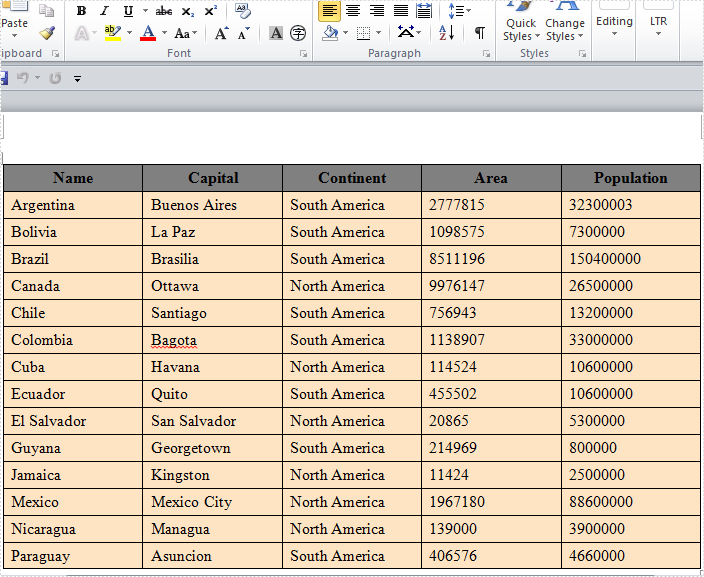
The sample demonstrates how to Create Table in Word for Silverlight via Spire.Doc.
<Application xmlns="http://schemas.microsoft.com/winfx/2006/xaml/presentation"
xmlns:x="http://schemas.microsoft.com/winfx/2006/xaml"
x:Class="Table_doc.App">
<Application.Resources>
</Application.Resources>
</Application>
using System;
using System.Windows;
namespace Table_doc
{
public partial class App : Application
{
public App()
{
this.Startup += this.Application_Startup;
this.Exit += this.Application_Exit;
this.UnhandledException += this.Application_UnhandledException;
InitializeComponent();
}
private void Application_Startup(object sender, StartupEventArgs e)
{
this.RootVisual = new MainPage();
}
private void Application_Exit(object sender, EventArgs e)
{
}
private void Application_UnhandledException(object sender, ApplicationUnhandledExceptionEventArgs e)
{
// If the app is running outside of the debugger then report the exception using
// the browser's exception mechanism. On IE this will display it a yellow alert
// icon in the status bar and Firefox will display a script error.
if (!System.Diagnostics.Debugger.IsAttached)
{
// NOTE: This will allow the application to continue running after an exception has been thrown
// but not handled.
// For production applications this error handling should be replaced with something that will
// report the error to the website and stop the application.
e.Handled = true;
Deployment.Current.Dispatcher.BeginInvoke(delegate { ReportErrorToDOM(e); });
}
}
private void ReportErrorToDOM(ApplicationUnhandledExceptionEventArgs e)
{
try
{
string errorMsg = e.ExceptionObject.Message + e.ExceptionObject.StackTrace;
errorMsg = errorMsg.Replace('"', '\'').Replace("\r\n", @"\n");
System.Windows.Browser.HtmlPage.Window.Eval("throw new Error(\"Unhandled Error in Silverlight Application " + errorMsg + "\");");
}
catch (Exception)
{
}
}
}
}
Imports System.Windows
Namespace Table_doc
Partial Public Class App
Inherits Application
Public Sub New()
AddHandler Me.Startup, AddressOf Application_Startup
AddHandler Me.Exit, AddressOf Application_Exit
AddHandler Me.UnhandledException, AddressOf Application_UnhandledException
InitializeComponent()
End Sub
Private Sub Application_Startup(ByVal sender As Object, ByVal e As StartupEventArgs)
Me.RootVisual = New MainPage()
End Sub
Private Sub Application_Exit(ByVal sender As Object, ByVal e As EventArgs)
End Sub
Private Sub Application_UnhandledException(ByVal sender As Object, ByVal e As ApplicationUnhandledExceptionEventArgs)
' If the app is running outside of the debugger then report the exception using
' the browser's exception mechanism. On IE this will display it a yellow alert
' icon in the status bar and Firefox will display a script error.
If Not Debugger.IsAttached Then
' NOTE: This will allow the application to continue running after an exception has been thrown
' but not handled.
' For production applications this error handling should be replaced with something that will
' report the error to the website and stop the application.
e.Handled = True
Deployment.Current.Dispatcher.BeginInvoke(Sub() ReportErrorToDOM(e))
End If
End Sub
Private Sub ReportErrorToDOM(ByVal e As ApplicationUnhandledExceptionEventArgs)
Try
Dim errorMsg As String = e.ExceptionObject.Message + e.ExceptionObject.StackTrace
errorMsg = errorMsg.Replace(""""c, "'"c).Replace(vbCrLf, vbLf)
System.Windows.Browser.HtmlPage.Window.Eval("throw new Error(""Unhandled Error in Silverlight Application " & errorMsg & """);")
Catch e1 As Exception
End Try
End Sub
End Class
End Namespace
<UserControl x:Class="Table_doc.MainPage"
xmlns="http://schemas.microsoft.com/winfx/2006/xaml/presentation"
xmlns:x="http://schemas.microsoft.com/winfx/2006/xaml"
xmlns:d="http://schemas.microsoft.com/expression/blend/2008"
xmlns:mc="http://schemas.openxmlformats.org/markup-compatibility/2006"
mc:Ignorable="d"
d:DesignHeight="300" d:DesignWidth="400">
<Grid x:Name="LayoutRoot" Background="White">
<Button Content="Run" Height="23" HorizontalAlignment="Left" Margin="306,253,0,0" Name="button1" VerticalAlignment="Top" Width="75" Click="button1_Click" />
</Grid>
</UserControl>
using System;
using System.Windows;
using System.Windows.Controls;
using System.Drawing;
using System.IO;
using Spire.Doc;
using Spire.Doc.Documents;
using Spire.Doc.Fields;
namespace Table_doc
{
public partial class MainPage : UserControl
{
private SaveFileDialog saveFileDialog = null;
public MainPage()
{
InitializeComponent();
this.saveFileDialog = new SaveFileDialog();
this.saveFileDialog.Filter = "Word Documents(*.doc)|*.doc";
}
private void button1_Click(object sender, RoutedEventArgs e)
{
//create a blank word document
Document document = new Document();
//add one section
Section section = document.AddSection();
//add one paragraph
Paragraph paragraph = section.AddParagraph();
TextRange txtRange = paragraph.AppendText("This is a sample demonstrates how to create table using Spire.Doc\n\n");
txtRange.CharacterFormat.Font.Bold = true;
txtRange.CharacterFormat.Font.Italic = true;
txtRange.CharacterFormat.TextColor = Color.Red;
//add one table
AddTable(section);
//save the word document
bool? result = this.saveFileDialog.ShowDialog();
if (result.HasValue && result.Value)
{
using (Stream stream = this.saveFileDialog.OpenFile())
{
document.SaveToStream(stream, FileFormat.Doc);
}
}
}
private void AddTable(Section section)
{
//prepare the data of table
String[] header = { "Name", "Capital", "Continent", "Area", "Population" };
String[][] data =
{
new String[]{"Argentina", "Buenos Aires", "South America", "2777815", "32300003"},
new String[]{"Bolivia", "La Paz", "South America", "1098575", "7300000"},
new String[]{"Brazil", "Brasilia", "South America", "8511196", "150400000"},
new String[]{"Canada", "Ottawa", "North America", "9976147", "26500000"},
new String[]{"Chile", "Santiago", "South America", "756943", "13200000"},
new String[]{"Colombia", "Bagota", "South America", "1138907", "33000000"},
new String[]{"Cuba", "Havana", "North America", "114524", "10600000"},
new String[]{"Ecuador", "Quito", "South America", "455502", "10600000"},
new String[]{"El Salvador", "San Salvador", "North America", "20865", "5300000"},
new String[]{"Guyana", "Georgetown", "South America", "214969", "800000"},
new String[]{"Jamaica", "Kingston", "North America", "11424", "2500000"},
new String[]{"Mexico", "Mexico City", "North America", "1967180", "88600000"},
new String[]{"Nicaragua", "Managua", "North America", "139000", "3900000"},
new String[]{"Paraguay", "Asuncion", "South America", "406576", "4660000"},
};
//create the table and set the cells
Spire.Doc.Table table = section.AddTable();
table.ResetCells(data.Length + 1, header.Length);
//edit the header row
TableRow row = table.Rows[0];
row.IsHeader = true;
row.Height = 20;
row.HeightType = TableRowHeightType.Exactly;
row.RowFormat.BackColor = Color.Gray;
for (int i = 0; i < header.Length; i++)
{
row.Cells[i].CellFormat.VerticalAlignment = Spire.Doc.Documents.VerticalAlignment.Middle;
Paragraph p = row.Cells[i].AddParagraph();
p.Format.HorizontalAlignment = Spire.Doc.Documents.HorizontalAlignment.Center;
TextRange txtRange = p.AppendText(header[i]);
txtRange.CharacterFormat.Bold = true;
}
//edit the data rows
for (int r = 0; r < data.Length; r++)
{
TableRow dataRow = table.Rows[r + 1];
dataRow.Height = 20;
dataRow.HeightType = TableRowHeightType.Exactly;
dataRow.RowFormat.BackColor = Color.Bisque;
for (int c = 0; c < data[r].Length; c++)
{
dataRow.Cells[c].CellFormat.VerticalAlignment = Spire.Doc.Documents.VerticalAlignment.Middle;
dataRow.Cells[c].AddParagraph().AppendText(data[r][c]);
}
}
//add the borders
table.TableFormat.Borders.BorderType = BorderStyle.Thick;
}
}
}
Imports System.Windows
Imports System.Windows.Controls
Imports System.Drawing
Imports System.IO
Imports Spire.Doc
Imports Spire.Doc.Documents
Imports Spire.Doc.Fields
Namespace Table_doc
Partial Public Class MainPage
Inherits UserControl
Private saveFileDialog As SaveFileDialog = Nothing
Public Sub New()
InitializeComponent()
Me.saveFileDialog = New SaveFileDialog()
Me.saveFileDialog.Filter = "Word Documents(*.doc)|*.doc"
End Sub
Private Sub button1_Click(ByVal sender As Object, ByVal e As RoutedEventArgs)
'create a blank word document
Dim document As New Document()
'add one section
Dim section As Section = document.AddSection()
'add one paragraph
Dim paragraph As Paragraph = section.AddParagraph()
Dim txtRange As TextRange = paragraph.AppendText("This is a sample demonstrates how to create table using Spire.Doc" & vbLf & vbLf)
txtRange.CharacterFormat.Font.Bold = True
txtRange.CharacterFormat.Font.Italic = True
txtRange.CharacterFormat.TextColor = Color.Red
'add one table
AddTable(section)
'save the word document
Dim result? As Boolean = Me.saveFileDialog.ShowDialog()
If result.HasValue AndAlso result.Value Then
Using stream As Stream = Me.saveFileDialog.OpenFile()
document.SaveToStream(stream, FileFormat.Doc)
End Using
End If
End Sub
Private Sub AddTable(ByVal section As Section)
'prepare the data of table
Dim header() As String = { "Name", "Capital", "Continent", "Area", "Population" }
Dim data()() As String = { New String(){"Argentina", "Buenos Aires", "South America", "2777815", "32300003"}, New String(){"Bolivia", "La Paz", "South America", "1098575", "7300000"}, New String(){"Brazil", "Brasilia", "South America", "8511196", "150400000"}, New String(){"Canada", "Ottawa", "North America", "9976147", "26500000"}, New String(){"Chile", "Santiago", "South America", "756943", "13200000"}, New String(){"Colombia", "Bagota", "South America", "1138907", "33000000"}, New String(){"Cuba", "Havana", "North America", "114524", "10600000"}, New String(){"Ecuador", "Quito", "South America", "455502", "10600000"}, New String(){"El Salvador", "San Salvador", "North America", "20865", "5300000"}, New String(){"Guyana", "Georgetown", "South America", "214969", "800000"}, New String(){"Jamaica", "Kingston", "North America", "11424", "2500000"}, New String(){"Mexico", "Mexico City", "North America", "1967180", "88600000"}, New String(){"Nicaragua", "Managua", "North America", "139000", "3900000"}, New String(){"Paraguay", "Asuncion", "South America", "406576", "4660000"} }
'create the table and set the cells
Dim table As Spire.Doc.Table = section.AddTable()
table.ResetCells(data.Length + 1, header.Length)
'edit the header row
Dim row As TableRow = table.Rows(0)
row.IsHeader = True
row.Height = 20
row.HeightType = TableRowHeightType.Exactly
row.RowFormat.BackColor = Color.Gray
For i As Integer = 0 To header.Length - 1
row.Cells(i).CellFormat.VerticalAlignment = Spire.Doc.Documents.VerticalAlignment.Middle
Dim p As Paragraph = row.Cells(i).AddParagraph()
p.Format.HorizontalAlignment = Spire.Doc.Documents.HorizontalAlignment.Center
Dim txtRange As TextRange = p.AppendText(header(i))
txtRange.CharacterFormat.Bold = True
Next i
'edit the data rows
For r As Integer = 0 To data.Length - 1
Dim dataRow As TableRow = table.Rows(r + 1)
dataRow.Height = 20
dataRow.HeightType = TableRowHeightType.Exactly
dataRow.RowFormat.BackColor = Color.Bisque
For c As Integer = 0 To data(r).Length - 1
dataRow.Cells(c).CellFormat.VerticalAlignment = Spire.Doc.Documents.VerticalAlignment.Middle
dataRow.Cells(c).AddParagraph().AppendText(data(r)(c))
Next c
Next r
'add the borders
table.TableFormat.Borders.BorderType = BorderStyle.Thick
End Sub
End Class
End Namespace

Published in
Context
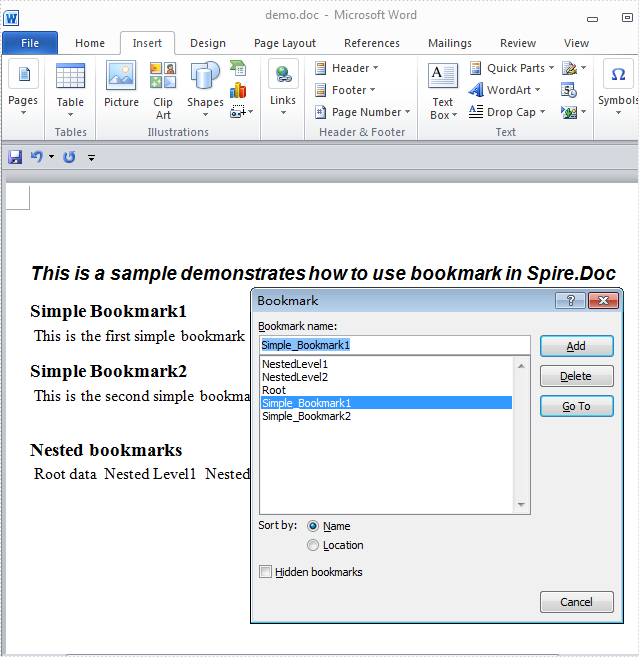
The sample demonstrates how to add bookmark into Word for Silverlight via Spire.Doc.

<Application xmlns="http://schemas.microsoft.com/winfx/2006/xaml/presentation"
xmlns:x="http://schemas.microsoft.com/winfx/2006/xaml"
x:Class="Bookmark_Doc.App">
<Application.Resources>
</Application.Resources>
</Application>
using System;
using System.Windows;
namespace Bookmark_Doc
{
public partial class App : Application
{
public App()
{
this.Startup += this.Application_Startup;
this.Exit += this.Application_Exit;
this.UnhandledException += this.Application_UnhandledException;
InitializeComponent();
}
private void Application_Startup(object sender, StartupEventArgs e)
{
this.RootVisual = new MainPage();
}
private void Application_Exit(object sender, EventArgs e)
{
}
private void Application_UnhandledException(object sender, ApplicationUnhandledExceptionEventArgs e)
{
// If the app is running outside of the debugger then report the exception using
// the browser's exception mechanism. On IE this will display it a yellow alert
// icon in the status bar and Firefox will display a script error.
if (!System.Diagnostics.Debugger.IsAttached)
{
// NOTE: This will allow the application to continue running after an exception has been thrown
// but not handled.
// For production applications this error handling should be replaced with something that will
// report the error to the website and stop the application.
e.Handled = true;
Deployment.Current.Dispatcher.BeginInvoke(delegate { ReportErrorToDOM(e); });
}
}
private void ReportErrorToDOM(ApplicationUnhandledExceptionEventArgs e)
{
try
{
string errorMsg = e.ExceptionObject.Message + e.ExceptionObject.StackTrace;
errorMsg = errorMsg.Replace('"', '\'').Replace("\r\n", @"\n");
System.Windows.Browser.HtmlPage.Window.Eval("throw new Error(\"Unhandled Error in Silverlight Application " + errorMsg + "\");");
}
catch (Exception)
{
}
}
}
}
Imports System.Windows
Namespace Bookmark_Doc
Partial Public Class App
Inherits Application
Public Sub New()
AddHandler Me.Startup, AddressOf Application_Startup
AddHandler Me.Exit, AddressOf Application_Exit
AddHandler Me.UnhandledException, AddressOf Application_UnhandledException
InitializeComponent()
End Sub
Private Sub Application_Startup(ByVal sender As Object, ByVal e As StartupEventArgs)
Me.RootVisual = New MainPage()
End Sub
Private Sub Application_Exit(ByVal sender As Object, ByVal e As EventArgs)
End Sub
Private Sub Application_UnhandledException(ByVal sender As Object, ByVal e As ApplicationUnhandledExceptionEventArgs)
' If the app is running outside of the debugger then report the exception using
' the browser's exception mechanism. On IE this will display it a yellow alert
' icon in the status bar and Firefox will display a script error.
If Not Debugger.IsAttached Then
' NOTE: This will allow the application to continue running after an exception has been thrown
' but not handled.
' For production applications this error handling should be replaced with something that will
' report the error to the website and stop the application.
e.Handled = True
Deployment.Current.Dispatcher.BeginInvoke(Sub() ReportErrorToDOM(e))
End If
End Sub
Private Sub ReportErrorToDOM(ByVal e As ApplicationUnhandledExceptionEventArgs)
Try
Dim errorMsg As String = e.ExceptionObject.Message + e.ExceptionObject.StackTrace
errorMsg = errorMsg.Replace(""""c, "'"c).Replace(vbCrLf, vbLf)
System.Windows.Browser.HtmlPage.Window.Eval("throw new Error(""Unhandled Error in Silverlight Application " & errorMsg & """);")
Catch e1 As Exception
End Try
End Sub
End Class
End Namespace
<UserControl x:Class="Bookmark_Doc.MainPage"
xmlns="http://schemas.microsoft.com/winfx/2006/xaml/presentation"
xmlns:x="http://schemas.microsoft.com/winfx/2006/xaml"
xmlns:d="http://schemas.microsoft.com/expression/blend/2008"
xmlns:mc="http://schemas.openxmlformats.org/markup-compatibility/2006"
mc:Ignorable="d"
d:DesignHeight="300" d:DesignWidth="400">
<Grid x:Name="LayoutRoot" Background="White">
<Button Content="RUN" Height="23" HorizontalAlignment="Left" Margin="286,265,0,0" Name="button1" VerticalAlignment="Top" Width="75" Click="button1_Click" />
</Grid>
</UserControl>
using System.Windows;
using System.Windows.Controls;
using System.IO;
using Spire.Doc;
using Spire.Doc.Documents;
namespace Bookmark_Doc
{
public partial class MainPage : UserControl
{
private SaveFileDialog saveFile = null;
public MainPage()
{
InitializeComponent();
this.saveFile = new SaveFileDialog();
this.saveFile.Filter = "Word Document(*.doc)|*.doc";
}
private void button1_Click(object sender, RoutedEventArgs e)
{
//create a word document
Document document = new Document();
//add one section
Section section = document.AddSection();
AddBookmark(section);
//save word document
bool? result = this.saveFile.ShowDialog();
if (result.HasValue && result.Value)
{
using (Stream stream = this.saveFile.OpenFile())
{
document.SaveToStream(stream, FileFormat.Docx);
}
}
}
private void AddBookmark(Section section)
{
Paragraph paragraph = section.Paragraphs.Count > 0 ? section.Paragraphs[0] : section.AddParagraph();
paragraph.AppendText("This is a sample demonstrates how to use bookmark in Spire.Doc");
paragraph.ApplyStyle(BuiltinStyle.Heading2);
//writing simple bookmarks
paragraph = section.AddParagraph();
paragraph.AppendText("Simple Bookmark1");
paragraph.ApplyStyle(BuiltinStyle.Heading4);
paragraph = section.AddParagraph();
paragraph.AppendBookmarkStart("Simple_Bookmark1");
paragraph.AppendText(" This is the first simple bookmark");
paragraph.AppendBookmarkEnd("Simple_Bookmark1");
paragraph = section.AddParagraph();
paragraph.AppendText("Simple Bookmark2");
paragraph.ApplyStyle(BuiltinStyle.Heading4);
paragraph = section.AddParagraph();
paragraph.AppendBookmarkStart("Simple_Bookmark2");
paragraph.AppendText(" This is the second simple bookmark\n");
paragraph.AppendBookmarkEnd("Simple_Bookmark2");
//writing nested bookmarks
paragraph = section.AddParagraph();
paragraph.AppendText("Nested bookmarks");
paragraph.ApplyStyle(BuiltinStyle.Heading4);
paragraph = section.AddParagraph();
paragraph.AppendBookmarkStart("Root");
paragraph.AppendText(" Root data ");
paragraph.AppendBookmarkStart("NestedLevel1");
paragraph.AppendText(" Nested Level1 ");
paragraph.AppendBookmarkStart("NestedLevel2");
paragraph.AppendText(" Nested Level2 ");
paragraph.AppendBookmarkEnd("NestedLevel2");
paragraph.AppendText(" Data Level1 ");
paragraph.AppendBookmarkEnd("NestedLevel1");
paragraph.AppendText(" Data Root ");
paragraph.AppendBookmarkEnd("Root");
}
}
}
Imports System.Windows
Imports System.Windows.Controls
Imports System.IO
Imports Spire.Doc
Imports Spire.Doc.Documents
Namespace Bookmark_Doc
Partial Public Class MainPage
Inherits UserControl
Private saveFile As SaveFileDialog = Nothing
Public Sub New()
InitializeComponent()
Me.saveFile = New SaveFileDialog()
Me.saveFile.Filter = "Word Document(*.doc)|*.doc"
End Sub
Private Sub button1_Click(ByVal sender As Object, ByVal e As RoutedEventArgs)
'create a word document
Dim document As New Document()
'add one section
Dim section As Section = document.AddSection()
AddBookmark(section)
'save word document
Dim result? As Boolean = Me.saveFile.ShowDialog()
If result.HasValue AndAlso result.Value Then
Using stream As Stream = Me.saveFile.OpenFile()
document.SaveToStream(stream, FileFormat.Docx)
End Using
End If
End Sub
Private Sub AddBookmark(ByVal section As Section)
Dim paragraph As Paragraph = If(section.Paragraphs.Count > 0, section.Paragraphs(0), section.AddParagraph())
paragraph.AppendText("This is a sample demonstrates how to use bookmark in Spire.Doc")
paragraph.ApplyStyle(BuiltinStyle.Heading2)
'writing simple bookmarks
paragraph = section.AddParagraph()
paragraph.AppendText("Simple Bookmark1")
paragraph.ApplyStyle(BuiltinStyle.Heading4)
paragraph = section.AddParagraph()
paragraph.AppendBookmarkStart("Simple_Bookmark1")
paragraph.AppendText(" This is the first simple bookmark")
paragraph.AppendBookmarkEnd("Simple_Bookmark1")
paragraph = section.AddParagraph()
paragraph.AppendText("Simple Bookmark2")
paragraph.ApplyStyle(BuiltinStyle.Heading4)
paragraph = section.AddParagraph()
paragraph.AppendBookmarkStart("Simple_Bookmark2")
paragraph.AppendText(" This is the second simple bookmark" & vbLf)
paragraph.AppendBookmarkEnd("Simple_Bookmark2")
'writing nested bookmarks
paragraph = section.AddParagraph()
paragraph.AppendText("Nested bookmarks")
paragraph.ApplyStyle(BuiltinStyle.Heading4)
paragraph = section.AddParagraph()
paragraph.AppendBookmarkStart("Root")
paragraph.AppendText(" Root data ")
paragraph.AppendBookmarkStart("NestedLevel1")
paragraph.AppendText(" Nested Level1 ")
paragraph.AppendBookmarkStart("NestedLevel2")
paragraph.AppendText(" Nested Level2 ")
paragraph.AppendBookmarkEnd("NestedLevel2")
paragraph.AppendText(" Data Level1 ")
paragraph.AppendBookmarkEnd("NestedLevel1")
paragraph.AppendText(" Data Root ")
paragraph.AppendBookmarkEnd("Root")
End Sub
End Class
End Namespace
Published in
Context
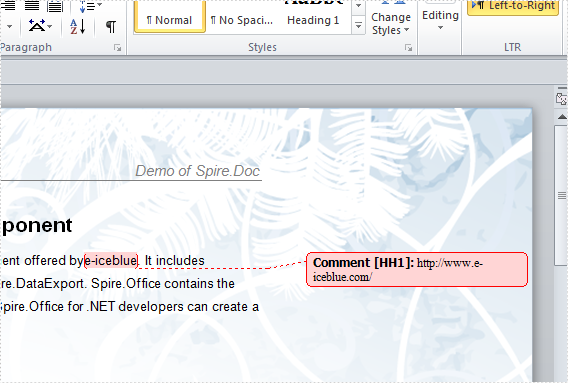
The sample demonstrates how to insert comments into Word for Silverlight via Spire.Doc.

<Application xmlns="http://schemas.microsoft.com/winfx/2006/xaml/presentation"
xmlns:x="http://schemas.microsoft.com/winfx/2006/xaml"
x:Class="Comments_Doc.App">
<Application.Resources>
</Application.Resources>
</Application>
using System;
using System.Windows;
namespace Comments_Doc
{
public partial class App : Application
{
public App()
{
this.Startup += this.Application_Startup;
this.Exit += this.Application_Exit;
this.UnhandledException += this.Application_UnhandledException;
InitializeComponent();
}
private void Application_Startup(object sender, StartupEventArgs e)
{
this.RootVisual = new MainPage();
}
private void Application_Exit(object sender, EventArgs e)
{
}
private void Application_UnhandledException(object sender, ApplicationUnhandledExceptionEventArgs e)
{
// If the app is running outside of the debugger then report the exception using
// the browser's exception mechanism. On IE this will display it a yellow alert
// icon in the status bar and Firefox will display a script error.
if (!System.Diagnostics.Debugger.IsAttached)
{
// NOTE: This will allow the application to continue running after an exception has been thrown
// but not handled.
// For production applications this error handling should be replaced with something that will
// report the error to the website and stop the application.
e.Handled = true;
Deployment.Current.Dispatcher.BeginInvoke(delegate { ReportErrorToDOM(e); });
}
}
private void ReportErrorToDOM(ApplicationUnhandledExceptionEventArgs e)
{
try
{
string errorMsg = e.ExceptionObject.Message + e.ExceptionObject.StackTrace;
errorMsg = errorMsg.Replace('"', '\'').Replace("\r\n", @"\n");
System.Windows.Browser.HtmlPage.Window.Eval("throw new Error(\"Unhandled Error in Silverlight Application " + errorMsg + "\");");
}
catch (Exception)
{
}
}
}
}
Imports System.Windows
Namespace Comments_Doc
Partial Public Class App
Inherits Application
Public Sub New()
AddHandler Me.Startup, AddressOf Application_Startup
AddHandler Me.Exit, AddressOf Application_Exit
AddHandler Me.UnhandledException, AddressOf Application_UnhandledException
InitializeComponent()
End Sub
Private Sub Application_Startup(ByVal sender As Object, ByVal e As StartupEventArgs)
Me.RootVisual = New MainPage()
End Sub
Private Sub Application_Exit(ByVal sender As Object, ByVal e As EventArgs)
End Sub
Private Sub Application_UnhandledException(ByVal sender As Object, ByVal e As ApplicationUnhandledExceptionEventArgs)
' If the app is running outside of the debugger then report the exception using
' the browser's exception mechanism. On IE this will display it a yellow alert
' icon in the status bar and Firefox will display a script error.
If Not Debugger.IsAttached Then
' NOTE: This will allow the application to continue running after an exception has been thrown
' but not handled.
' For production applications this error handling should be replaced with something that will
' report the error to the website and stop the application.
e.Handled = True
Deployment.Current.Dispatcher.BeginInvoke(Sub() ReportErrorToDOM(e))
End If
End Sub
Private Sub ReportErrorToDOM(ByVal e As ApplicationUnhandledExceptionEventArgs)
Try
Dim errorMsg As String = e.ExceptionObject.Message + e.ExceptionObject.StackTrace
errorMsg = errorMsg.Replace(""""c, "'"c).Replace(vbCrLf, vbLf)
System.Windows.Browser.HtmlPage.Window.Eval("throw new Error(""Unhandled Error in Silverlight Application " & errorMsg & """);")
Catch e1 As Exception
End Try
End Sub
End Class
End Namespace
<UserControl x:Class="Comments_Doc.MainPage"
xmlns="http://schemas.microsoft.com/winfx/2006/xaml/presentation"
xmlns:x="http://schemas.microsoft.com/winfx/2006/xaml"
xmlns:d="http://schemas.microsoft.com/expression/blend/2008"
xmlns:mc="http://schemas.openxmlformats.org/markup-compatibility/2006"
mc:Ignorable="d"
d:DesignHeight="300" d:DesignWidth="400">
<Grid x:Name="LayoutRoot" Background="White" Loaded="LayoutRoot_Loaded">
<Button Content="RUN" Height="23" HorizontalAlignment="Left" Margin="290,266,0,0" Name="button1" VerticalAlignment="Top" Width="75" Click="button1_Click" />
</Grid>
</UserControl>
using System.Windows;
using System.Windows.Controls;
using System.Reflection;
using System.IO;
using Spire.Doc;
using Spire.Doc.Fields;
using Spire.Doc.Documents;
namespace Comments_Doc
{
public partial class MainPage : UserControl
{
private Document document = new Document();
private SaveFileDialog saveFileDialog = null;
public MainPage()
{
InitializeComponent();
this.saveFileDialog = new SaveFileDialog();
this.saveFileDialog.Filter = "Word Document(*.doc)|*.doc";
}
private void button1_Click(object sender, RoutedEventArgs e)
{
Section section = this.document.Sections[0];
//insert comment
InsertComment(section);
//save the doc document using a SaveFileDialog
bool? result = this.saveFileDialog.ShowDialog();
if (result.HasValue && result.Value)
{
using (Stream stream = this.saveFileDialog.OpenFile())
{
this.document.SaveToStream(stream, FileFormat.Doc);
}
}
}
private void LayoutRoot_Loaded(object sender, RoutedEventArgs e)
{
Assembly assembly = this.GetType().Assembly;
foreach (string name in assembly.GetManifestResourceNames())
{
if (name.EndsWith("Blank.doc"))
{
using (Stream fileStr = assembly.GetManifestResourceStream(name))
{
this.document.LoadFromStream(fileStr, FileFormat.Doc);
}
}
}
}
private void InsertComment(Section section)
{
//title
Paragraph paragraph
= section.Paragraphs.Count > 0 ? section.Paragraphs[0] : section.AddParagraph();
TextRange title = paragraph.AppendText("Spire.office Component");
title.CharacterFormat.Bold = true;
title.CharacterFormat.FontName = "Arial";
title.CharacterFormat.FontSize = 14;
paragraph.Format.HorizontalAlignment
= Spire.Doc.Documents.HorizontalAlignment.Center;
paragraph.Format.AfterSpacing = 10;
//style
ParagraphStyle style1 = new ParagraphStyle(section.Document);
style1.Name = "style1";
style1.CharacterFormat.FontName = "Arial";
style1.CharacterFormat.FontSize = 9;
style1.ParagraphFormat.LineSpacing = 1.5F * 12F;
style1.ParagraphFormat.LineSpacingRule = LineSpacingRule.Multiple;
section.Document.Styles.Add(style1);
ParagraphStyle style2 = new ParagraphStyle(section.Document);
style2.Name = "style2";
style2.ApplyBaseStyle(style1.Name);
section.Document.Styles.Add(style2);
paragraph = section.AddParagraph();
paragraph.AppendText("Spire.Office for .NET is a compilation of every .NET component offered by");
TextRange text = paragraph.AppendText("e-iceblue");
//Comment e-iceblue, adding url for it.
Comment comment1 = paragraph.AppendComment("http://www.e-iceblue.com/");
comment1.AddItem(text);
comment1.Format.Author = "Suvi Wu";
comment1.Format.Initial = "HH";
paragraph.AppendText(". It includes Spire.Doc, Spire.XLS, Spire.PDFViewer, Spire.PDF and Spire.DataExport. Spire.Office contains the most up-to-date versions of the components above. Using Spire.Office for .NET developers can create a wide range of applications.");
paragraph.ApplyStyle(style1.Name);
}
}
}
Imports System.Windows
Imports System.Windows.Controls
Imports System.Reflection
Imports System.IO
Imports Spire.Doc
Imports Spire.Doc.Fields
Imports Spire.Doc.Documents
Namespace Comments_Doc
Partial Public Class MainPage
Inherits UserControl
Private document As New Document()
Private saveFileDialog As SaveFileDialog = Nothing
Public Sub New()
InitializeComponent()
Me.saveFileDialog = New SaveFileDialog()
Me.saveFileDialog.Filter = "Word Document(*.doc)|*.doc"
End Sub
Private Sub button1_Click(ByVal sender As Object, ByVal e As RoutedEventArgs)
Dim section As Section = Me.document.Sections(0)
'insert comment
InsertComment(section)
'save the doc document using a SaveFileDialog
Dim result? As Boolean = Me.saveFileDialog.ShowDialog()
If result.HasValue AndAlso result.Value Then
Using stream As Stream = Me.saveFileDialog.OpenFile()
Me.document.SaveToStream(stream, FileFormat.Doc)
End Using
End If
End Sub
Private Sub LayoutRoot_Loaded(ByVal sender As Object, ByVal e As RoutedEventArgs)
Dim [assembly] As System.Reflection.Assembly = Me.GetType().Assembly
For Each name As String In [assembly].GetManifestResourceNames()
If name.EndsWith("Blank.doc") Then
Using fileStr As Stream = [assembly].GetManifestResourceStream(name)
Me.document.LoadFromStream(fileStr, FileFormat.Doc)
End Using
End If
Next name
End Sub
Private Sub InsertComment(ByVal section As Section)
'title
Dim paragraph As Paragraph = If(section.Paragraphs.Count > 0, section.Paragraphs(0), section.AddParagraph())
Dim title As TextRange = paragraph.AppendText("Spire.office Component")
title.CharacterFormat.Bold = True
title.CharacterFormat.FontName = "Arial"
title.CharacterFormat.FontSize = 14
paragraph.Format.HorizontalAlignment = Spire.Doc.Documents.HorizontalAlignment.Center
paragraph.Format.AfterSpacing = 10
'style
Dim style1 As New ParagraphStyle(section.Document)
style1.Name = "style1"
style1.CharacterFormat.FontName = "Arial"
style1.CharacterFormat.FontSize = 9
style1.ParagraphFormat.LineSpacing = 1.5F * 12F
style1.ParagraphFormat.LineSpacingRule = LineSpacingRule.Multiple
section.Document.Styles.Add(style1)
Dim style2 As New ParagraphStyle(section.Document)
style2.Name = "style2"
style2.ApplyBaseStyle(style1.Name)
section.Document.Styles.Add(style2)
paragraph = section.AddParagraph()
paragraph.AppendText("Spire.Office for .NET is a compilation of every .NET component offered by")
Dim text As TextRange = paragraph.AppendText("e-iceblue")
'Comment e-iceblue, adding url for it.
Dim comment1 As Comment = paragraph.AppendComment("http://www.e-iceblue.com/")
comment1.AddItem(text)
comment1.Format.Author = "Suvi Wu"
comment1.Format.Initial = "HH"
paragraph.AppendText(". It includes Spire.Doc, Spire.XLS, Spire.PDFViewer, Spire.PDF and Spire.DataExport. Spire.Office contains the most up-to-date versions of the components above. Using Spire.Office for .NET developers can create a wide range of applications.")
paragraph.ApplyStyle(style1.Name)
End Sub
End Class
End Namespace
Published in
Context