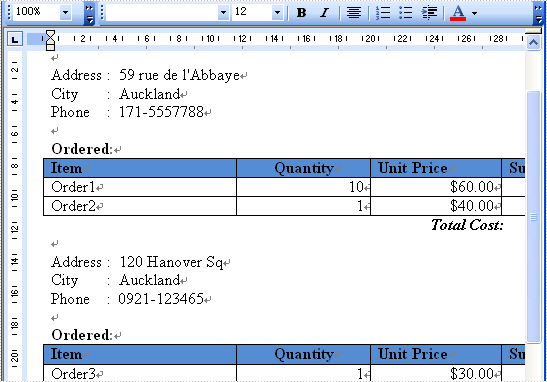
The sample demonstrates how to work with MailMerge in Silverlight via Spire.Doc.
Download template doc file.
Download merged result file.
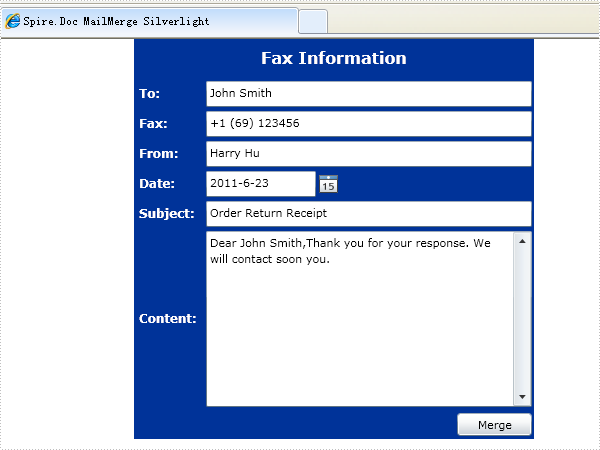
<Application xmlns="http://schemas.microsoft.com/winfx/2006/xaml/presentation"
             xmlns:x="http://schemas.microsoft.com/winfx/2006/xaml"
             x:Class="MailMergeSL.App">
    <Application.Resources>
    </Application.Resources>
</Application>
using System;
using System.Windows;
using System.Windows.Browser;
using Spire.License;

namespace MailMergeSL
{
    public partial class App : Application
    {
        public App()
        {
            this.Startup += this.Application_Startup;
            this.Exit += this.Application_Exit;
            this.UnhandledException += this.Application_UnhandledException;

            InitializeComponent();
        }

        private void Application_Startup(object sender, StartupEventArgs e)
        {
            LicenseProvider.SetLicenseKey("your license key in license.elic.xml");
            this.RootVisual = new MainPage();
        }

        private void Application_Exit(object sender, EventArgs e)
        {

        }

        private void Application_UnhandledException(object sender, ApplicationUnhandledExceptionEventArgs e)
        {
            // If the app is running outside of the debugger then report the exception using
            // the browser's exception mechanism. On IE this will display it a yellow alert
            // icon in the status bar and Firefox will display a script error.
            if (!System.Diagnostics.Debugger.IsAttached)
            {

                // NOTE: This will allow the application to continue running after an exception has been thrown
                // but not handled.
                // For production applications this error handling should be replaced with something that will
                // report the error to the website and stop the application.
                e.Handled = true;
                Deployment.Current.Dispatcher.BeginInvoke(delegate { ReportErrorToDOM(e); });
            }
        }

        private void ReportErrorToDOM(ApplicationUnhandledExceptionEventArgs e)
        {
            try
            {
                string errorMsg = e.ExceptionObject.Message + e.ExceptionObject.StackTrace;
                errorMsg = errorMsg.Replace('"', '\'').Replace("\r\n", @"\n");

                String exp = "throw new Error(\"Unhandled Error in Silverlight Application " + errorMsg + "\");";
                HtmlPage.Window.Eval(exp);
            }
            catch (Exception)
            {
            }
        }
    }
}
 Partial Public Class App
    Inherits Application

    public Sub New()
        InitializeComponent()
    End Sub

    Private Sub Application_Startup(ByVal o As Object, ByVal e As StartupEventArgs) _
            Handles Me.Startup
        Me.RootVisual = New MainPage()
    End Sub

    Private Sub Application_Exit(ByVal o As Object, ByVal e As EventArgs) Handles Me.Exit

    End Sub

    Private Sub Application_UnhandledException(ByVal sender As object, _
            ByVal e As ApplicationUnhandledExceptionEventArgs) Handles Me.UnhandledException

        ' If the app is running outside of the debugger then report the exception using
        ' the browser's exception mechanism. On IE this will display it a yellow alert
        ' icon in the status bar and Firefox will display a script error.
        If Not System.Diagnostics.Debugger.IsAttached Then

            ' NOTE: This will allow the application to continue running after an exception has been thrown
            ' but not handled.
            ' For production applications this error handling should be replaced with something that will
            ' report the error to the website and stop the application.
            e.Handled = True
            Deployment.Current.Dispatcher.BeginInvoke( _
                New Action(Of ApplicationUnhandledExceptionEventArgs)(AddressOf ReportErrorToDOM), e)
        End If
    End Sub

   Private Sub ReportErrorToDOM(ByVal e As ApplicationUnhandledExceptionEventArgs)

        Try
            Dim errorMsg As String = e.ExceptionObject.Message + e.ExceptionObject.StackTrace
            errorMsg = errorMsg.Replace(""""c, "'"c).Replace(ChrW(13) & ChrW(10), "\n")

            System.Windows.Browser.HtmlPage.Window.Eval( _
                "throw new Error(""Unhandled Error in Silverlight Application " + errorMsg + """);")
        Catch

        End Try
    End Sub

End Class
<UserControl x:Class="MailMergeSL.MainPage"
    xmlns="http://schemas.microsoft.com/winfx/2006/xaml/presentation"
    xmlns:x="http://schemas.microsoft.com/winfx/2006/xaml"
    xmlns:d="http://schemas.microsoft.com/expression/blend/2008"
    xmlns:mc="http://schemas.openxmlformats.org/markup-compatibility/2006"
    mc:Ignorable="d"
    d:DesignHeight="600" d:DesignWidth="400"
             xmlns:dataInput="clr-namespace:System.Windows.Controls;assembly=System.Windows.Controls.Data.Input"
             xmlns:controls="clr-namespace:System.Windows.Controls;assembly=System.Windows.Controls">

    <Grid x:Name="LayoutRoot" Background="#FF003399" Loaded="LayoutRoot_Loaded"
          Width="400" Height="400" HorizontalAlignment="Center" VerticalAlignment="Top">
        <Grid.ColumnDefinitions>
            <ColumnDefinition MaxWidth="70" MinWidth="70" Width="70" />
            <ColumnDefinition MinWidth="300" Width="*" />
        </Grid.ColumnDefinitions>
        <Grid.RowDefinitions>
            <RowDefinition Height="40" MinHeight="40" />
            <RowDefinition Height="30" MaxHeight="30" MinHeight="30" />
            <RowDefinition Height="30" MaxHeight="30" MinHeight="30" />
            <RowDefinition Height="30" MaxHeight="30" MinHeight="30" />
            <RowDefinition Height="30" MaxHeight="30" MinHeight="30" />
            <RowDefinition Height="30" MaxHeight="30" MinHeight="30" />
            <RowDefinition />
            <RowDefinition Height="30" MaxHeight="30" MinHeight="30" />
        </Grid.RowDefinitions>
        <Button Content="Merge" Height="23" HorizontalAlignment="Right" Margin="0,0,2,0" Name="buttonMerge"
                VerticalAlignment="Center" Width="75" Click="buttonMerge_Click" IsEnabled="False"
                Grid.Row="7" Grid.ColumnSpan="2" />
        <dataInput:Label HorizontalAlignment="Center" Name="labelTitle" VerticalAlignment="Center"
                         Content="Fax Information" Foreground="White" FontWeight="Bold" FontSize="16"
                         Grid.ColumnSpan="2" />
        <dataInput:Label HorizontalAlignment="Left" Name="labelContactName" Foreground="White"
                         Content="To:" VerticalAlignment="Center" FontSize="12"
                         VerticalContentAlignment="Center" Grid.Row="1" FontWeight="Bold" Margin="5,0,0,0" />
        <dataInput:Label HorizontalAlignment="Left" Margin="5,0,0,0" Name="labelFax" Foreground="White"
                         Content="Fax:" FontSize="12" Grid.Row="2" FontWeight="Bold"
                         VerticalAlignment="Center" />
        <dataInput:Label HorizontalAlignment="Left" Margin="5,0,0,0" Name="labelFrom" Foreground="White"
                         Content="From:" FontSize="12" Grid.Row="3" FontWeight="Bold"
                         VerticalAlignment="Center" />
        <dataInput:Label HorizontalAlignment="Left" Margin="5,0,0,0" Name="labelDate" Foreground="White"
                         Content="Date:" FontSize="12" Grid.Row="4" FontWeight="Bold"
                         VerticalAlignment="Center" />
        <dataInput:Label HorizontalAlignment="Left" Margin="5,0,0,0" Name="labelSubject" Foreground="White"
                         Content="Subject:" FontSize="12" Grid.Row="5" FontWeight="Bold"
                         VerticalAlignment="Center" />
        <dataInput:Label HorizontalAlignment="Left" Margin="5,0,0,0" Name="labelContent" Foreground="White"
                         Content="Content:" FontSize="12" Grid.Row="6" FontWeight="Bold"
                         VerticalAlignment="Center" />
        <TextBox Grid.Column="1" Grid.Row="1" HorizontalAlignment="Stretch" Margin="2" Name="textBoxTo"
                 VerticalAlignment="Stretch" VerticalContentAlignment="Center"
                 HorizontalContentAlignment="Left" Text="John Smith" />
        <TextBox Grid.Column="1" Grid.Row="2" HorizontalAlignment="Stretch" Margin="2" Name="textBoxFax"
                 VerticalAlignment="Stretch" VerticalContentAlignment="Center"
                 HorizontalContentAlignment="Left" Text="+1 (69) 123456" />
        <TextBox Grid.Column="1" Grid.Row="3" HorizontalAlignment="Stretch" Margin="2" Name="textBoxFrom"
                 VerticalAlignment="Stretch" VerticalContentAlignment="Center"
                 HorizontalContentAlignment="Left" Text="Harry Hu" />
        <controls:DatePicker Grid.Column="1" Grid.Row="4" Grid.RowSpan="1" HorizontalAlignment="Left"
                             Margin="2" Name="datePickerFaxDate" VerticalAlignment="Stretch"
                             SelectedDate="6/23/2011" />
        <TextBox Grid.Column="1" Grid.Row="5" HorizontalAlignment="Stretch" Margin="2"
                 Name="textBoxSubject" VerticalAlignment="Stretch" VerticalContentAlignment="Center"
                 HorizontalContentAlignment="Left" Text="Order Return Receipt" />
        <TextBox Grid.Column="1" Grid.Row="6" HorizontalAlignment="Stretch" Margin="2"
                 Name="textBoxContent" VerticalAlignment="Stretch"
                 VerticalContentAlignment="Center" HorizontalContentAlignment="Left"
                 AcceptsReturn="True" VerticalScrollBarVisibility="Visible"
                 Text="Dear John Smith,Thank you for your response. We will contact soon you."
                 TextWrapping="Wrap" HorizontalScrollBarVisibility="Auto" />
    </Grid>
</UserControl>
using System;
using System.IO;
using System.Net;
using System.Reflection;
using System.Windows;
using System.Windows.Controls;

using Spire.Doc;

namespace MailMergeSL
{
    public partial class MainPage : UserControl
    {
        private SaveFileDialog saveFileDialog = null;
        private Document documentTemplate = null;
        public MainPage()
        {
            InitializeComponent();
            this.saveFileDialog = new SaveFileDialog();
            this.saveFileDialog.Filter = "Word Document (*.doc)|*.doc";
        }

        private void LayoutRoot_Loaded(object sender, RoutedEventArgs e)
        {
            Uri baseUri = App.Current.Host.Source;
            if ("file" == baseUri.Scheme)
            {
                Assembly assembly = this.GetType().Assembly;
                foreach (String name in assembly.GetManifestResourceNames())
                {
                    if (name.EndsWith(".Fax.doc"))
                    {
                        using (Stream docStream = assembly.GetManifestResourceStream(name))
                        {
                            this.documentTemplate = new Document(docStream, FileFormat.Doc);
                        }
                        this.buttonMerge.IsEnabled = true;
                    }
                }
            }
            else
            {
                Uri docUri = new Uri(baseUri, "../Fax.doc");

                WebClient webClient = new WebClient();
                webClient.AllowReadStreamBuffering = true;
                webClient.OpenReadAsync(docUri);
                webClient.OpenReadCompleted +=
                    delegate(object eventSender, OpenReadCompletedEventArgs eventArgs)
                {
                    using (Stream docStream = eventArgs.Result)
                    {
                        this.documentTemplate = new Document(docStream, FileFormat.Doc);
                    }
                    this.buttonMerge.IsEnabled = true;
                };
            }
        }

        private void buttonMerge_Click(object sender, RoutedEventArgs e)
        {
            String[] fieldNames
                = new String[] { "Contact Name", "Fax", "From", "Date", "Subject", "Content" };
            DateTime faxDate
                = this.datePickerFaxDate.SelectedDate.HasValue ?
                    this.datePickerFaxDate.SelectedDate.Value : DateTime.Now;
            String[] fieldValues
                = new String[]
                {
                    this.textBoxTo.Text,
                    this.textBoxFax.Text,
                    this.textBoxFrom.Text,
                    faxDate.ToShortDateString(),
                    this.textBoxSubject.Text,
                    this.textBoxContent.Text
                };
            this.documentTemplate.MailMerge.Execute(fieldNames, fieldValues);

            bool? result = this.saveFileDialog.ShowDialog();
            if (result.HasValue && result.Value)
            {
                using (Stream stream = this.saveFileDialog.OpenFile())
                {
                    this.documentTemplate.SaveToStream(stream, FileFormat.Doc);
                }
            }
        }
    }
}
Imports System
Imports System.IO
Imports System.Net
Imports System.Reflection
Imports System.Windows
Imports System.Windows.Controls

Imports Spire.Doc

Partial Public Class MainPage
    Inherits UserControl

    Private saveFileDialog As SaveFileDialog
    Private documentTemplate As Document

    Private WithEvents webClient As WebClient

    Public Sub New()
        InitializeComponent()
        Me.saveFileDialog = New SaveFileDialog()
        Me.saveFileDialog.Filter = "Word Document (*.doc)|*.doc"
    End Sub

    Private Sub LayoutRoot_Loaded(ByVal sender As System.Object, _
            ByVal e As System.Windows.RoutedEventArgs)
        Dim baseUri As Uri = App.Current.Host.Source
        If "file" = baseUri.Scheme Then
            Dim assembly As Assembly = Me.[GetType]().Assembly
            For Each name As [String] In assembly.GetManifestResourceNames()
                If name.EndsWith(".Fax.doc") Then
                    Using docStream As Stream = assembly.GetManifestResourceStream(name)
                        Me.documentTemplate = New Document(docStream, FileFormat.Doc)
                    End Using
                    Me.buttonMerge.IsEnabled = True
                End If
            Next
        Else
            Dim docUri As New Uri(baseUri, "../Fax.doc")

            webClient = New WebClient()
            webClient.AllowReadStreamBuffering = True
            webClient.OpenReadAsync(docUri)
        End If
    End Sub

    Private Sub DownloadFileCompleted(ByVal sender As Object, _
            ByVal e As OpenReadCompletedEventArgs) Handles webClient.OpenReadCompleted
        Using docStream As Stream = e.Result
            Me.documentTemplate = New Document(docStream, FileFormat.Doc)
        End Using
        Me.buttonMerge.IsEnabled = True
    End Sub

    Private Sub buttonMerge_Click(ByVal sender As System.Object, _
            ByVal e As System.Windows.RoutedEventArgs)
        Dim fieldNames As [String]() = _
            New [String]() {"Contact Name", "Fax", "From", "Date", "Subject", "Content"}
        Dim faxDate As DateTime = DateTime.Now
        If Me.datePickerFaxDate.SelectedDate.HasValue Then
            faxDate = Me.datePickerFaxDate.SelectedDate.Value
        End If

        Dim fieldValues As [String]() = _
            New [String]() {Me.textBoxTo.Text, Me.textBoxFax.Text, Me.textBoxFrom.Text, _
                            faxDate.ToShortDateString(), Me.textBoxSubject.Text, Me.textBoxContent.Text}
        Me.documentTemplate.MailMerge.Execute(fieldNames, fieldValues)

        Dim result As System.Nullable(Of Boolean) = Me.saveFileDialog.ShowDialog()
        If result.HasValue AndAlso result.Value Then
            Using stream As Stream = Me.saveFileDialog.OpenFile()
                Me.documentTemplate.SaveToStream(stream, FileFormat.Doc)
            End Using
        End If
    End Sub
End Class