Excel Cell Names
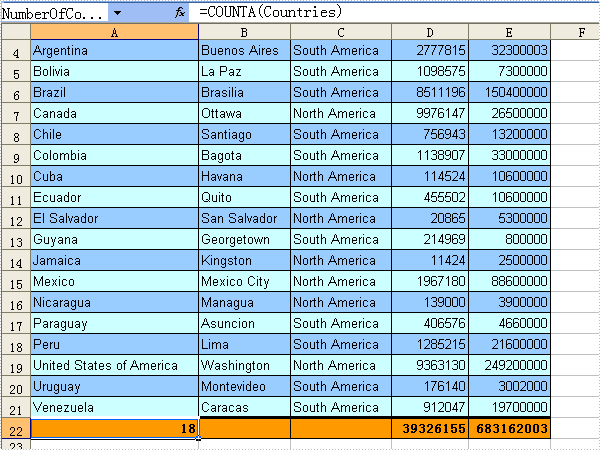
The sample demonstrates how to define named cell references or ranges in excel workbook.
using System;
using Spire.Xls;
using System.Drawing;

namespace Names
{
    class Program
    {
        static void Main(string[] args)
        {
            Workbook workbook = new Workbook();

            workbook.LoadFromFile(@"..\..\MiscDataTable.xls");
            Worksheet sheet = workbook.Worksheets[0];
            sheet.InsertRow(1, 2);
            sheet.Rows[0].RowHeight = 16;

            //Style
            sheet.Range["A1:B1"].Style.Font.IsBold = true;
            sheet.Range["A3:E3"].Style.KnownColor = ExcelColors.LightOrange;

            //set the color of le event/odd row color
            int index = 4;
            while (sheet.Range[String.Format("A{0}", index)].HasString)
            {
                sheet.Range[String.Format("A{0}:E{0}", index)].Style.KnownColor
                    = index % 2 == 0 ? ExcelColors.PaleBlue : ExcelColors.LightTurquoise;
                index++;
            }

            //define named cell ranges
            sheet.Names.Add("Countries", sheet[String.Format("A4:A{0}", index - 1)]);
            sheet.Names.Add("Cities", sheet[String.Format("B4:B{0}", index - 1)]);
            sheet.Names.Add("Continents", sheet[String.Format("C4:C{0}", index - 1)]);
            sheet.Names.Add("Area", sheet[String.Format("D4:D{0}", index - 1)]);
            sheet.Names.Add("Population", sheet[String.Format("E4:E{0}", index - 1)]);
            sheet.Names.Add("NumberOfCountries", sheet[String.Format("A{0}", index)]);

            //references of names
            sheet.Range["A1"].Value = "Number of Countries:";
            sheet.Range["B1"].Formula = "=NumberOfCountries";
            sheet[String.Format("A{0}", index)].Formula = "=COUNTA(Countries)";
            sheet[String.Format("D{0}", index)].Formula = "=SUM(Area)";
            sheet[String.Format("E{0}", index)].Formula = "=SUM(Population)";

            //style
            sheet.Rows[index - 1].RowHeight = 16;
            String range = String.Format("A{0}:E{0}", index);
            sheet.Range[range].Style.Font.IsBold = true;
            sheet.Range[range].Style.KnownColor = ExcelColors.LightOrange;
            sheet.Range[range].Style.Borders[BordersLineType.EdgeTop].Color = Color.FromArgb(0, 0, 0);
            sheet.Range[range].Style.Borders[BordersLineType.EdgeTop].LineStyle = LineStyleType.Thick;
            sheet.Range[range].Style.Borders[BordersLineType.EdgeBottom].Color = Color.FromArgb(0, 0, 0);
            sheet.Range[range].Style.Borders[BordersLineType.EdgeBottom].LineStyle = LineStyleType.Thin;
            sheet.Range[range].Style.Borders[BordersLineType.EdgeLeft].Color = Color.FromArgb(0, 0, 0);
            sheet.Range[range].Style.Borders[BordersLineType.EdgeLeft].LineStyle = LineStyleType.Thin;
            sheet.Range[range].Style.Borders[BordersLineType.EdgeRight].Color = Color.FromArgb(0, 0, 0);
            sheet.Range[range].Style.Borders[BordersLineType.EdgeRight].LineStyle = LineStyleType.Thin;
            workbook.SaveToFile("Sample.xls");
            System.Diagnostics.Process.Start(workbook.FileName);
        }
    }
}
Imports Spire.Xls
Imports System.Drawing

Module Module1
    Sub Main()
        Dim workbook As New Spire.Xls.Workbook()

        workbook.LoadFromFile("..\..\MiscDataTable.xls")
        Dim sheet As Worksheet = workbook.Worksheets(0)
        sheet.InsertRow(1, 2)
        sheet.Rows(0).RowHeight = 16

        'Style
        sheet.Range("A1:B1").Style.Font.IsBold = True
        sheet.Range("A3:E3").Style.KnownColor = ExcelColors.LightOrange

        Dim index As Integer = 4
        While sheet.Range([String].Format("A{0}", index)).HasString
            sheet.Range([String].Format("A{0}:E{0}", index)).Style.KnownColor _
                = If(index Mod 2 = 0, ExcelColors.PaleBlue, ExcelColors.LightTurquoise)
            index += 1
        End While

        'define named cell ranges
        sheet.Names.Add("Countries", sheet([String].Format("A4:A{0}", index - 1)))
        sheet.Names.Add("Cities", sheet([String].Format("B4:B{0}", index - 1)))
        sheet.Names.Add("Continents", sheet([String].Format("C4:C{0}", index - 1)))
        sheet.Names.Add("Area", sheet([String].Format("D4:D{0}", index - 1)))
        sheet.Names.Add("Population", sheet([String].Format("E4:E{0}", index - 1)))
        sheet.Names.Add("NumberOfCountries", sheet([String].Format("A{0}", index)))

        'references of names
        sheet.Range("A1").Value = "Number of Countries:"
        sheet.Range("B1").Formula = "=NumberOfCountries"
        sheet([String].Format("A{0}", index)).Formula = "=COUNTA(Countries)"
        sheet([String].Format("D{0}", index)).Formula = "=SUM(Area)"
        sheet([String].Format("E{0}", index)).Formula = "=SUM(Population)"

        'style
        sheet.Rows(index - 1).RowHeight = 16
        Dim range As [String] = [String].Format("A{0}:E{0}", index)
        sheet.Range(range).Style.Font.IsBold = True
        sheet.Range(range).Style.KnownColor = ExcelColors.LightOrange
        sheet.Range(range).Style.Borders(BordersLineType.EdgeTop).Color = Color.FromArgb(0, 0, 0)
        sheet.Range(range).Style.Borders(BordersLineType.EdgeTop).LineStyle = LineStyleType.Thick
        sheet.Range(range).Style.Borders(BordersLineType.EdgeBottom).Color = Color.FromArgb(0, 0, 0)
        sheet.Range(range).Style.Borders(BordersLineType.EdgeBottom).LineStyle = LineStyleType.Thin
        sheet.Range(range).Style.Borders(BordersLineType.EdgeLeft).Color = Color.FromArgb(0, 0, 0)
        sheet.Range(range).Style.Borders(BordersLineType.EdgeLeft).LineStyle = LineStyleType.Thin
        sheet.Range(range).Style.Borders(BordersLineType.EdgeRight).Color = Color.FromArgb(0, 0, 0)
        sheet.Range(range).Style.Borders(BordersLineType.EdgeRight).LineStyle = LineStyleType.Thin

        workbook.SaveToFile("Sample.xls")
        System.Diagnostics.Process.Start(workbook.FileName)
    End Sub

End Module
Data Export Style in C#, VB.NET
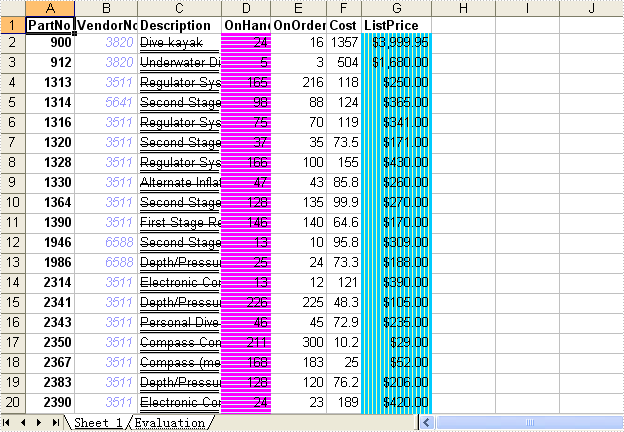
How to export data table to Excel file and set cell style.
private void button1_Click(object sender, EventArgs e)
{
    System.Data.OleDb.OleDbConnection oleDbConnection1
         = new System.Data.OleDb.OleDbConnection();
    oleDbConnection1.ConnectionString
        = @"Provider=Microsoft.Jet.OLEDB.4.0;Data Source=..\..\..\..\Database\demo.mdb";

    System.Data.OleDb.OleDbCommand oleDbCommand1
        = new System.Data.OleDb.OleDbCommand();
    oleDbCommand1.CommandText = "select * from parts";
    oleDbCommand1.Connection = oleDbConnection1;

    System.Data.OleDb.OleDbCommand oleDbCommand2
        = new System.Data.OleDb.OleDbCommand();
    oleDbCommand2.CommandText = "select * from country";
    oleDbCommand2.Connection = oleDbConnection1;

    Spire.DataExport.XLS.CellExport cellExport3
        = new Spire.DataExport.XLS.CellExport();

    Spire.DataExport.XLS.WorkSheet workSheet6 = new Spire.DataExport.XLS.WorkSheet();
    Spire.DataExport.XLS.ColumnFormat columnFormat1 = new Spire.DataExport.XLS.ColumnFormat();
    Spire.DataExport.XLS.ColumnFormat columnFormat2 = new Spire.DataExport.XLS.ColumnFormat();
    Spire.DataExport.XLS.ColumnFormat columnFormat3 = new Spire.DataExport.XLS.ColumnFormat();
    Spire.DataExport.XLS.ColumnFormat columnFormat4 = new Spire.DataExport.XLS.ColumnFormat();
    Spire.DataExport.XLS.ColumnFormat columnFormat5 = new Spire.DataExport.XLS.ColumnFormat();

    cellExport3.ActionAfterExport = Spire.DataExport.Common.ActionType.OpenView;
    cellExport3.DataFormats.CultureName = "zh-CN";
    cellExport3.DataFormats.Currency = "¥#,###,##0.00";
    cellExport3.DataFormats.DateTime = "yyyy-M-d H:mm";
    cellExport3.DataFormats.Float = "#,###,##0.00";
    cellExport3.DataFormats.Integer = "#,###,##0";
    cellExport3.DataFormats.Time = "H:mm";
    cellExport3.FileName = "misc.xls";
    cellExport3.SheetOptions.AggregateFormat.Font.Name = "Arial";
    cellExport3.SheetOptions.CustomDataFormat.Font.Name = "Arial";
    cellExport3.SheetOptions.DefaultFont.Name = "Arial";
    cellExport3.SheetOptions.FooterFormat.Font.Name = "Arial";
    cellExport3.SheetOptions.HeaderFormat.Font.Name = "Arial";
    cellExport3.SheetOptions.HyperlinkFormat.Font.Color = Spire.DataExport.XLS.CellColor.Blue;
    cellExport3.SheetOptions.HyperlinkFormat.Font.Name = "Arial";
    cellExport3.SheetOptions.HyperlinkFormat.Font.Underline = Spire.DataExport.XLS.XlsFontUnderline.Single;
    cellExport3.SheetOptions.NoteFormat.Alignment.Horizontal = Spire.DataExport.XLS.HorizontalAlignment.Left;
    cellExport3.SheetOptions.NoteFormat.Alignment.Vertical = Spire.DataExport.XLS.VerticalAlignment.Top;
    cellExport3.SheetOptions.NoteFormat.Font.Bold = true;
    cellExport3.SheetOptions.NoteFormat.Font.Name = "Tahoma";
    cellExport3.SheetOptions.NoteFormat.Font.Size = 8F;
    cellExport3.SheetOptions.TitlesFormat.FillStyle.Background = Spire.DataExport.XLS.CellColor.Gray40Percent;
    cellExport3.SheetOptions.TitlesFormat.Font.Bold = true;
    cellExport3.SheetOptions.TitlesFormat.Font.Name = "Arial";
    columnFormat1.FieldName = "PartNo";
    columnFormat1.Font.Bold = true;
    columnFormat1.Font.Name = "Arial";
    columnFormat2.FieldName = "VendorNo";
    columnFormat2.Font.Color = Spire.DataExport.XLS.CellColor.Color1;
    columnFormat2.Font.Italic = true;
    columnFormat2.Font.Name = "Arial";
    columnFormat3.FieldName = "Description";
    columnFormat3.Font.Name = "Arial";
    columnFormat3.Font.Strikeout = true;
    columnFormat3.Font.Underline = Spire.DataExport.XLS.XlsFontUnderline.DoubleAccounting;
    columnFormat4.FieldName = "OnHand";
    columnFormat4.FillStyle.Background = Spire.DataExport.XLS.CellColor.LightTurquoise;
    columnFormat4.FillStyle.Foreground = Spire.DataExport.XLS.CellColor.Pink;
    columnFormat4.FillStyle.Pattern = Spire.DataExport.XLS.Pattern.ThinGorizontal;
    columnFormat4.Font.Name = "Arial";
    columnFormat5.FieldName = "ListPrice";
    columnFormat5.FillStyle.Background = Spire.DataExport.XLS.CellColor.LightYellow;
    columnFormat5.FillStyle.Foreground = Spire.DataExport.XLS.CellColor.SkyBlue;
    columnFormat5.FillStyle.Pattern = Spire.DataExport.XLS.Pattern.ThinVertical;
    columnFormat5.Font.Name = "Arial";
    workSheet6.ColumnFormats.Add(columnFormat1);
    workSheet6.ColumnFormats.Add(columnFormat2);
    workSheet6.ColumnFormats.Add(columnFormat3);
    workSheet6.ColumnFormats.Add(columnFormat4);
    workSheet6.ColumnFormats.Add(columnFormat5);
    workSheet6.FormatsExport.CultureName = "zh-CN";
    workSheet6.FormatsExport.Currency = "¥#,###,##0.00";
    workSheet6.FormatsExport.DateTime = "yyyy-M-d H:mm";
    workSheet6.FormatsExport.Float = "#,###,##0.00";
    workSheet6.FormatsExport.Integer = "#,###,##0";
    workSheet6.FormatsExport.Time = "H:mm";
    workSheet6.Options.AggregateFormat.Font.Name = "Arial";
    workSheet6.Options.CustomDataFormat.Font.Name = "Arial";
    workSheet6.Options.DefaultFont.Name = "Arial";
    workSheet6.Options.FooterFormat.Font.Name = "Arial";
    workSheet6.Options.HeaderFormat.Font.Name = "Arial";
    workSheet6.Options.HyperlinkFormat.Font.Color = Spire.DataExport.XLS.CellColor.Blue;
    workSheet6.Options.HyperlinkFormat.Font.Name = "Arial";
    workSheet6.Options.HyperlinkFormat.Font.Underline = Spire.DataExport.XLS.XlsFontUnderline.Single;
    workSheet6.Options.NoteFormat.Alignment.Horizontal = Spire.DataExport.XLS.HorizontalAlignment.Left;
    workSheet6.Options.NoteFormat.Alignment.Vertical = Spire.DataExport.XLS.VerticalAlignment.Top;
    workSheet6.Options.NoteFormat.Font.Bold = true;
    workSheet6.Options.NoteFormat.Font.Name = "Tahoma";
    workSheet6.Options.NoteFormat.Font.Size = 8F;
    workSheet6.Options.TitlesFormat.Font.Bold = true;
    workSheet6.Options.TitlesFormat.Font.Name = "Arial";
    workSheet6.SheetName = "Sheet 1";
    workSheet6.SQLCommand = oleDbCommand1;
    workSheet6.StartDataCol = ((System.Byte)(0));
    cellExport3.Sheets.Add(workSheet6);
    cellExport3.GetDataParams += new Spire.DataExport.Delegates.DataParamsEventHandler(this.cellExport3_GetDataParams);

    oleDbConnection1.Open();
    try
    {
        cellExport3.SaveToFile();
    }
    finally
    {
        oleDbConnection1.Close();
    }
}

private void cellExport3_GetDataParams(object sender, Spire.DataExport.EventArgs.DataParamsEventArgs e)
{
    if ((e.Sheet == 0) && (e.Col == 6))
    {
        e.FormatText = (sender as Spire.DataExport.XLS.WorkSheet).ExportCell.DataFormats.Currency;
    }
}
Private WithEvents cellExport3 As Spire.DataExport.XLS.CellExport
Private Sub Button1_Click(ByVal sender As System.Object, ByVal e As System.EventArgs) Handles Button1.Click
    Dim oleDbConnection1 As New System.Data.OleDb.OleDbConnection()
    oleDbConnection1.ConnectionString = "Provider=Microsoft.Jet.OLEDB.4.0;Data Source=..\..\..\..\Database\demo.mdb"

    Dim oleDbCommand1 As New System.Data.OleDb.OleDbCommand()
    oleDbCommand1.CommandText = "select * from parts"
    oleDbCommand1.Connection = oleDbConnection1

    Dim oleDbCommand2 As New System.Data.OleDb.OleDbCommand()
    oleDbCommand2.CommandText = "select * from country"
    oleDbCommand2.Connection = oleDbConnection1

    Dim workSheet6 As New Spire.DataExport.XLS.WorkSheet()
    Dim columnFormat1 As New Spire.DataExport.XLS.ColumnFormat()
    Dim columnFormat2 As New Spire.DataExport.XLS.ColumnFormat()
    Dim columnFormat3 As New Spire.DataExport.XLS.ColumnFormat()
    Dim columnFormat4 As New Spire.DataExport.XLS.ColumnFormat()
    Dim columnFormat5 As New Spire.DataExport.XLS.ColumnFormat()

    cellExport3 = New Spire.DataExport.XLS.CellExport
    cellExport3.ActionAfterExport = Spire.DataExport.Common.ActionType.OpenView
    cellExport3.DataFormats.CultureName = "zh-CN"
    cellExport3.DataFormats.Currency = "¥#,###,##0.00"
    cellExport3.DataFormats.DateTime = "yyyy-M-d H:mm"
    cellExport3.DataFormats.Float = "#,###,##0.00"
    cellExport3.DataFormats.[Integer] = "#,###,##0"
    cellExport3.DataFormats.Time = "H:mm"
    cellExport3.FileName = "misc.xls"
    cellExport3.SheetOptions.AggregateFormat.Font.Name = "Arial"
    cellExport3.SheetOptions.CustomDataFormat.Font.Name = "Arial"
    cellExport3.SheetOptions.DefaultFont.Name = "Arial"
    cellExport3.SheetOptions.FooterFormat.Font.Name = "Arial"
    cellExport3.SheetOptions.HeaderFormat.Font.Name = "Arial"
    cellExport3.SheetOptions.HyperlinkFormat.Font.Color = Spire.DataExport.XLS.CellColor.Blue
    cellExport3.SheetOptions.HyperlinkFormat.Font.Name = "Arial"
    cellExport3.SheetOptions.HyperlinkFormat.Font.Underline = Spire.DataExport.XLS.XlsFontUnderline.[Single]
    cellExport3.SheetOptions.NoteFormat.Alignment.Horizontal = Spire.DataExport.XLS.HorizontalAlignment.Left
    cellExport3.SheetOptions.NoteFormat.Alignment.Vertical = Spire.DataExport.XLS.VerticalAlignment.Top
    cellExport3.SheetOptions.NoteFormat.Font.Bold = True
    cellExport3.SheetOptions.NoteFormat.Font.Name = "Tahoma"
    cellExport3.SheetOptions.NoteFormat.Font.Size = 8.0F
    cellExport3.SheetOptions.TitlesFormat.FillStyle.Background = Spire.DataExport.XLS.CellColor.Gray40Percent
    cellExport3.SheetOptions.TitlesFormat.Font.Bold = True
    cellExport3.SheetOptions.TitlesFormat.Font.Name = "Arial"
    columnFormat1.FieldName = "PartNo"
    columnFormat1.Font.Bold = True
    columnFormat1.Font.Name = "Arial"
    columnFormat2.FieldName = "VendorNo"
    columnFormat2.Font.Color = Spire.DataExport.XLS.CellColor.Color1
    columnFormat2.Font.Italic = True
    columnFormat2.Font.Name = "Arial"
    columnFormat3.FieldName = "Description"
    columnFormat3.Font.Name = "Arial"
    columnFormat3.Font.Strikeout = True
    columnFormat3.Font.Underline = Spire.DataExport.XLS.XlsFontUnderline.DoubleAccounting
    columnFormat4.FieldName = "OnHand"
    columnFormat4.FillStyle.Background = Spire.DataExport.XLS.CellColor.LightTurquoise
    columnFormat4.FillStyle.Foreground = Spire.DataExport.XLS.CellColor.Pink
    columnFormat4.FillStyle.Pattern = Spire.DataExport.XLS.Pattern.ThinGorizontal
    columnFormat4.Font.Name = "Arial"
    columnFormat5.FieldName = "ListPrice"
    columnFormat5.FillStyle.Background = Spire.DataExport.XLS.CellColor.LightYellow
    columnFormat5.FillStyle.Foreground = Spire.DataExport.XLS.CellColor.SkyBlue
    columnFormat5.FillStyle.Pattern = Spire.DataExport.XLS.Pattern.ThinVertical
    columnFormat5.Font.Name = "Arial"
    workSheet6.ColumnFormats.Add(columnFormat1)
    workSheet6.ColumnFormats.Add(columnFormat2)
    workSheet6.ColumnFormats.Add(columnFormat3)
    workSheet6.ColumnFormats.Add(columnFormat4)
    workSheet6.ColumnFormats.Add(columnFormat5)
    workSheet6.FormatsExport.CultureName = "zh-CN"
    workSheet6.FormatsExport.Currency = "¥#,###,##0.00"
    workSheet6.FormatsExport.DateTime = "yyyy-M-d H:mm"
    workSheet6.FormatsExport.Float = "#,###,##0.00"
    workSheet6.FormatsExport.[Integer] = "#,###,##0"
    workSheet6.FormatsExport.Time = "H:mm"
    workSheet6.Options.AggregateFormat.Font.Name = "Arial"
    workSheet6.Options.CustomDataFormat.Font.Name = "Arial"
    workSheet6.Options.DefaultFont.Name = "Arial"
    workSheet6.Options.FooterFormat.Font.Name = "Arial"
    workSheet6.Options.HeaderFormat.Font.Name = "Arial"
    workSheet6.Options.HyperlinkFormat.Font.Color = Spire.DataExport.XLS.CellColor.Blue
    workSheet6.Options.HyperlinkFormat.Font.Name = "Arial"
    workSheet6.Options.HyperlinkFormat.Font.Underline = Spire.DataExport.XLS.XlsFontUnderline.[Single]
    workSheet6.Options.NoteFormat.Alignment.Horizontal = Spire.DataExport.XLS.HorizontalAlignment.Left
    workSheet6.Options.NoteFormat.Alignment.Vertical = Spire.DataExport.XLS.VerticalAlignment.Top
    workSheet6.Options.NoteFormat.Font.Bold = True
    workSheet6.Options.NoteFormat.Font.Name = "Tahoma"
    workSheet6.Options.NoteFormat.Font.Size = 8.0F
    workSheet6.Options.TitlesFormat.Font.Bold = True
    workSheet6.Options.TitlesFormat.Font.Name = "Arial"
    workSheet6.SheetName = "Sheet 1"
    workSheet6.SQLCommand = oleDbCommand1
    workSheet6.StartDataCol = CByte(0)
    cellExport3.Sheets.Add(workSheet6)

    oleDbConnection1.Open()
    Try
        cellExport3.SaveToFile()
    Finally
        oleDbConnection1.Close()
    End Try
End Sub

Private Sub cellExport3_GetDataParams(ByVal sender As Object, ByVal e As Spire.DataExport.EventArgs.DataParamsEventArgs) Handles cellExport3.GetDataParams
    If (e.Sheet = 0) AndAlso (e.Col = 6) Then
        e.FormatText = cellExport3.DataFormats.Currency
    End If
End Sub
Data Export Bar Chart in C#, VB.NET
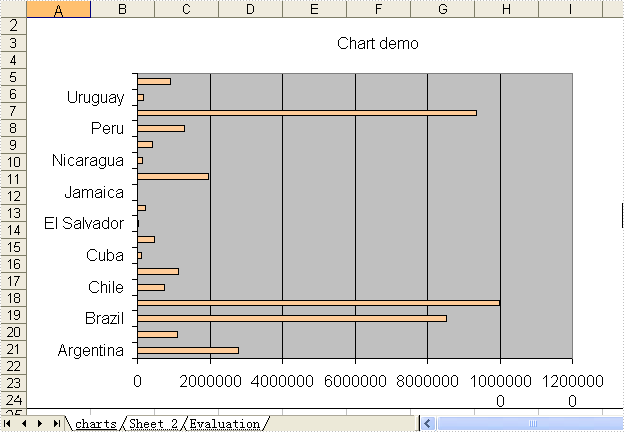
Not needing to have Microsoft Excel installed on the machine, The Spire.DataExport can create Excel spreadsheet. This sample demonstrates how to export data table into xls and create bar chart.
private void button1_Click(object sender, EventArgs e)
{
    System.Data.OleDb.OleDbConnection oleDbConnection1
         = new System.Data.OleDb.OleDbConnection();
    oleDbConnection1.ConnectionString
        = @"Provider=Microsoft.Jet.OLEDB.4.0;Data Source=..\..\..\..\Database\demo.mdb";

    System.Data.OleDb.OleDbCommand oleDbCommand1
        = new System.Data.OleDb.OleDbCommand();
    oleDbCommand1.CommandText = "select * from parts";
    oleDbCommand1.Connection = oleDbConnection1;

    System.Data.OleDb.OleDbCommand oleDbCommand2
        = new System.Data.OleDb.OleDbCommand();
    oleDbCommand2.CommandText = "select * from country";
    oleDbCommand2.Connection = oleDbConnection1;

    Spire.DataExport.XLS.CellExport cellExport4
        = new Spire.DataExport.XLS.CellExport();

    Spire.DataExport.XLS.WorkSheet workSheet4 = new Spire.DataExport.XLS.WorkSheet();
    Spire.DataExport.XLS.Chart chart2 = new Spire.DataExport.XLS.Chart();
    Spire.DataExport.XLS.ChartSeries chartSeries2 = new Spire.DataExport.XLS.ChartSeries();
    Spire.DataExport.XLS.WorkSheet workSheet5 = new Spire.DataExport.XLS.WorkSheet();
    Spire.DataExport.XLS.StripStyle stripStyle7 = new Spire.DataExport.XLS.StripStyle();
    Spire.DataExport.XLS.StripStyle stripStyle8 = new Spire.DataExport.XLS.StripStyle();

    cellExport4.ActionAfterExport = Spire.DataExport.Common.ActionType.OpenView;
    cellExport4.AutoFitColWidth = true;
    cellExport4.DataFormats.CultureName = "zh-CN";
    cellExport4.DataFormats.Currency = "¥#,###,##0.00";
    cellExport4.DataFormats.DateTime = "yyyy-M-d H:mm";
    cellExport4.DataFormats.Float = "#,###,##0.00";
    cellExport4.DataFormats.Integer = "#,###,##0";
    cellExport4.DataFormats.Time = "H:mm";
    cellExport4.FileName = "chart2.xls";
    cellExport4.SheetOptions.AggregateFormat.Font.Name = "Arial";
    cellExport4.SheetOptions.CustomDataFormat.Font.Name = "Arial";
    cellExport4.SheetOptions.DefaultFont.Name = "Arial";
    cellExport4.SheetOptions.FooterFormat.Font.Name = "Arial";
    cellExport4.SheetOptions.HeaderFormat.Font.Name = "Arial";
    cellExport4.SheetOptions.HyperlinkFormat.Font.Color = Spire.DataExport.XLS.CellColor.Blue;
    cellExport4.SheetOptions.HyperlinkFormat.Font.Name = "Arial";
    cellExport4.SheetOptions.HyperlinkFormat.Font.Underline = Spire.DataExport.XLS.XlsFontUnderline.Single;
    cellExport4.SheetOptions.NoteFormat.Alignment.Horizontal = Spire.DataExport.XLS.HorizontalAlignment.Left;
    cellExport4.SheetOptions.NoteFormat.Alignment.Vertical = Spire.DataExport.XLS.VerticalAlignment.Top;
    cellExport4.SheetOptions.NoteFormat.Font.Bold = true;
    cellExport4.SheetOptions.NoteFormat.Font.Name = "Tahoma";
    cellExport4.SheetOptions.NoteFormat.Font.Size = 8F;
    cellExport4.SheetOptions.TitlesFormat.Font.Bold = true;
    cellExport4.SheetOptions.TitlesFormat.Font.Name = "Arial";
    chart2.AutoColor = false;
    chart2.CategoryLabels.ColX = ((System.Byte)(1));
    chart2.CategoryLabels.ColY = ((System.Byte)(1));
    chart2.CategoryLabels.RowX = 1;
    chart2.CategoryLabels.RowY = 9;
    chart2.CategoryLabelsColumn = "Name";
    chart2.DataRangeSheet = "Sheet 2";
    chart2.Position.AutoPosition.Height = 23;
    chart2.Position.AutoPosition.Left = 1;
    chart2.Position.AutoPosition.Top = 1;
    chart2.Position.AutoPosition.Width = 11;
    chart2.Position.CustomPosition.X1 = ((System.Byte)(1));
    chart2.Position.CustomPosition.X2 = ((System.Byte)(15));
    chart2.Position.CustomPosition.Y1 = 1;
    chart2.Position.CustomPosition.Y2 = 30;
    chartSeries2.Color = Spire.DataExport.XLS.CellColor.Tan;
    chartSeries2.DataColumn = "Area";
    chartSeries2.DataRangeSheet = "Sheet 2";
    chartSeries2.Title = "Population";
    chart2.Series.Add(chartSeries2);
    chart2.Style = Spire.DataExport.XLS.ChartStyle.Bar;
    chart2.Title = "Chart demo";
    workSheet4.Charts.Add(chart2);
    workSheet4.DataExported = false;
    workSheet4.FormatsExport.CultureName = "zh-CN";
    workSheet4.FormatsExport.Currency = "¥#,###,##0.00";
    workSheet4.FormatsExport.DateTime = "yyyy-M-d H:mm";
    workSheet4.FormatsExport.Float = "#,###,##0.00";
    workSheet4.FormatsExport.Integer = "#,###,##0";
    workSheet4.FormatsExport.Time = "H:mm";
    workSheet4.Options.AggregateFormat.Font.Name = "Arial";
    workSheet4.Options.CustomDataFormat.Font.Name = "Arial";
    workSheet4.Options.DefaultFont.Name = "Arial";
    workSheet4.Options.FooterFormat.Font.Name = "Arial";
    workSheet4.Options.HeaderFormat.Font.Bold = true;
    workSheet4.Options.HeaderFormat.Font.Color = Spire.DataExport.XLS.CellColor.Blue;
    workSheet4.Options.HeaderFormat.Font.Name = "Arial";
    workSheet4.Options.HyperlinkFormat.Font.Color = Spire.DataExport.XLS.CellColor.Blue;
    workSheet4.Options.HyperlinkFormat.Font.Name = "Arial";
    workSheet4.Options.HyperlinkFormat.Font.Underline = Spire.DataExport.XLS.XlsFontUnderline.Single;
    workSheet4.Options.NoteFormat.Alignment.Horizontal = Spire.DataExport.XLS.HorizontalAlignment.Left;
    workSheet4.Options.NoteFormat.Alignment.Vertical = Spire.DataExport.XLS.VerticalAlignment.Top;
    workSheet4.Options.NoteFormat.Font.Bold = true;
    workSheet4.Options.NoteFormat.Font.Name = "Tahoma";
    workSheet4.Options.NoteFormat.Font.Size = 8F;
    workSheet4.Options.TitlesFormat.Font.Bold = true;
    workSheet4.Options.TitlesFormat.Font.Name = "Times New Roman";
    workSheet4.Options.TitlesFormat.Font.Size = 13F;
    workSheet4.SheetName = "charts";
    workSheet4.StartDataCol = ((System.Byte)(0));
    workSheet5.AutoFitColWidth = true;
    workSheet5.FormatsExport.CultureName = "zh-CN";
    workSheet5.FormatsExport.Currency = "¥#,###,##0.00";
    workSheet5.FormatsExport.DateTime = "yyyy-M-d H:mm";
    workSheet5.FormatsExport.Float = "#,###,##0.00";
    workSheet5.FormatsExport.Integer = "#,###,##0";
    workSheet5.FormatsExport.Time = "H:mm";
    stripStyle7.Borders.Bottom.Style = Spire.DataExport.XLS.CellBorderStyle.Medium;
    stripStyle7.Borders.Left.Style = Spire.DataExport.XLS.CellBorderStyle.Medium;
    stripStyle7.Borders.Right.Style = Spire.DataExport.XLS.CellBorderStyle.Medium;
    stripStyle7.Borders.Top.Style = Spire.DataExport.XLS.CellBorderStyle.Medium;
    stripStyle7.FillStyle.Background = Spire.DataExport.XLS.CellColor.LightGreen;
    stripStyle7.FillStyle.Pattern = Spire.DataExport.XLS.Pattern.Solid;
    stripStyle7.Font.Name = "Arial";
    stripStyle8.Borders.Bottom.Style = Spire.DataExport.XLS.CellBorderStyle.Medium;
    stripStyle8.Borders.Left.Style = Spire.DataExport.XLS.CellBorderStyle.Medium;
    stripStyle8.Borders.Right.Style = Spire.DataExport.XLS.CellBorderStyle.Medium;
    stripStyle8.Borders.Top.Style = Spire.DataExport.XLS.CellBorderStyle.Medium;
    stripStyle8.FillStyle.Background = Spire.DataExport.XLS.CellColor.LightTurquoise;
    stripStyle8.FillStyle.Pattern = Spire.DataExport.XLS.Pattern.Solid;
    stripStyle8.Font.Name = "Arial";
    workSheet5.ItemStyles.Add(stripStyle7);
    workSheet5.ItemStyles.Add(stripStyle8);
    workSheet5.ItemType = Spire.DataExport.XLS.CellItemType.Col;
    workSheet5.Options.AggregateFormat.Font.Name = "Arial";
    workSheet5.Options.CustomDataFormat.Font.Name = "Arial";
    workSheet5.Options.DefaultFont.Name = "Arial";
    workSheet5.Options.FooterFormat.Font.Name = "Arial";
    workSheet5.Options.HeaderFormat.Font.Name = "Arial";
    workSheet5.Options.HyperlinkFormat.Font.Color = Spire.DataExport.XLS.CellColor.Blue;
    workSheet5.Options.HyperlinkFormat.Font.Name = "Arial";
    workSheet5.Options.HyperlinkFormat.Font.Underline = Spire.DataExport.XLS.XlsFontUnderline.Single;
    workSheet5.Options.NoteFormat.Alignment.Horizontal = Spire.DataExport.XLS.HorizontalAlignment.Left;
    workSheet5.Options.NoteFormat.Alignment.Vertical = Spire.DataExport.XLS.VerticalAlignment.Top;
    workSheet5.Options.NoteFormat.Font.Bold = true;
    workSheet5.Options.NoteFormat.Font.Name = "Tahoma";
    workSheet5.Options.NoteFormat.Font.Size = 8F;
    workSheet5.Options.TitlesFormat.Borders.Bottom.Style = Spire.DataExport.XLS.CellBorderStyle.Medium;
    workSheet5.Options.TitlesFormat.Borders.Left.Style = Spire.DataExport.XLS.CellBorderStyle.Medium;
    workSheet5.Options.TitlesFormat.Borders.Right.Style = Spire.DataExport.XLS.CellBorderStyle.Medium;
    workSheet5.Options.TitlesFormat.Borders.Top.Style = Spire.DataExport.XLS.CellBorderStyle.Medium;
    workSheet5.Options.TitlesFormat.FillStyle.Background = Spire.DataExport.XLS.CellColor.LightYellow;
    workSheet5.Options.TitlesFormat.FillStyle.Pattern = Spire.DataExport.XLS.Pattern.Solid;
    workSheet5.Options.TitlesFormat.Font.Bold = true;
    workSheet5.Options.TitlesFormat.Font.Name = "Arial";
    workSheet5.SheetName = "Sheet 2";
    workSheet5.SQLCommand = oleDbCommand2;
    workSheet5.StartDataCol = ((System.Byte)(0));
    cellExport4.Sheets.Add(workSheet4);
    cellExport4.Sheets.Add(workSheet5);
    cellExport4.SQLCommand = oleDbCommand1;

    oleDbConnection1.Open();
    try
    {
        cellExport4.SaveToFile();
    }
    finally
    {
        oleDbConnection1.Close();
    }
}
Private Sub Button1_Click(ByVal sender As System.Object, ByVal e As System.EventArgs) Handles Button1.Click
    Dim oleDbConnection1 As New System.Data.OleDb.OleDbConnection()
    oleDbConnection1.ConnectionString = "Provider=Microsoft.Jet.OLEDB.4.0;Data Source=..\..\..\..\Database\demo.mdb"

    Dim oleDbCommand1 As New System.Data.OleDb.OleDbCommand()
    oleDbCommand1.CommandText = "select * from parts"
    oleDbCommand1.Connection = oleDbConnection1

    Dim oleDbCommand2 As New System.Data.OleDb.OleDbCommand()
    oleDbCommand2.CommandText = "select * from country"
    oleDbCommand2.Connection = oleDbConnection1

    Dim cellExport4 As New Spire.DataExport.XLS.CellExport()

    Dim workSheet4 As New Spire.DataExport.XLS.WorkSheet()
    Dim chart2 As New Spire.DataExport.XLS.Chart()
    Dim chartSeries2 As New Spire.DataExport.XLS.ChartSeries()
    Dim workSheet5 As New Spire.DataExport.XLS.WorkSheet()
    Dim stripStyle7 As New Spire.DataExport.XLS.StripStyle()
    Dim stripStyle8 As New Spire.DataExport.XLS.StripStyle()

    cellExport4.ActionAfterExport = Spire.DataExport.Common.ActionType.OpenView
    cellExport4.AutoFitColWidth = True
    cellExport4.DataFormats.CultureName = "zh-CN"
    cellExport4.DataFormats.Currency = "¥#,###,##0.00"
    cellExport4.DataFormats.DateTime = "yyyy-M-d H:mm"
    cellExport4.DataFormats.Float = "#,###,##0.00"
    cellExport4.DataFormats.[Integer] = "#,###,##0"
    cellExport4.DataFormats.Time = "H:mm"
    cellExport4.FileName = "chart2.xls"
    cellExport4.SheetOptions.AggregateFormat.Font.Name = "Arial"
    cellExport4.SheetOptions.CustomDataFormat.Font.Name = "Arial"
    cellExport4.SheetOptions.DefaultFont.Name = "Arial"
    cellExport4.SheetOptions.FooterFormat.Font.Name = "Arial"
    cellExport4.SheetOptions.HeaderFormat.Font.Name = "Arial"
    cellExport4.SheetOptions.HyperlinkFormat.Font.Color = Spire.DataExport.XLS.CellColor.Blue
    cellExport4.SheetOptions.HyperlinkFormat.Font.Name = "Arial"
    cellExport4.SheetOptions.HyperlinkFormat.Font.Underline = Spire.DataExport.XLS.XlsFontUnderline.[Single]
    cellExport4.SheetOptions.NoteFormat.Alignment.Horizontal = Spire.DataExport.XLS.HorizontalAlignment.Left
    cellExport4.SheetOptions.NoteFormat.Alignment.Vertical = Spire.DataExport.XLS.VerticalAlignment.Top
    cellExport4.SheetOptions.NoteFormat.Font.Bold = True
    cellExport4.SheetOptions.NoteFormat.Font.Name = "Tahoma"
    cellExport4.SheetOptions.NoteFormat.Font.Size = 8.0F
    cellExport4.SheetOptions.TitlesFormat.Font.Bold = True
    cellExport4.SheetOptions.TitlesFormat.Font.Name = "Arial"
    chart2.AutoColor = False
    chart2.CategoryLabels.ColX = CByte(1)
    chart2.CategoryLabels.ColY = CByte(1)
    chart2.CategoryLabels.RowX = 1
    chart2.CategoryLabels.RowY = 9
    chart2.CategoryLabelsColumn = "Name"
    chart2.DataRangeSheet = "Sheet 2"
    chart2.Position.AutoPosition.Height = 23
    chart2.Position.AutoPosition.Left = 1
    chart2.Position.AutoPosition.Top = 1
    chart2.Position.AutoPosition.Width = 11
    chart2.Position.CustomPosition.X1 = CByte(1)
    chart2.Position.CustomPosition.X2 = CByte(15)
    chart2.Position.CustomPosition.Y1 = 1
    chart2.Position.CustomPosition.Y2 = 30
    chartSeries2.Color = Spire.DataExport.XLS.CellColor.Tan
    chartSeries2.DataColumn = "Area"
    chartSeries2.DataRangeSheet = "Sheet 2"
    chartSeries2.Title = "Population"
    chart2.Series.Add(chartSeries2)
    chart2.Style = Spire.DataExport.XLS.ChartStyle.Bar
    chart2.Title = "Chart demo"
    workSheet4.Charts.Add(chart2)
    workSheet4.DataExported = False
    workSheet4.FormatsExport.CultureName = "zh-CN"
    workSheet4.FormatsExport.Currency = "¥#,###,##0.00"
    workSheet4.FormatsExport.DateTime = "yyyy-M-d H:mm"
    workSheet4.FormatsExport.Float = "#,###,##0.00"
    workSheet4.FormatsExport.[Integer] = "#,###,##0"
    workSheet4.FormatsExport.Time = "H:mm"
    workSheet4.Options.AggregateFormat.Font.Name = "Arial"
    workSheet4.Options.CustomDataFormat.Font.Name = "Arial"
    workSheet4.Options.DefaultFont.Name = "Arial"
    workSheet4.Options.FooterFormat.Font.Name = "Arial"
    workSheet4.Options.HeaderFormat.Font.Bold = True
    workSheet4.Options.HeaderFormat.Font.Color = Spire.DataExport.XLS.CellColor.Blue
    workSheet4.Options.HeaderFormat.Font.Name = "Arial"
    workSheet4.Options.HyperlinkFormat.Font.Color = Spire.DataExport.XLS.CellColor.Blue
    workSheet4.Options.HyperlinkFormat.Font.Name = "Arial"
    workSheet4.Options.HyperlinkFormat.Font.Underline = Spire.DataExport.XLS.XlsFontUnderline.[Single]
    workSheet4.Options.NoteFormat.Alignment.Horizontal = Spire.DataExport.XLS.HorizontalAlignment.Left
    workSheet4.Options.NoteFormat.Alignment.Vertical = Spire.DataExport.XLS.VerticalAlignment.Top
    workSheet4.Options.NoteFormat.Font.Bold = True
    workSheet4.Options.NoteFormat.Font.Name = "Tahoma"
    workSheet4.Options.NoteFormat.Font.Size = 8.0F
    workSheet4.Options.TitlesFormat.Font.Bold = True
    workSheet4.Options.TitlesFormat.Font.Name = "Times New Roman"
    workSheet4.Options.TitlesFormat.Font.Size = 13.0F
    workSheet4.SheetName = "charts"
    workSheet4.StartDataCol = CByte(0)
    workSheet5.AutoFitColWidth = True
    workSheet5.FormatsExport.CultureName = "zh-CN"
    workSheet5.FormatsExport.Currency = "¥#,###,##0.00"
    workSheet5.FormatsExport.DateTime = "yyyy-M-d H:mm"
    workSheet5.FormatsExport.Float = "#,###,##0.00"
    workSheet5.FormatsExport.[Integer] = "#,###,##0"
    workSheet5.FormatsExport.Time = "H:mm"
    stripStyle7.Borders.Bottom.Style = Spire.DataExport.XLS.CellBorderStyle.Medium
    stripStyle7.Borders.Left.Style = Spire.DataExport.XLS.CellBorderStyle.Medium
    stripStyle7.Borders.Right.Style = Spire.DataExport.XLS.CellBorderStyle.Medium
    stripStyle7.Borders.Top.Style = Spire.DataExport.XLS.CellBorderStyle.Medium
    stripStyle7.FillStyle.Background = Spire.DataExport.XLS.CellColor.LightGreen
    stripStyle7.FillStyle.Pattern = Spire.DataExport.XLS.Pattern.Solid
    stripStyle7.Font.Name = "Arial"
    stripStyle8.Borders.Bottom.Style = Spire.DataExport.XLS.CellBorderStyle.Medium
    stripStyle8.Borders.Left.Style = Spire.DataExport.XLS.CellBorderStyle.Medium
    stripStyle8.Borders.Right.Style = Spire.DataExport.XLS.CellBorderStyle.Medium
    stripStyle8.Borders.Top.Style = Spire.DataExport.XLS.CellBorderStyle.Medium
    stripStyle8.FillStyle.Background = Spire.DataExport.XLS.CellColor.LightTurquoise
    stripStyle8.FillStyle.Pattern = Spire.DataExport.XLS.Pattern.Solid
    stripStyle8.Font.Name = "Arial"
    workSheet5.ItemStyles.Add(stripStyle7)
    workSheet5.ItemStyles.Add(stripStyle8)
    workSheet5.ItemType = Spire.DataExport.XLS.CellItemType.Col
    workSheet5.Options.AggregateFormat.Font.Name = "Arial"
    workSheet5.Options.CustomDataFormat.Font.Name = "Arial"
    workSheet5.Options.DefaultFont.Name = "Arial"
    workSheet5.Options.FooterFormat.Font.Name = "Arial"
    workSheet5.Options.HeaderFormat.Font.Name = "Arial"
    workSheet5.Options.HyperlinkFormat.Font.Color = Spire.DataExport.XLS.CellColor.Blue
    workSheet5.Options.HyperlinkFormat.Font.Name = "Arial"
    workSheet5.Options.HyperlinkFormat.Font.Underline = Spire.DataExport.XLS.XlsFontUnderline.[Single]
    workSheet5.Options.NoteFormat.Alignment.Horizontal = Spire.DataExport.XLS.HorizontalAlignment.Left
    workSheet5.Options.NoteFormat.Alignment.Vertical = Spire.DataExport.XLS.VerticalAlignment.Top
    workSheet5.Options.NoteFormat.Font.Bold = True
    workSheet5.Options.NoteFormat.Font.Name = "Tahoma"
    workSheet5.Options.NoteFormat.Font.Size = 8.0F
    workSheet5.Options.TitlesFormat.Borders.Bottom.Style = Spire.DataExport.XLS.CellBorderStyle.Medium
    workSheet5.Options.TitlesFormat.Borders.Left.Style = Spire.DataExport.XLS.CellBorderStyle.Medium
    workSheet5.Options.TitlesFormat.Borders.Right.Style = Spire.DataExport.XLS.CellBorderStyle.Medium
    workSheet5.Options.TitlesFormat.Borders.Top.Style = Spire.DataExport.XLS.CellBorderStyle.Medium
    workSheet5.Options.TitlesFormat.FillStyle.Background = Spire.DataExport.XLS.CellColor.LightYellow
    workSheet5.Options.TitlesFormat.FillStyle.Pattern = Spire.DataExport.XLS.Pattern.Solid
    workSheet5.Options.TitlesFormat.Font.Bold = True
    workSheet5.Options.TitlesFormat.Font.Name = "Arial"
    workSheet5.SheetName = "Sheet 2"
    workSheet5.SQLCommand = oleDbCommand2
    workSheet5.StartDataCol = CByte(0)
    cellExport4.Sheets.Add(workSheet4)
    cellExport4.Sheets.Add(workSheet5)
    cellExport4.SQLCommand = oleDbCommand1

    oleDbConnection1.Open()
    Try
        cellExport4.SaveToFile()
    Finally
        oleDbConnection1.Close()
    End Try
End Sub
Data Export Pie3D Chart in C#, VB.NET
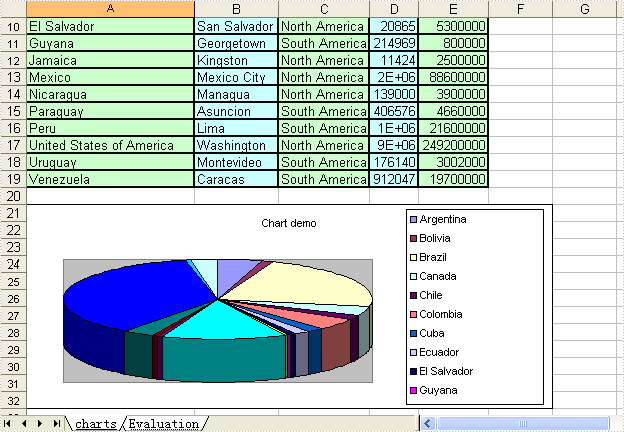
Not needing to have Microsoft Excel installed on the machine, The Spire.DataExport can create Excel spreadsheet. This sample demonstrates how to export data table into xls and create pie-3d chart.
private void button1_Click(object sender, EventArgs e)
{
    System.Data.OleDb.OleDbConnection oleDbConnection1
         = new System.Data.OleDb.OleDbConnection();
    oleDbConnection1.ConnectionString
        = @"Provider=Microsoft.Jet.OLEDB.4.0;Data Source=..\..\..\..\Database\demo.mdb";

    System.Data.OleDb.OleDbCommand oleDbCommand1
        = new System.Data.OleDb.OleDbCommand();
    oleDbCommand1.CommandText = "select * from parts";
    oleDbCommand1.Connection = oleDbConnection1;

    System.Data.OleDb.OleDbCommand oleDbCommand2
        = new System.Data.OleDb.OleDbCommand();
    oleDbCommand2.CommandText = "select * from country";
    oleDbCommand2.Connection = oleDbConnection1;

    Spire.DataExport.XLS.CellExport cellExport2
        = new Spire.DataExport.XLS.CellExport();
    Spire.DataExport.XLS.WorkSheet workSheet3 = new Spire.DataExport.XLS.WorkSheet();
    Spire.DataExport.XLS.Chart chart1 = new Spire.DataExport.XLS.Chart();
    Spire.DataExport.XLS.ChartSeries chartSeries1 = new Spire.DataExport.XLS.ChartSeries();
    Spire.DataExport.XLS.StripStyle stripStyle5 = new Spire.DataExport.XLS.StripStyle();
    Spire.DataExport.XLS.StripStyle stripStyle6 = new Spire.DataExport.XLS.StripStyle();

    cellExport2.ActionAfterExport = Spire.DataExport.Common.ActionType.OpenView;
    cellExport2.AutoFitColWidth = true;
    cellExport2.DataFormats.CultureName = "zh-CN";
    cellExport2.DataFormats.Currency = "¥#,###,##0.00";
    cellExport2.DataFormats.DateTime = "yyyy-M-d H:mm";
    cellExport2.DataFormats.Float = "#,###,##0.00";
    cellExport2.DataFormats.Integer = "#,###,##0";
    cellExport2.DataFormats.Time = "H:mm";
    cellExport2.FileName = "chart1.xls";
    cellExport2.SheetOptions.AggregateFormat.Font.Name = "Arial";
    cellExport2.SheetOptions.CustomDataFormat.Font.Name = "Arial";
    cellExport2.SheetOptions.DefaultFont.Name = "Arial";
    cellExport2.SheetOptions.FooterFormat.Font.Name = "Arial";
    cellExport2.SheetOptions.HeaderFormat.Font.Name = "Arial";
    cellExport2.SheetOptions.HyperlinkFormat.Font.Color = Spire.DataExport.XLS.CellColor.Blue;
    cellExport2.SheetOptions.HyperlinkFormat.Font.Name = "Arial";
    cellExport2.SheetOptions.HyperlinkFormat.Font.Underline = Spire.DataExport.XLS.XlsFontUnderline.Single;
    cellExport2.SheetOptions.NoteFormat.Alignment.Horizontal = Spire.DataExport.XLS.HorizontalAlignment.Left;
    cellExport2.SheetOptions.NoteFormat.Alignment.Vertical = Spire.DataExport.XLS.VerticalAlignment.Top;
    cellExport2.SheetOptions.NoteFormat.Font.Bold = true;
    cellExport2.SheetOptions.NoteFormat.Font.Name = "Tahoma";
    cellExport2.SheetOptions.NoteFormat.Font.Size = 8F;
    cellExport2.SheetOptions.TitlesFormat.Font.Bold = true;
    cellExport2.SheetOptions.TitlesFormat.Font.Name = "Arial";
    workSheet3.AutoFitColWidth = true;
    chart1.CategoryLabels.ColX = ((System.Byte)(1));
    chart1.CategoryLabels.ColY = ((System.Byte)(1));
    chart1.CategoryLabels.RowX = 1;
    chart1.CategoryLabels.RowY = 9;
    chart1.CategoryLabelsColumn = "Name";
    chart1.DataRangeSheet = "charts";
    chart1.Position.AutoPosition.Height = 12;
    chart1.Position.AutoPosition.Top = 1;
    chart1.Position.AutoPosition.Width = 6;
    chartSeries1.DataColumn = "Population";
    chartSeries1.DataRangeSheet = "charts";
    chartSeries1.Title = "Population";
    chart1.Series.Add(chartSeries1);
    chart1.Style = Spire.DataExport.XLS.ChartStyle.Pie3d;
    chart1.Title = "Chart demo";
    workSheet3.Charts.Add(chart1);
    workSheet3.FormatsExport.CultureName = "zh-CN";
    workSheet3.FormatsExport.Currency = "¥#,###,##0.00";
    workSheet3.FormatsExport.DateTime = "yyyy-M-d H:mm";
    workSheet3.FormatsExport.Float = "#,###,##0.00";
    workSheet3.FormatsExport.Integer = "#,###,##0";
    workSheet3.FormatsExport.Time = "H:mm";
    stripStyle5.Borders.Bottom.Style = Spire.DataExport.XLS.CellBorderStyle.Medium;
    stripStyle5.Borders.Left.Style = Spire.DataExport.XLS.CellBorderStyle.Medium;
    stripStyle5.Borders.Right.Style = Spire.DataExport.XLS.CellBorderStyle.Medium;
    stripStyle5.Borders.Top.Style = Spire.DataExport.XLS.CellBorderStyle.Medium;
    stripStyle5.FillStyle.Background = Spire.DataExport.XLS.CellColor.LightGreen;
    stripStyle5.FillStyle.Pattern = Spire.DataExport.XLS.Pattern.Solid;
    stripStyle5.Font.Name = "Arial";
    stripStyle6.Borders.Bottom.Style = Spire.DataExport.XLS.CellBorderStyle.Medium;
    stripStyle6.Borders.Left.Style = Spire.DataExport.XLS.CellBorderStyle.Medium;
    stripStyle6.Borders.Right.Style = Spire.DataExport.XLS.CellBorderStyle.Medium;
    stripStyle6.Borders.Top.Style = Spire.DataExport.XLS.CellBorderStyle.Medium;
    stripStyle6.FillStyle.Background = Spire.DataExport.XLS.CellColor.LightTurquoise;
    stripStyle6.FillStyle.Pattern = Spire.DataExport.XLS.Pattern.Solid;
    stripStyle6.Font.Name = "Arial";
    workSheet3.ItemStyles.Add(stripStyle5);
    workSheet3.ItemStyles.Add(stripStyle6);
    workSheet3.ItemType = Spire.DataExport.XLS.CellItemType.Col;
    workSheet3.Options.AggregateFormat.Font.Name = "Arial";
    workSheet3.Options.CustomDataFormat.Font.Name = "Arial";
    workSheet3.Options.DefaultFont.Name = "Arial";
    workSheet3.Options.FooterFormat.Font.Name = "Arial";
    workSheet3.Options.HeaderFormat.Font.Bold = true;
    workSheet3.Options.HeaderFormat.Font.Color = Spire.DataExport.XLS.CellColor.Blue;
    workSheet3.Options.HeaderFormat.Font.Name = "Arial";
    workSheet3.Options.HyperlinkFormat.Font.Color = Spire.DataExport.XLS.CellColor.Blue;
    workSheet3.Options.HyperlinkFormat.Font.Name = "Arial";
    workSheet3.Options.HyperlinkFormat.Font.Underline = Spire.DataExport.XLS.XlsFontUnderline.Single;
    workSheet3.Options.NoteFormat.Alignment.Horizontal = Spire.DataExport.XLS.HorizontalAlignment.Left;
    workSheet3.Options.NoteFormat.Alignment.Vertical = Spire.DataExport.XLS.VerticalAlignment.Top;
    workSheet3.Options.NoteFormat.Font.Bold = true;
    workSheet3.Options.NoteFormat.Font.Name = "Tahoma";
    workSheet3.Options.NoteFormat.Font.Size = 8F;
    workSheet3.Options.TitlesFormat.Borders.Bottom.Style = Spire.DataExport.XLS.CellBorderStyle.Medium;
    workSheet3.Options.TitlesFormat.Borders.Left.Style = Spire.DataExport.XLS.CellBorderStyle.Medium;
    workSheet3.Options.TitlesFormat.Borders.Right.Style = Spire.DataExport.XLS.CellBorderStyle.Medium;
    workSheet3.Options.TitlesFormat.Borders.Top.Style = Spire.DataExport.XLS.CellBorderStyle.Medium;
    workSheet3.Options.TitlesFormat.FillStyle.Background = Spire.DataExport.XLS.CellColor.LightYellow;
    workSheet3.Options.TitlesFormat.FillStyle.Pattern = Spire.DataExport.XLS.Pattern.Solid;
    workSheet3.Options.TitlesFormat.Font.Bold = true;
    workSheet3.Options.TitlesFormat.Font.Name = "Arial";
    workSheet3.SheetName = "charts";
    workSheet3.SQLCommand = oleDbCommand2;
    workSheet3.StartDataCol = ((System.Byte)(0));
    cellExport2.Sheets.Add(workSheet3);
    cellExport2.SQLCommand = oleDbCommand1;

    oleDbConnection1.Open();
    try
    {
        cellExport2.SaveToFile();
    }
    finally
    {
        oleDbConnection1.Close();
    }
}
Private Sub Button1_Click(ByVal sender As System.Object, ByVal e As System.EventArgs) Handles Button1.Click
    Dim oleDbConnection1 As New System.Data.OleDb.OleDbConnection()
    oleDbConnection1.ConnectionString = "Provider=Microsoft.Jet.OLEDB.4.0;Data Source=..\..\..\..\Database\demo.mdb"

    Dim oleDbCommand1 As New System.Data.OleDb.OleDbCommand()
    oleDbCommand1.CommandText = "select * from parts"
    oleDbCommand1.Connection = oleDbConnection1

    Dim oleDbCommand2 As New System.Data.OleDb.OleDbCommand()
    oleDbCommand2.CommandText = "select * from country"
    oleDbCommand2.Connection = oleDbConnection1

    Dim cellExport2 As New Spire.DataExport.XLS.CellExport()
    Dim workSheet3 As New Spire.DataExport.XLS.WorkSheet()
    Dim chart1 As New Spire.DataExport.XLS.Chart()
    Dim chartSeries1 As New Spire.DataExport.XLS.ChartSeries()
    Dim stripStyle5 As New Spire.DataExport.XLS.StripStyle()
    Dim stripStyle6 As New Spire.DataExport.XLS.StripStyle()

    cellExport2.ActionAfterExport = Spire.DataExport.Common.ActionType.OpenView
    cellExport2.AutoFitColWidth = True
    cellExport2.DataFormats.CultureName = "zh-CN"
    cellExport2.DataFormats.Currency = "¥#,###,##0.00"
    cellExport2.DataFormats.DateTime = "yyyy-M-d H:mm"
    cellExport2.DataFormats.Float = "#,###,##0.00"
    cellExport2.DataFormats.[Integer] = "#,###,##0"
    cellExport2.DataFormats.Time = "H:mm"
    cellExport2.FileName = "chart1.xls"
    cellExport2.SheetOptions.AggregateFormat.Font.Name = "Arial"
    cellExport2.SheetOptions.CustomDataFormat.Font.Name = "Arial"
    cellExport2.SheetOptions.DefaultFont.Name = "Arial"
    cellExport2.SheetOptions.FooterFormat.Font.Name = "Arial"
    cellExport2.SheetOptions.HeaderFormat.Font.Name = "Arial"
    cellExport2.SheetOptions.HyperlinkFormat.Font.Color = Spire.DataExport.XLS.CellColor.Blue
    cellExport2.SheetOptions.HyperlinkFormat.Font.Name = "Arial"
    cellExport2.SheetOptions.HyperlinkFormat.Font.Underline = Spire.DataExport.XLS.XlsFontUnderline.[Single]
    cellExport2.SheetOptions.NoteFormat.Alignment.Horizontal = Spire.DataExport.XLS.HorizontalAlignment.Left
    cellExport2.SheetOptions.NoteFormat.Alignment.Vertical = Spire.DataExport.XLS.VerticalAlignment.Top
    cellExport2.SheetOptions.NoteFormat.Font.Bold = True
    cellExport2.SheetOptions.NoteFormat.Font.Name = "Tahoma"
    cellExport2.SheetOptions.NoteFormat.Font.Size = 8.0F
    cellExport2.SheetOptions.TitlesFormat.Font.Bold = True
    cellExport2.SheetOptions.TitlesFormat.Font.Name = "Arial"
    workSheet3.AutoFitColWidth = True
    chart1.CategoryLabels.ColX = CByte(1)
    chart1.CategoryLabels.ColY = CByte(1)
    chart1.CategoryLabels.RowX = 1
    chart1.CategoryLabels.RowY = 9
    chart1.CategoryLabelsColumn = "Name"
    chart1.DataRangeSheet = "charts"
    chart1.Position.AutoPosition.Height = 12
    chart1.Position.AutoPosition.Top = 1
    chart1.Position.AutoPosition.Width = 6
    chartSeries1.DataColumn = "Population"
    chartSeries1.DataRangeSheet = "charts"
    chartSeries1.Title = "Population"
    chart1.Series.Add(chartSeries1)
    chart1.Style = Spire.DataExport.XLS.ChartStyle.Pie3d
    chart1.Title = "Chart demo"
    workSheet3.Charts.Add(chart1)
    workSheet3.FormatsExport.CultureName = "zh-CN"
    workSheet3.FormatsExport.Currency = "¥#,###,##0.00"
    workSheet3.FormatsExport.DateTime = "yyyy-M-d H:mm"
    workSheet3.FormatsExport.Float = "#,###,##0.00"
    workSheet3.FormatsExport.[Integer] = "#,###,##0"
    workSheet3.FormatsExport.Time = "H:mm"
    stripStyle5.Borders.Bottom.Style = Spire.DataExport.XLS.CellBorderStyle.Medium
    stripStyle5.Borders.Left.Style = Spire.DataExport.XLS.CellBorderStyle.Medium
    stripStyle5.Borders.Right.Style = Spire.DataExport.XLS.CellBorderStyle.Medium
    stripStyle5.Borders.Top.Style = Spire.DataExport.XLS.CellBorderStyle.Medium
    stripStyle5.FillStyle.Background = Spire.DataExport.XLS.CellColor.LightGreen
    stripStyle5.FillStyle.Pattern = Spire.DataExport.XLS.Pattern.Solid
    stripStyle5.Font.Name = "Arial"
    stripStyle6.Borders.Bottom.Style = Spire.DataExport.XLS.CellBorderStyle.Medium
    stripStyle6.Borders.Left.Style = Spire.DataExport.XLS.CellBorderStyle.Medium
    stripStyle6.Borders.Right.Style = Spire.DataExport.XLS.CellBorderStyle.Medium
    stripStyle6.Borders.Top.Style = Spire.DataExport.XLS.CellBorderStyle.Medium
    stripStyle6.FillStyle.Background = Spire.DataExport.XLS.CellColor.LightTurquoise
    stripStyle6.FillStyle.Pattern = Spire.DataExport.XLS.Pattern.Solid
    stripStyle6.Font.Name = "Arial"
    workSheet3.ItemStyles.Add(stripStyle5)
    workSheet3.ItemStyles.Add(stripStyle6)
    workSheet3.ItemType = Spire.DataExport.XLS.CellItemType.Col
    workSheet3.Options.AggregateFormat.Font.Name = "Arial"
    workSheet3.Options.CustomDataFormat.Font.Name = "Arial"
    workSheet3.Options.DefaultFont.Name = "Arial"
    workSheet3.Options.FooterFormat.Font.Name = "Arial"
    workSheet3.Options.HeaderFormat.Font.Bold = True
    workSheet3.Options.HeaderFormat.Font.Color = Spire.DataExport.XLS.CellColor.Blue
    workSheet3.Options.HeaderFormat.Font.Name = "Arial"
    workSheet3.Options.HyperlinkFormat.Font.Color = Spire.DataExport.XLS.CellColor.Blue
    workSheet3.Options.HyperlinkFormat.Font.Name = "Arial"
    workSheet3.Options.HyperlinkFormat.Font.Underline = Spire.DataExport.XLS.XlsFontUnderline.[Single]
    workSheet3.Options.NoteFormat.Alignment.Horizontal = Spire.DataExport.XLS.HorizontalAlignment.Left
    workSheet3.Options.NoteFormat.Alignment.Vertical = Spire.DataExport.XLS.VerticalAlignment.Top
    workSheet3.Options.NoteFormat.Font.Bold = True
    workSheet3.Options.NoteFormat.Font.Name = "Tahoma"
    workSheet3.Options.NoteFormat.Font.Size = 8.0F
    workSheet3.Options.TitlesFormat.Borders.Bottom.Style = Spire.DataExport.XLS.CellBorderStyle.Medium
    workSheet3.Options.TitlesFormat.Borders.Left.Style = Spire.DataExport.XLS.CellBorderStyle.Medium
    workSheet3.Options.TitlesFormat.Borders.Right.Style = Spire.DataExport.XLS.CellBorderStyle.Medium
    workSheet3.Options.TitlesFormat.Borders.Top.Style = Spire.DataExport.XLS.CellBorderStyle.Medium
    workSheet3.Options.TitlesFormat.FillStyle.Background = Spire.DataExport.XLS.CellColor.LightYellow
    workSheet3.Options.TitlesFormat.FillStyle.Pattern = Spire.DataExport.XLS.Pattern.Solid
    workSheet3.Options.TitlesFormat.Font.Bold = True
    workSheet3.Options.TitlesFormat.Font.Name = "Arial"
    workSheet3.SheetName = "charts"
    workSheet3.SQLCommand = oleDbCommand2
    workSheet3.StartDataCol = CByte(0)
    cellExport2.Sheets.Add(workSheet3)
    cellExport2.SQLCommand = oleDbCommand1

    oleDbConnection1.Open()
    Try
        cellExport2.SaveToFile()
    Finally
        oleDbConnection1.Close()
    End Try
End Sub
Data Export Formula in C#, VB.NET
Not needing to have Microsoft Excel installed on the machine, The Spire.DataExport can create Excel spreadsheet. This sample demonstrates how to add formulas into xls.
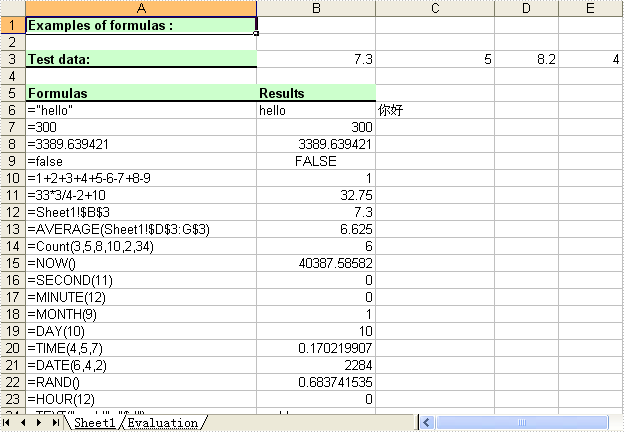
private void button1_Click(object sender, EventArgs e)
{
    Spire.DataExport.XLS.CellExport cellExport5
        = new Spire.DataExport.XLS.CellExport();

    cellExport5.ActionAfterExport = Spire.DataExport.Common.ActionType.OpenView;
    cellExport5.ColumnsWidth.AddRange(new object[] {
                                                            "100",
                                                            "200"});
    cellExport5.DataExported = false;
    cellExport5.DataFormats.CultureName = "zh-CN";
    cellExport5.DataFormats.Currency = "¥#,###,##0.00";
    cellExport5.DataFormats.DateTime = "yyyy-M-d H:mm";
    cellExport5.DataFormats.Float = "#,###,##0.00";
    cellExport5.DataFormats.Integer = "#,###,##0";
    cellExport5.DataFormats.Time = "H:mm";
    cellExport5.FileName = "formula.xls";
    cellExport5.SheetOptions.AggregateFormat.Font.Name = "Arial";
    cellExport5.SheetOptions.CustomDataFormat.Font.Name = "Arial";
    cellExport5.SheetOptions.DefaultFont.Name = "Arial";
    cellExport5.SheetOptions.FooterFormat.Font.Name = "Arial";
    cellExport5.SheetOptions.HeaderFormat.Font.Name = "Arial";
    cellExport5.SheetOptions.HyperlinkFormat.Font.Color = Spire.DataExport.XLS.CellColor.Blue;
    cellExport5.SheetOptions.HyperlinkFormat.Font.Name = "Arial";
    cellExport5.SheetOptions.HyperlinkFormat.Font.Underline = Spire.DataExport.XLS.XlsFontUnderline.Single;
    cellExport5.SheetOptions.NoteFormat.Alignment.Horizontal = Spire.DataExport.XLS.HorizontalAlignment.Left;
    cellExport5.SheetOptions.NoteFormat.Alignment.Vertical = Spire.DataExport.XLS.VerticalAlignment.Top;
    cellExport5.SheetOptions.NoteFormat.Font.Bold = true;
    cellExport5.SheetOptions.NoteFormat.Font.Name = "Tahoma";
    cellExport5.SheetOptions.NoteFormat.Font.Size = 8F;
    cellExport5.SheetOptions.TitlesFormat.Font.Bold = true;
    cellExport5.SheetOptions.TitlesFormat.Font.Name = "Arial";

    ushort currentRow = 1;
    string currentFormula = string.Empty;

    Spire.DataExport.XLS.Cell cell = null;

    cellExport5.Cells.Clear();
    cellExport5.SetColumnWidth(1, 32);
    cellExport5.SetColumnWidth(2, 16);
    cellExport5.SetColumnWidth(3, 16);

    cell = cellExport5.AddString(1, currentRow++, "Examples of formulas :");
    cell.Format.Font.Bold = true;
    cell.Format.FillStyle.Background = Spire.DataExport.XLS.CellColor.LightGreen;
    cell.Format.FillStyle.Pattern = Spire.DataExport.XLS.Pattern.Solid;
    cell.Format.Borders.Bottom.Style = Spire.DataExport.XLS.CellBorderStyle.Medium;

    cell = cellExport5.AddString(1, ++currentRow, "Test data:");
    cell.Format.Font.Bold = true;
    cell.Format.FillStyle.Background = Spire.DataExport.XLS.CellColor.LightGreen;
    cell.Format.FillStyle.Pattern = Spire.DataExport.XLS.Pattern.Solid;
    cell.Format.Borders.Bottom.Style = Spire.DataExport.XLS.CellBorderStyle.Medium;

    //test data
    cellExport5.AddNumeric(2, currentRow, 7.3);
    cellExport5.AddNumeric(3, currentRow, 5);
    cellExport5.AddNumeric(4, currentRow, 8.2);
    cellExport5.AddNumeric(5, currentRow, 4);
    cellExport5.AddNumeric(6, currentRow, 3);
    cellExport5.AddNumeric(7, currentRow++, 11.3);


    cell = cellExport5.AddString(1, ++currentRow, "Formulas");
    cell.Format.Font.Bold = true;
    cell.Format.FillStyle.Background = Spire.DataExport.XLS.CellColor.LightGreen;
    cell.Format.FillStyle.Pattern = Spire.DataExport.XLS.Pattern.Solid;
    cell.Format.Borders.Bottom.Style = Spire.DataExport.XLS.CellBorderStyle.Medium;

    cell = cellExport5.AddString(2, currentRow, "Results");
    cell.Format.Font.Bold = true;
    cell.Format.FillStyle.Background = Spire.DataExport.XLS.CellColor.LightGreen;
    cell.Format.FillStyle.Pattern = Spire.DataExport.XLS.Pattern.Solid;
    cell.Format.Borders.Bottom.Style = Spire.DataExport.XLS.CellBorderStyle.Medium;

    //str.
    currentFormula = "=\"hello\"";
    cellExport5.AddString(1, ++currentRow, currentFormula);
    cellExport5.AddFormula(2, currentRow, "=\"hello\"");
    cellExport5.AddFormula(3, currentRow, "=\"" + new string(new char[] { '\u4f60', '\u597d' }) + "\"");


    //int.
    currentFormula = "=300";
    cellExport5.AddString(1, ++currentRow, currentFormula);
    cellExport5.AddFormula(2, currentRow, currentFormula);

    // float
    currentFormula = "=3389.639421";
    cellExport5.AddString(1, ++currentRow, currentFormula);
    cellExport5.AddFormula(2, currentRow, currentFormula);

    //bool.
    currentFormula = "=false";
    cellExport5.AddString(1, ++currentRow, currentFormula);
    cellExport5.AddFormula(2, currentRow, currentFormula);

    currentFormula = "=1+2+3+4+5-6-7+8-9";
    cellExport5.AddString(1, ++currentRow, currentFormula);
    cellExport5.AddFormula(2, currentRow, currentFormula);

    currentFormula = "=33*3/4-2+10";
    cellExport5.AddString(1, ++currentRow, currentFormula);
    cellExport5.AddFormula(2, currentRow, currentFormula);


    // sheet reference
    currentFormula = "=Sheet1!$B$3";
    cellExport5.AddString(1, ++currentRow, currentFormula);
    cellExport5.AddFormula(2, currentRow, currentFormula);

    // sheet area reference
    currentFormula = "=AVERAGE(Sheet1!$D$3:G$3)";
    cellExport5.AddString(1, ++currentRow, currentFormula);
    cellExport5.AddFormula(2, currentRow, currentFormula);

    // Functions
    currentFormula = "=Count(3,5,8,10,2,34)";
    cellExport5.AddString(1, ++currentRow, currentFormula);
    cellExport5.AddFormula(2, currentRow++, currentFormula);


    currentFormula = "=NOW()";
    cellExport5.AddString(1, currentRow, currentFormula);
    cellExport5.AddFormula(2, currentRow++, currentFormula);

    currentFormula = "=SECOND(11)";
    cellExport5.AddString(1, currentRow, currentFormula);
    cellExport5.AddFormula(2, currentRow++, currentFormula);

    currentFormula = "=MINUTE(12)";
    cellExport5.AddString(1, currentRow, currentFormula);
    cellExport5.AddFormula(2, currentRow++, currentFormula);

    currentFormula = "=MONTH(9)";
    cellExport5.AddString(1, currentRow, currentFormula);
    cellExport5.AddFormula(2, currentRow++, currentFormula);

    currentFormula = "=DAY(10)";
    cellExport5.AddString(1, currentRow, currentFormula);
    cellExport5.AddFormula(2, currentRow++, currentFormula);

    currentFormula = "=TIME(4,5,7)";
    cellExport5.AddString(1, currentRow, currentFormula);
    cellExport5.AddFormula(2, currentRow++, currentFormula);

    currentFormula = "=DATE(6,4,2)";
    cellExport5.AddString(1, currentRow, currentFormula);
    cellExport5.AddFormula(2, currentRow++, currentFormula);

    currentFormula = "=RAND()";
    cellExport5.AddString(1, currentRow, currentFormula);
    cellExport5.AddFormula(2, currentRow++, currentFormula);

    currentFormula = "=HOUR(12)";
    cellExport5.AddString(1, currentRow, currentFormula);
    cellExport5.AddFormula(2, currentRow++, currentFormula);

    currentFormula = "=TEXT(\"world\", \"$d\")";
    cellExport5.AddString(1, currentRow, currentFormula);
    cellExport5.AddFormula(2, currentRow++, currentFormula);

    currentFormula = "=MOD(5,3)";
    cellExport5.AddString(1, currentRow, currentFormula);
    cellExport5.AddFormula(2, currentRow++, currentFormula);

    currentFormula = "=WEEKDAY(3)";
    cellExport5.AddString(1, currentRow, currentFormula);
    cellExport5.AddFormula(2, currentRow++, currentFormula);

    currentFormula = "=YEAR(23)";
    cellExport5.AddString(1, currentRow, currentFormula);
    cellExport5.AddFormula(2, currentRow++, currentFormula);

    currentFormula = "=NOT(true)";
    cellExport5.AddString(1, currentRow, currentFormula);
    cellExport5.AddFormula(2, currentRow++, currentFormula);

    currentFormula = "=OR(true)";
    cellExport5.AddString(1, currentRow, currentFormula);
    cellExport5.AddFormula(2, currentRow++, currentFormula);

    currentFormula = "=AND(TRUE)";
    cellExport5.AddString(1, currentRow, currentFormula);
    cellExport5.AddFormula(2, currentRow++, currentFormula);

    currentFormula = "=VALUE(30)";
    cellExport5.AddString(1, currentRow, currentFormula);
    cellExport5.AddFormula(2, currentRow++, currentFormula);

    currentFormula = "=LEN(\"world\")";
    cellExport5.AddString(1, currentRow, currentFormula);
    cellExport5.AddFormula(2, currentRow++, currentFormula);

    currentFormula = "=MID(\"world\",4,2)";
    cellExport5.AddString(1, currentRow, currentFormula);
    cellExport5.AddFormula(2, currentRow++, currentFormula);

    currentFormula = "=ROUND(7,3)";
    cellExport5.AddString(1, currentRow, currentFormula);
    cellExport5.AddFormula(2, currentRow++, currentFormula);

    currentFormula = "=SIGN(4)";
    cellExport5.AddString(1, currentRow, currentFormula);
    cellExport5.AddFormula(2, currentRow++, currentFormula);

    currentFormula = "=INT(200)";
    cellExport5.AddString(1, currentRow, currentFormula);
    cellExport5.AddFormula(2, currentRow++, currentFormula);

    currentFormula = "=ABS(-1.21)";
    cellExport5.AddString(1, currentRow, currentFormula);
    cellExport5.AddFormula(2, currentRow++, currentFormula);

    currentFormula = "=LN(15)";
    cellExport5.AddString(1, currentRow, currentFormula);
    cellExport5.AddFormula(2, currentRow++, currentFormula);

    currentFormula = "=EXP(20)";
    cellExport5.AddString(1, currentRow, currentFormula);
    cellExport5.AddFormula(2, currentRow++, currentFormula);

    currentFormula = "=SQRT(40)";
    cellExport5.AddString(1, currentRow, currentFormula);
    cellExport5.AddFormula(2, currentRow++, currentFormula);

    currentFormula = "=PI()";
    cellExport5.AddString(1, currentRow, currentFormula);
    cellExport5.AddFormula(2, currentRow++, currentFormula);

    currentFormula = "=COS(9)";
    cellExport5.AddString(1, currentRow, currentFormula);
    cellExport5.AddFormula(2, currentRow++, currentFormula);

    currentFormula = "=SIN(45)";
    cellExport5.AddString(1, currentRow, currentFormula);
    cellExport5.AddFormula(2, currentRow++, currentFormula);

    currentFormula = "=MAX(10,30)";
    cellExport5.AddString(1, currentRow, currentFormula);
    cellExport5.AddFormula(2, currentRow++, currentFormula);

    currentFormula = "=MIN(5,7)";
    cellExport5.AddString(1, currentRow, currentFormula);
    cellExport5.AddFormula(2, currentRow++, currentFormula);

    currentFormula = "=AVERAGE(12,45)";
    cellExport5.AddString(1, currentRow, currentFormula);
    cellExport5.AddFormula(2, currentRow++, currentFormula);

    currentFormula = "=SUM(18,29)";
    cellExport5.AddString(1, currentRow, currentFormula);
    cellExport5.AddFormula(2, currentRow++, currentFormula);

    currentFormula = "=IF(4,2,2)";
    cellExport5.AddString(1, currentRow, currentFormula);
    cellExport5.AddFormula(2, currentRow++, currentFormula);

    currentFormula = "=SUBTOTAL(3,Sheet1!B2:E3)";
    cellExport5.AddString(1, currentRow, currentFormula);
    cellExport5.AddFormula(2, currentRow++, currentFormula);

    cellExport5.SaveToFile();
}
Private Sub Button1_Click(ByVal sender As System.Object, ByVal e As System.EventArgs) Handles Button1.Click
    Dim cellExport5 As Spire.DataExport.XLS.CellExport
    cellExport5 = New Spire.DataExport.XLS.CellExport

    cellExport5.ActionAfterExport = Spire.DataExport.Common.ActionType.OpenView
    cellExport5.ColumnsWidth.AddRange(New Object() {"100", "200"})
    cellExport5.DataExported = False
    cellExport5.DataFormats.CultureName = "zh-CN"
    cellExport5.DataFormats.Currency = "¥#,###,##0.00"
    cellExport5.DataFormats.DateTime = "yyyy-M-d H:mm"
    cellExport5.DataFormats.Float = "#,###,##0.00"
    cellExport5.DataFormats.Integer = "#,###,##0"
    cellExport5.DataFormats.Time = "H:mm"
    cellExport5.FileName = "formula.xls"
    cellExport5.SheetOptions.AggregateFormat.Font.Name = "Arial"
    cellExport5.SheetOptions.CustomDataFormat.Font.Name = "Arial"
    cellExport5.SheetOptions.DefaultFont.Name = "Arial"
    cellExport5.SheetOptions.FooterFormat.Font.Name = "Arial"
    cellExport5.SheetOptions.HeaderFormat.Font.Name = "Arial"
    cellExport5.SheetOptions.HyperlinkFormat.Font.Color = Spire.DataExport.XLS.CellColor.Blue
    cellExport5.SheetOptions.HyperlinkFormat.Font.Name = "Arial"
    cellExport5.SheetOptions.HyperlinkFormat.Font.Underline = Spire.DataExport.XLS.XlsFontUnderline.Single
    cellExport5.SheetOptions.NoteFormat.Alignment.Horizontal = Spire.DataExport.XLS.HorizontalAlignment.Left
    cellExport5.SheetOptions.NoteFormat.Alignment.Vertical = Spire.DataExport.XLS.VerticalAlignment.Top
    cellExport5.SheetOptions.NoteFormat.Font.Bold = True
    cellExport5.SheetOptions.NoteFormat.Font.Name = "Tahoma"
    cellExport5.SheetOptions.NoteFormat.Font.Size = 8.0!
    cellExport5.SheetOptions.TitlesFormat.Font.Bold = True
    cellExport5.SheetOptions.TitlesFormat.Font.Name = "Arial"

    Dim currentRow As Integer = 1
    Dim firstCol As UInt16 = Convert.ToUInt16(1)
    Dim secondCol As UInt16 = Convert.ToUInt16(2)
    Dim currentFormula As String = String.Empty

    Dim cell As cell = Nothing

    cellExport5.Cells.Clear()
    cellExport5.SetColumnWidth(System.Convert.ToUInt16(1), System.Convert.ToUInt16(32))
    cellExport5.SetColumnWidth(System.Convert.ToUInt16(2), System.Convert.ToUInt16(16))
    cellExport5.SetColumnWidth(System.Convert.ToUInt16(3), System.Convert.ToUInt16(16))

    cell = cellExport5.AddString(System.Convert.ToUInt16(1), System.Convert.ToUInt16(currentRow), "Examples of formulas :")
    currentRow += 1
    cell.Format.Font.Bold = True
    cell.Format.FillStyle.Background = CellColor.LightGreen
    cell.Format.FillStyle.Pattern = Pattern.Solid
    cell.Format.Borders.Bottom.Style = CellBorderStyle.Medium

    cell = cellExport5.AddString(System.Convert.ToUInt16(1), System.Convert.ToUInt16(currentRow), "Test data:")
    currentRow += 1
    cell.Format.Font.Bold = True
    cell.Format.FillStyle.Background = CellColor.LightGreen
    cell.Format.FillStyle.Pattern = Pattern.Solid
    cell.Format.Borders.Bottom.Style = CellBorderStyle.Medium

    'test data
    cellExport5.AddNumeric(System.Convert.ToUInt16(2), System.Convert.ToUInt16(currentRow), 7.3)
    cellExport5.AddNumeric(System.Convert.ToUInt16(3), System.Convert.ToUInt16(currentRow), 5)
    cellExport5.AddNumeric(System.Convert.ToUInt16(4), System.Convert.ToUInt16(currentRow), 8.2)
    cellExport5.AddNumeric(System.Convert.ToUInt16(5), System.Convert.ToUInt16(currentRow), 4)
    cellExport5.AddNumeric(System.Convert.ToUInt16(6), System.Convert.ToUInt16(currentRow), 3)
    cellExport5.AddNumeric(System.Convert.ToUInt16(7), System.Convert.ToUInt16(currentRow), 11.3)
    currentRow += 1
    currentRow += 1


    cell = cellExport5.AddString(Convert.ToUInt16(1), Convert.ToUInt16(currentRow), "Formulas")
    cell.Format.Font.Bold = True
    cell.Format.FillStyle.Background = CellColor.LightGreen
    cell.Format.FillStyle.Pattern = Pattern.Solid
    cell.Format.Borders.Bottom.Style = CellBorderStyle.Medium

    cell = cellExport5.AddString(secondCol, Convert.ToUInt16(currentRow), "Results")
    currentRow += 1
    cell.Format.Font.Bold = True
    cell.Format.FillStyle.Background = CellColor.LightGreen
    cell.Format.FillStyle.Pattern = Pattern.Solid
    cell.Format.Borders.Bottom.Style = CellBorderStyle.Medium

    'str.
    currentFormula = "=""hello"""
    cellExport5.AddString(firstCol, Convert.ToUInt16(currentRow), currentFormula)
    cellExport5.AddFormula(secondCol, Convert.ToUInt16(currentRow), "=""hello""")
    cellExport5.AddFormula(Convert.ToUInt16(3), Convert.ToUInt16(currentRow), "=""" & ChrW(20320) & ChrW(22909) + """")
    currentRow += 1


    'int.
    currentFormula = "=300"
    cellExport5.AddString(firstCol, Convert.ToUInt16(currentRow), currentFormula)
    cellExport5.AddFormula(secondCol, Convert.ToUInt16(currentRow), currentFormula)
    currentRow += 1

    ' float
    currentFormula = "=3389.639421"
    cellExport5.AddString(firstCol, Convert.ToUInt16(currentRow), currentFormula)
    cellExport5.AddFormula(secondCol, Convert.ToUInt16(currentRow), currentFormula)
    currentRow += 1


    'bool.
    currentFormula = "=false"
    cellExport5.AddString(firstCol, Convert.ToUInt16(currentRow), currentFormula)
    cellExport5.AddFormula(secondCol, Convert.ToUInt16(currentRow), currentFormula)
    currentRow += 1

    currentFormula = "=1+2+3+4+5-6-7+8-9"
    cellExport5.AddString(firstCol, Convert.ToUInt16(currentRow), currentFormula)
    cellExport5.AddFormula(secondCol, Convert.ToUInt16(currentRow), currentFormula)
    currentRow += 1

    currentFormula = "=33*3/4-2+10"
    cellExport5.AddString(firstCol, Convert.ToUInt16(currentRow), currentFormula)
    cellExport5.AddFormula(secondCol, Convert.ToUInt16(currentRow), currentFormula)
    currentRow += 1

    ' sheet reference
    currentFormula = "=Sheet1!$B$3"
    cellExport5.AddString(firstCol, Convert.ToUInt16(currentRow), currentFormula)
    cellExport5.AddFormula(secondCol, Convert.ToUInt16(currentRow), currentFormula)
    currentRow += 1

    ' sheet area reference
    currentFormula = "=AVERAGE(Sheet1!$D$3:G$3)"
    cellExport5.AddString(firstCol, Convert.ToUInt16(currentRow), currentFormula)
    cellExport5.AddFormula(secondCol, Convert.ToUInt16(currentRow), currentFormula)
    currentRow += 1

    ' Functions
    currentFormula = "=Count(3,5,8,10,2,34)"
    cellExport5.AddString(firstCol, Convert.ToUInt16(currentRow), currentFormula)
    cellExport5.AddFormula(secondCol, Convert.ToUInt16(currentRow), currentFormula)
    currentRow += 1


    currentFormula = "=NOW()"
    cellExport5.AddString(firstCol, Convert.ToUInt16(currentRow), currentFormula)
    cellExport5.AddFormula(secondCol, Convert.ToUInt16(currentRow), currentFormula)
    currentRow += 1

    currentFormula = "=SECOND(11)"
    cellExport5.AddString(firstCol, Convert.ToUInt16(currentRow), currentFormula)
    cellExport5.AddFormula(secondCol, Convert.ToUInt16(currentRow), currentFormula)
    currentRow += 1

    currentFormula = "=MINUTE(12)"
    cellExport5.AddString(firstCol, Convert.ToUInt16(currentRow), currentFormula)
    cellExport5.AddFormula(secondCol, Convert.ToUInt16(currentRow), currentFormula)
    currentRow += 1

    currentFormula = "=MONTH(9)"
    cellExport5.AddString(firstCol, Convert.ToUInt16(currentRow), currentFormula)
    cellExport5.AddFormula(secondCol, Convert.ToUInt16(currentRow), currentFormula)
    currentRow += 1

    currentFormula = "=DAY(10)"
    cellExport5.AddString(firstCol, Convert.ToUInt16(currentRow), currentFormula)
    cellExport5.AddFormula(secondCol, Convert.ToUInt16(currentRow), currentFormula)
    currentRow += 1

    currentFormula = "=TIME(4,5,7)"
    cellExport5.AddString(firstCol, Convert.ToUInt16(currentRow), currentFormula)
    cellExport5.AddFormula(secondCol, Convert.ToUInt16(currentRow), currentFormula)
    currentRow += 1

    currentFormula = "=DATE(6,4,2)"
    cellExport5.AddString(firstCol, Convert.ToUInt16(currentRow), currentFormula)
    cellExport5.AddFormula(secondCol, Convert.ToUInt16(currentRow), currentFormula)
    currentRow += 1

    currentFormula = "=RAND()"
    cellExport5.AddString(firstCol, Convert.ToUInt16(currentRow), currentFormula)
    cellExport5.AddFormula(secondCol, Convert.ToUInt16(currentRow), currentFormula)
    currentRow += 1

    currentFormula = "=HOUR(12)"
    cellExport5.AddString(firstCol, Convert.ToUInt16(currentRow), currentFormula)
    cellExport5.AddFormula(secondCol, Convert.ToUInt16(currentRow), currentFormula)
    currentRow += 1

    currentFormula = "=TEXT(""world"", ""$d"")"
    cellExport5.AddString(firstCol, Convert.ToUInt16(currentRow), currentFormula)
    cellExport5.AddFormula(secondCol, Convert.ToUInt16(currentRow), currentFormula)
    currentRow += 1

    currentFormula = "=MOD(5,3)"
    cellExport5.AddString(firstCol, Convert.ToUInt16(currentRow), currentFormula)
    cellExport5.AddFormula(secondCol, Convert.ToUInt16(currentRow), currentFormula)
    currentRow += 1

    currentFormula = "=WEEKDAY(3)"
    cellExport5.AddString(firstCol, Convert.ToUInt16(currentRow), currentFormula)
    cellExport5.AddFormula(secondCol, Convert.ToUInt16(currentRow), currentFormula)
    currentRow += 1

    currentFormula = "=YEAR(23)"
    cellExport5.AddString(firstCol, Convert.ToUInt16(currentRow), currentFormula)
    cellExport5.AddFormula(secondCol, Convert.ToUInt16(currentRow), currentFormula)
    currentRow += 1

    currentFormula = "=NOT(true)"
    cellExport5.AddString(firstCol, Convert.ToUInt16(currentRow), currentFormula)
    cellExport5.AddFormula(secondCol, Convert.ToUInt16(currentRow), currentFormula)
    currentRow += 1

    currentFormula = "=OR(true)"
    cellExport5.AddString(firstCol, Convert.ToUInt16(currentRow), currentFormula)
    cellExport5.AddFormula(secondCol, Convert.ToUInt16(currentRow), currentFormula)
    currentRow += 1

    currentFormula = "=AND(TRUE)"
    cellExport5.AddString(firstCol, Convert.ToUInt16(currentRow), currentFormula)
    cellExport5.AddFormula(secondCol, Convert.ToUInt16(currentRow), currentFormula)
    currentRow += 1

    currentFormula = "=VALUE(30)"
    cellExport5.AddString(firstCol, Convert.ToUInt16(currentRow), currentFormula)
    cellExport5.AddFormula(secondCol, Convert.ToUInt16(currentRow), currentFormula)
    currentRow += 1

    currentFormula = "=LEN(""world"")"
    cellExport5.AddString(firstCol, Convert.ToUInt16(currentRow), currentFormula)
    cellExport5.AddFormula(secondCol, Convert.ToUInt16(currentRow), currentFormula)
    currentRow += 1

    currentFormula = "=MID(""world"",4,2)"
    cellExport5.AddString(firstCol, Convert.ToUInt16(currentRow), currentFormula)
    cellExport5.AddFormula(secondCol, Convert.ToUInt16(currentRow), currentFormula)
    currentRow += 1

    currentFormula = "=ROUND(7,3)"
    cellExport5.AddString(firstCol, Convert.ToUInt16(currentRow), currentFormula)
    cellExport5.AddFormula(secondCol, Convert.ToUInt16(currentRow), currentFormula)
    currentRow += 1

    currentFormula = "=SIGN(4)"
    cellExport5.AddString(firstCol, Convert.ToUInt16(currentRow), currentFormula)
    cellExport5.AddFormula(secondCol, Convert.ToUInt16(currentRow), currentFormula)
    currentRow += 1

    currentFormula = "=INT(200)"
    cellExport5.AddString(firstCol, Convert.ToUInt16(currentRow), currentFormula)
    cellExport5.AddFormula(secondCol, Convert.ToUInt16(currentRow), currentFormula)
    currentRow += 1

    currentFormula = "=ABS(-1.21)"
    cellExport5.AddString(firstCol, Convert.ToUInt16(currentRow), currentFormula)
    cellExport5.AddFormula(secondCol, Convert.ToUInt16(currentRow), currentFormula)
    currentRow += 1

    currentFormula = "=LN(15)"
    cellExport5.AddString(firstCol, Convert.ToUInt16(currentRow), currentFormula)
    cellExport5.AddFormula(secondCol, Convert.ToUInt16(currentRow), currentFormula)
    currentRow += 1

    currentFormula = "=EXP(20)"
    cellExport5.AddString(firstCol, Convert.ToUInt16(currentRow), currentFormula)
    cellExport5.AddFormula(secondCol, Convert.ToUInt16(currentRow), currentFormula)
    currentRow += 1

    currentFormula = "=SQRT(40)"
    cellExport5.AddString(firstCol, Convert.ToUInt16(currentRow), currentFormula)
    cellExport5.AddFormula(secondCol, Convert.ToUInt16(currentRow), currentFormula)
    currentRow += 1

    currentFormula = "=PI()"
    cellExport5.AddString(firstCol, Convert.ToUInt16(currentRow), currentFormula)
    cellExport5.AddFormula(secondCol, Convert.ToUInt16(currentRow), currentFormula)
    currentRow += 1

    currentFormula = "=COS(9)"
    cellExport5.AddString(firstCol, Convert.ToUInt16(currentRow), currentFormula)
    cellExport5.AddFormula(secondCol, Convert.ToUInt16(currentRow), currentFormula)
    currentRow += 1

    currentFormula = "=SIN(45)"
    cellExport5.AddString(firstCol, Convert.ToUInt16(currentRow), currentFormula)
    cellExport5.AddFormula(secondCol, Convert.ToUInt16(currentRow), currentFormula)
    currentRow += 1

    currentFormula = "=MAX(10,30)"
    cellExport5.AddString(firstCol, Convert.ToUInt16(currentRow), currentFormula)
    cellExport5.AddFormula(secondCol, Convert.ToUInt16(currentRow), currentFormula)
    currentRow += 1

    currentFormula = "=MIN(5,7)"
    cellExport5.AddString(firstCol, Convert.ToUInt16(currentRow), currentFormula)
    cellExport5.AddFormula(secondCol, Convert.ToUInt16(currentRow), currentFormula)
    currentRow += 1

    currentFormula = "=AVERAGE(12,45)"
    cellExport5.AddString(firstCol, Convert.ToUInt16(currentRow), currentFormula)
    cellExport5.AddFormula(secondCol, Convert.ToUInt16(currentRow), currentFormula)
    currentRow += 1

    currentFormula = "=SUM(18,29)"
    cellExport5.AddString(firstCol, Convert.ToUInt16(currentRow), currentFormula)
    cellExport5.AddFormula(secondCol, Convert.ToUInt16(currentRow), currentFormula)
    currentRow += 1

    currentFormula = "=IF(4,2,2)"
    cellExport5.AddString(firstCol, Convert.ToUInt16(currentRow), currentFormula)
    cellExport5.AddFormula(secondCol, Convert.ToUInt16(currentRow), currentFormula)
    currentRow += 1

    currentFormula = "=SUBTOTAL(3,Sheet1!B2:E3)"
    cellExport5.AddString(firstCol, Convert.ToUInt16(currentRow), currentFormula)
    cellExport5.AddFormula(secondCol, Convert.ToUInt16(currentRow), currentFormula)
    currentRow += 1
    cellExport5.SaveToFile()
End Sub
Data Export Cell in C#, VB.NET
Not needing to have Microsoft Excel installed on the machine, The Spire.DataExport can create Excel spreadsheet.
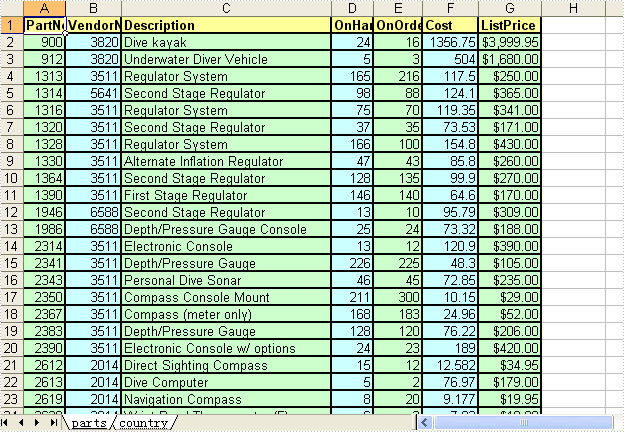
private void btnRun_Click(object sender, System.EventArgs e)
{
	oleDbConnection1.Open();
	try
	{
		cellExport1.SaveToFile();
	}
	finally
	{
		this.oleDbConnection1.Close();
	}
}

private void Form1_Load(object sender, System.EventArgs e)
{
	LoadData();
}

private void button2_Click(object sender, System.EventArgs e)
{
	LoadData();
}

private void btnAbout_Click(object sender, System.EventArgs e)
{
	Close();
}

private void button1_Click(object sender, System.EventArgs e)
{
	oleDbConnection1.Open();
	try
	{
		cellExport2.SaveToFile();
	}
	finally
	{
		this.oleDbConnection1.Close();
	}
}

private void button3_Click(object sender, System.EventArgs e)
{
	oleDbConnection1.Open();
	try
	{
		cellExport3.SaveToFile();
	}
	finally
	{
		this.oleDbConnection1.Close();
	}

}

private void button4_Click(object sender, System.EventArgs e)
{
	oleDbConnection1.Open();
	try
	{
		cellExport4.SaveToFile();
	}
	finally
	{
		this.oleDbConnection1.Close();
	}

}

private void button5_Click(object sender, System.EventArgs e)
{
	ushort currentRow = 1;
	string currentFormula = string.Empty;

	Cell cell = null;

	cellExport5.Cells.Clear();
	cellExport5.SetColumnWidth(1, 32);
	cellExport5.SetColumnWidth(2, 16);
	cellExport5.SetColumnWidth(3, 16);

	cell = cellExport5.AddString(1,currentRow++,"Examples of formulas :");
	cell.Format.Font.Bold = true;
	cell.Format.FillStyle.Background = CellColor.LightGreen;
	cell.Format.FillStyle.Pattern = Pattern.Solid;
	cell.Format.Borders.Bottom.Style = CellBorderStyle.Medium;

	cell = cellExport5.AddString(1,++currentRow,"Test data:");
	cell.Format.Font.Bold = true;
	cell.Format.FillStyle.Background = CellColor.LightGreen;
	cell.Format.FillStyle.Pattern = Pattern.Solid;
	cell.Format.Borders.Bottom.Style = CellBorderStyle.Medium;

    //test data
	cellExport5.AddNumeric(2,currentRow, 7.3);
	cellExport5.AddNumeric(3,currentRow,5);
	cellExport5.AddNumeric(4,currentRow,8.2);
	cellExport5.AddNumeric(5,currentRow,  4);
	cellExport5.AddNumeric(6,currentRow, 3);
	cellExport5.AddNumeric(7,currentRow++, 11.3);


	cell = cellExport5.AddString(1,++currentRow, "Formulas");
	cell.Format.Font.Bold = true;
	cell.Format.FillStyle.Background = CellColor.LightGreen;
	cell.Format.FillStyle.Pattern = Pattern.Solid;
	cell.Format.Borders.Bottom.Style = CellBorderStyle.Medium;

	cell = cellExport5.AddString(2,currentRow, "Results");
	cell.Format.Font.Bold = true;
	cell.Format.FillStyle.Background = CellColor.LightGreen;
	cell.Format.FillStyle.Pattern = Pattern.Solid;
	cell.Format.Borders.Bottom.Style = CellBorderStyle.Medium;

	//str.
	currentFormula = "=\"hello\"";
	cellExport5.AddString(1, ++currentRow, currentFormula);
	cellExport5.AddFormula(2, currentRow, "=\"hello\"");
	cellExport5.AddFormula(3, currentRow, "=\"" + new string(new char[]{'\u4f60', '\u597d'})+ "\"");


	//int.
	currentFormula = "=300";
	cellExport5.AddString(1, ++currentRow,currentFormula);
	cellExport5.AddFormula(2,currentRow, currentFormula);

	// float
	currentFormula = "=3389.639421";
	cellExport5.AddString(1, ++currentRow, currentFormula);
	cellExport5.AddFormula(2,currentRow,currentFormula);

	//bool.
	currentFormula = "=false";
	cellExport5.AddString(1, ++currentRow, currentFormula);
	cellExport5.AddFormula(2, currentRow, currentFormula);

	currentFormula = "=1+2+3+4+5-6-7+8-9";
	cellExport5.AddString( 1, ++currentRow, currentFormula);
	cellExport5.AddFormula(2, currentRow, currentFormula);

	currentFormula = "=33*3/4-2+10";
	cellExport5.AddString( 1,++currentRow,currentFormula);
	cellExport5.AddFormula(2, currentRow, currentFormula);


	// sheet reference
	currentFormula = "=Sheet1!$B$3";
	cellExport5.AddString(1,++currentRow, currentFormula);
	cellExport5.AddFormula(2,currentRow, currentFormula);

	// sheet area reference
	currentFormula = "=AVERAGE(Sheet1!$D$3:G$3)";
	cellExport5.AddString(1, ++currentRow, currentFormula);
	cellExport5.AddFormula(2,currentRow, currentFormula);

	// Functions
	currentFormula = "=Count(3,5,8,10,2,34)";
	cellExport5.AddString(1,++currentRow,  currentFormula);
	cellExport5.AddFormula(2,currentRow++, currentFormula);


	currentFormula = "=NOW()";
	cellExport5.AddString( 1, currentRow, currentFormula);
	cellExport5.AddFormula( 2, currentRow++,  currentFormula);

	currentFormula = "=SECOND(11)";
	cellExport5.AddString(1 ,currentRow, currentFormula);
	cellExport5.AddFormula(2, currentRow++, currentFormula);

	currentFormula = "=MINUTE(12)";
	cellExport5.AddString(1, currentRow,currentFormula);
	cellExport5.AddFormula(2, currentRow++, currentFormula);

	currentFormula = "=MONTH(9)";
	cellExport5.AddString( 1, currentRow, currentFormula);
	cellExport5.AddFormula( 2, currentRow++, currentFormula);

	currentFormula = "=DAY(10)";
	cellExport5.AddString( 1, currentRow, currentFormula);
	cellExport5.AddFormula( 2, currentRow++, currentFormula);

	currentFormula = "=TIME(4,5,7)";
	cellExport5.AddString( 1, currentRow, currentFormula);
	cellExport5.AddFormula( 2, currentRow++, currentFormula);

	currentFormula = "=DATE(6,4,2)";
	cellExport5.AddString( 1, currentRow, currentFormula);
	cellExport5.AddFormula( 2, currentRow++, currentFormula);

	currentFormula = "=RAND()";
	cellExport5.AddString( 1, currentRow, currentFormula);
	cellExport5.AddFormula( 2, currentRow++, currentFormula);

	currentFormula = "=HOUR(12)";
	cellExport5.AddString(1, currentRow,currentFormula);
	cellExport5.AddFormula(2, currentRow++,  currentFormula);

	currentFormula = "=TEXT(\"world\", \"$d\")";
	cellExport5.AddString( 1, currentRow, currentFormula);
	cellExport5.AddFormula( 2, currentRow++, currentFormula);

	currentFormula = "=MOD(5,3)";
	cellExport5.AddString( 1, currentRow, currentFormula);
	cellExport5.AddFormula( 2, currentRow++, currentFormula);

	currentFormula = "=WEEKDAY(3)";
	cellExport5.AddString(1, currentRow, currentFormula);
	cellExport5.AddFormula(2, currentRow++, currentFormula);

	currentFormula = "=YEAR(23)";
	cellExport5.AddString(1, currentRow, currentFormula);
	cellExport5.AddFormula(2, currentRow++, currentFormula);

	currentFormula = "=NOT(true)";
	cellExport5.AddString( 1, currentRow, currentFormula);
	cellExport5.AddFormula( 2, currentRow++, currentFormula);

	currentFormula = "=OR(true)";
	cellExport5.AddString( 1, currentRow, currentFormula);
	cellExport5.AddFormula( 2, currentRow++, currentFormula);

	currentFormula = "=AND(TRUE)";
	cellExport5.AddString( 1, currentRow, currentFormula);
	cellExport5.AddFormula( 2, currentRow++, currentFormula);

	currentFormula = "=VALUE(30)";
	cellExport5.AddString( 1, currentRow, currentFormula);
	cellExport5.AddFormula( 2, currentRow++, currentFormula);

	currentFormula = "=LEN(\"world\")";
	cellExport5.AddString( 1, currentRow, currentFormula);
	cellExport5.AddFormula( 2, currentRow++, currentFormula);

	currentFormula = "=MID(\"world\",4,2)";
	cellExport5.AddString( 1, currentRow, currentFormula);
	cellExport5.AddFormula( 2, currentRow++, currentFormula);

	currentFormula = "=ROUND(7,3)";
	cellExport5.AddString( 1, currentRow, currentFormula);
	cellExport5.AddFormula( 2, currentRow++, currentFormula);

	currentFormula = "=SIGN(4)";
	cellExport5.AddString( 1, currentRow, currentFormula);
	cellExport5.AddFormula( 2, currentRow++, currentFormula);

	currentFormula = "=INT(200)";
	cellExport5.AddString( 1, currentRow, currentFormula);
	cellExport5.AddFormula( 2, currentRow++, currentFormula);

	currentFormula = "=ABS(-1.21)";
	cellExport5.AddString( 1, currentRow, currentFormula);
	cellExport5.AddFormula( 2, currentRow++, currentFormula);

	currentFormula = "=LN(15)";
	cellExport5.AddString( 1, currentRow, currentFormula);
	cellExport5.AddFormula( 2, currentRow++, currentFormula);

	currentFormula = "=EXP(20)";
	cellExport5.AddString( 1, currentRow, currentFormula);
	cellExport5.AddFormula( 2, currentRow++, currentFormula);

	currentFormula = "=SQRT(40)";
	cellExport5.AddString( 1, currentRow, currentFormula);
	cellExport5.AddFormula( 2, currentRow++, currentFormula);

	currentFormula = "=PI()";
	cellExport5.AddString( 1, currentRow, currentFormula);
	cellExport5.AddFormula( 2, currentRow++, currentFormula);

	currentFormula = "=COS(9)";
	cellExport5.AddString( 1, currentRow, currentFormula);
	cellExport5.AddFormula( 2, currentRow++, currentFormula);

	currentFormula = "=SIN(45)";
	cellExport5.AddString( 1, currentRow, currentFormula);
	cellExport5.AddFormula( 2, currentRow++, currentFormula);

	currentFormula = "=MAX(10,30)";
	cellExport5.AddString( 1, currentRow, currentFormula);
	cellExport5.AddFormula( 2, currentRow++, currentFormula);

	currentFormula = "=MIN(5,7)";
	cellExport5.AddString( 1, currentRow, currentFormula);
	cellExport5.AddFormula( 2, currentRow++, currentFormula);

	currentFormula = "=AVERAGE(12,45)";
	cellExport5.AddString( 1, currentRow, currentFormula);
	cellExport5.AddFormula( 2, currentRow++, currentFormula);

	currentFormula = "=SUM(18,29)";
	cellExport5.AddString( 1, currentRow, currentFormula);
	cellExport5.AddFormula( 2, currentRow++, currentFormula);

	currentFormula = "=IF(4,2,2)";
	cellExport5.AddString( 1, currentRow, currentFormula);
	cellExport5.AddFormula( 2, currentRow++, currentFormula);

	currentFormula = "=SUBTOTAL(3,Sheet1!B2:E3)";
	cellExport5.AddString( 1, currentRow, currentFormula);
	cellExport5.AddFormula( 2, currentRow++, currentFormula);

	this.cellExport5.SaveToFile();
}

private void cellExport1_GetDataParams(object sender, Spire.DataExport.EventArgs.DataParamsEventArgs e)
{
	if 	((e.Sheet == 0) && (e.Col == 6))
	{
		e.FormatText = cellExport1.DataFormats.Currency;
	}
}
Private Sub btnRun_Click(ByVal sender As Object, ByVal e As System.EventArgs) Handles btnRun.Click
    oleDbConnection1.Open()
    Try
        cellExport1.SaveToFile()
    Finally
        Me.oleDbConnection1.Close()
    End Try
End Sub

Private Sub Form1_Load(ByVal sender As Object, ByVal e As System.EventArgs) Handles MyBase.Load
    LoadData()
End Sub

Private Sub button2_Click(ByVal sender As Object, ByVal e As System.EventArgs) Handles button2.Click
    LoadData()
End Sub

Private Sub btnAbout_Click(ByVal sender As Object, ByVal e As System.EventArgs) Handles btnAbout.Click
    Close()
End Sub

Private Sub button1_Click(ByVal sender As Object, ByVal e As System.EventArgs) Handles button1.Click
    oleDbConnection1.Open()
    Try
        cellExport2.SaveToFile()
    Finally
        Me.oleDbConnection1.Close()
    End Try
End Sub

Private Sub button3_Click(ByVal sender As Object, ByVal e As System.EventArgs) Handles button3.Click
    oleDbConnection1.Open()
    Try
        cellExport3.SaveToFile()
    Finally
        Me.oleDbConnection1.Close()
    End Try

End Sub

Private Sub button4_Click(ByVal sender As Object, ByVal e As System.EventArgs) Handles button4.Click
    oleDbConnection1.Open()
    Try
        cellExport4.SaveToFile()
    Finally
        Me.oleDbConnection1.Close()
    End Try

End Sub

Private Sub button5_Click(ByVal sender As Object, ByVal e As System.EventArgs) Handles button5.Click
    Dim currentRow As Integer = 1
    Dim firstCol As UInt16 = Convert.ToUInt16(1)
    Dim secondCol As UInt16 = Convert.ToUInt16(2)
    Dim currentFormula As String = String.Empty

    Dim cell As cell = Nothing

    cellExport5.Cells.Clear()
    cellExport5.SetColumnWidth(System.Convert.ToUInt16(1), System.Convert.ToUInt16(32))
    cellExport5.SetColumnWidth(System.Convert.ToUInt16(2), System.Convert.ToUInt16(16))
    cellExport5.SetColumnWidth(System.Convert.ToUInt16(3), System.Convert.ToUInt16(16))

    cell = cellExport5.AddString(System.Convert.ToUInt16(1), System.Convert.ToUInt16(currentRow), "Examples of formulas :")
    currentRow += 1
    cell.Format.Font.Bold = True
    cell.Format.FillStyle.Background = CellColor.LightGreen
    cell.Format.FillStyle.Pattern = Pattern.Solid
    cell.Format.Borders.Bottom.Style = CellBorderStyle.Medium

    cell = cellExport5.AddString(System.Convert.ToUInt16(1), System.Convert.ToUInt16(currentRow), "Test data:")
    currentRow += 1
    cell.Format.Font.Bold = True
    cell.Format.FillStyle.Background = CellColor.LightGreen
    cell.Format.FillStyle.Pattern = Pattern.Solid
    cell.Format.Borders.Bottom.Style = CellBorderStyle.Medium

    'test data
    cellExport5.AddNumeric(System.Convert.ToUInt16(2), System.Convert.ToUInt16(currentRow), 7.3)
    cellExport5.AddNumeric(System.Convert.ToUInt16(3), System.Convert.ToUInt16(currentRow), 5)
    cellExport5.AddNumeric(System.Convert.ToUInt16(4), System.Convert.ToUInt16(currentRow), 8.2)
    cellExport5.AddNumeric(System.Convert.ToUInt16(5), System.Convert.ToUInt16(currentRow), 4)
    cellExport5.AddNumeric(System.Convert.ToUInt16(6), System.Convert.ToUInt16(currentRow), 3)
    cellExport5.AddNumeric(System.Convert.ToUInt16(7), System.Convert.ToUInt16(currentRow), 11.3)
    currentRow += 1
    currentRow += 1


    cell = cellExport5.AddString(Convert.ToUInt16(1), Convert.ToUInt16(currentRow), "Formulas")
    cell.Format.Font.Bold = True
    cell.Format.FillStyle.Background = CellColor.LightGreen
    cell.Format.FillStyle.Pattern = Pattern.Solid
    cell.Format.Borders.Bottom.Style = CellBorderStyle.Medium

    cell = cellExport5.AddString(secondCol, Convert.ToUInt16(currentRow), "Results")
    currentRow += 1
    cell.Format.Font.Bold = True
    cell.Format.FillStyle.Background = CellColor.LightGreen
    cell.Format.FillStyle.Pattern = Pattern.Solid
    cell.Format.Borders.Bottom.Style = CellBorderStyle.Medium

    'str.
    currentFormula = "=""hello"""
    cellExport5.AddString(firstCol, Convert.ToUInt16(currentRow), currentFormula)
    cellExport5.AddFormula(secondCol, Convert.ToUInt16(currentRow), "=""hello""")
    cellExport5.AddFormula(Convert.ToUInt16(3), Convert.ToUInt16(currentRow), "=""" & ChrW(20320) & ChrW(22909) + """")
    currentRow += 1


    'int.
    currentFormula = "=300"
    cellExport5.AddString(firstCol, Convert.ToUInt16(currentRow), currentFormula)
    cellExport5.AddFormula(secondCol, Convert.ToUInt16(currentRow), currentFormula)
    currentRow += 1

    ' float
    currentFormula = "=3389.639421"
    cellExport5.AddString(firstCol, Convert.ToUInt16(currentRow), currentFormula)
    cellExport5.AddFormula(secondCol, Convert.ToUInt16(currentRow), currentFormula)
    currentRow += 1


    'bool.
    currentFormula = "=false"
    cellExport5.AddString(firstCol, Convert.ToUInt16(currentRow), currentFormula)
    cellExport5.AddFormula(secondCol, Convert.ToUInt16(currentRow), currentFormula)
    currentRow += 1

    currentFormula = "=1+2+3+4+5-6-7+8-9"
    cellExport5.AddString(firstCol, Convert.ToUInt16(currentRow), currentFormula)
    cellExport5.AddFormula(secondCol, Convert.ToUInt16(currentRow), currentFormula)
    currentRow += 1

    currentFormula = "=33*3/4-2+10"
    cellExport5.AddString(firstCol, Convert.ToUInt16(currentRow), currentFormula)
    cellExport5.AddFormula(secondCol, Convert.ToUInt16(currentRow), currentFormula)
    currentRow += 1

    ' sheet reference
    currentFormula = "=Sheet1!$B$3"
    cellExport5.AddString(firstCol, Convert.ToUInt16(currentRow), currentFormula)
    cellExport5.AddFormula(secondCol, Convert.ToUInt16(currentRow), currentFormula)
    currentRow += 1

    ' sheet area reference
    currentFormula = "=AVERAGE(Sheet1!$D$3:G$3)"
    cellExport5.AddString(firstCol, Convert.ToUInt16(currentRow), currentFormula)
    cellExport5.AddFormula(secondCol, Convert.ToUInt16(currentRow), currentFormula)
    currentRow += 1

    ' Functions
    currentFormula = "=Count(3,5,8,10,2,34)"
    cellExport5.AddString(firstCol, Convert.ToUInt16(currentRow), currentFormula)
    cellExport5.AddFormula(secondCol, Convert.ToUInt16(currentRow), currentFormula)
    currentRow += 1


    currentFormula = "=NOW()"
    cellExport5.AddString(firstCol, Convert.ToUInt16(currentRow), currentFormula)
    cellExport5.AddFormula(secondCol, Convert.ToUInt16(currentRow), currentFormula)
    currentRow += 1

    currentFormula = "=SECOND(11)"
    cellExport5.AddString(firstCol, Convert.ToUInt16(currentRow), currentFormula)
    cellExport5.AddFormula(secondCol, Convert.ToUInt16(currentRow), currentFormula)
    currentRow += 1

    currentFormula = "=MINUTE(12)"
    cellExport5.AddString(firstCol, Convert.ToUInt16(currentRow), currentFormula)
    cellExport5.AddFormula(secondCol, Convert.ToUInt16(currentRow), currentFormula)
    currentRow += 1

    currentFormula = "=MONTH(9)"
    cellExport5.AddString(firstCol, Convert.ToUInt16(currentRow), currentFormula)
    cellExport5.AddFormula(secondCol, Convert.ToUInt16(currentRow), currentFormula)
    currentRow += 1

    currentFormula = "=DAY(10)"
    cellExport5.AddString(firstCol, Convert.ToUInt16(currentRow), currentFormula)
    cellExport5.AddFormula(secondCol, Convert.ToUInt16(currentRow), currentFormula)
    currentRow += 1

    currentFormula = "=TIME(4,5,7)"
    cellExport5.AddString(firstCol, Convert.ToUInt16(currentRow), currentFormula)
    cellExport5.AddFormula(secondCol, Convert.ToUInt16(currentRow), currentFormula)
    currentRow += 1

    currentFormula = "=DATE(6,4,2)"
    cellExport5.AddString(firstCol, Convert.ToUInt16(currentRow), currentFormula)
    cellExport5.AddFormula(secondCol, Convert.ToUInt16(currentRow), currentFormula)
    currentRow += 1

    currentFormula = "=RAND()"
    cellExport5.AddString(firstCol, Convert.ToUInt16(currentRow), currentFormula)
    cellExport5.AddFormula(secondCol, Convert.ToUInt16(currentRow), currentFormula)
    currentRow += 1

    currentFormula = "=HOUR(12)"
    cellExport5.AddString(firstCol, Convert.ToUInt16(currentRow), currentFormula)
    cellExport5.AddFormula(secondCol, Convert.ToUInt16(currentRow), currentFormula)
    currentRow += 1

    currentFormula = "=TEXT(""world"", ""$d"")"
    cellExport5.AddString(firstCol, Convert.ToUInt16(currentRow), currentFormula)
    cellExport5.AddFormula(secondCol, Convert.ToUInt16(currentRow), currentFormula)
    currentRow += 1

    currentFormula = "=MOD(5,3)"
    cellExport5.AddString(firstCol, Convert.ToUInt16(currentRow), currentFormula)
    cellExport5.AddFormula(secondCol, Convert.ToUInt16(currentRow), currentFormula)
    currentRow += 1

    currentFormula = "=WEEKDAY(3)"
    cellExport5.AddString(firstCol, Convert.ToUInt16(currentRow), currentFormula)
    cellExport5.AddFormula(secondCol, Convert.ToUInt16(currentRow), currentFormula)
    currentRow += 1

    currentFormula = "=YEAR(23)"
    cellExport5.AddString(firstCol, Convert.ToUInt16(currentRow), currentFormula)
    cellExport5.AddFormula(secondCol, Convert.ToUInt16(currentRow), currentFormula)
    currentRow += 1

    currentFormula = "=NOT(true)"
    cellExport5.AddString(firstCol, Convert.ToUInt16(currentRow), currentFormula)
    cellExport5.AddFormula(secondCol, Convert.ToUInt16(currentRow), currentFormula)
    currentRow += 1

    currentFormula = "=OR(true)"
    cellExport5.AddString(firstCol, Convert.ToUInt16(currentRow), currentFormula)
    cellExport5.AddFormula(secondCol, Convert.ToUInt16(currentRow), currentFormula)
    currentRow += 1

    currentFormula = "=AND(TRUE)"
    cellExport5.AddString(firstCol, Convert.ToUInt16(currentRow), currentFormula)
    cellExport5.AddFormula(secondCol, Convert.ToUInt16(currentRow), currentFormula)
    currentRow += 1

    currentFormula = "=VALUE(30)"
    cellExport5.AddString(firstCol, Convert.ToUInt16(currentRow), currentFormula)
    cellExport5.AddFormula(secondCol, Convert.ToUInt16(currentRow), currentFormula)
    currentRow += 1

    currentFormula = "=LEN(""world"")"
    cellExport5.AddString(firstCol, Convert.ToUInt16(currentRow), currentFormula)
    cellExport5.AddFormula(secondCol, Convert.ToUInt16(currentRow), currentFormula)
    currentRow += 1

    currentFormula = "=MID(""world"",4,2)"
    cellExport5.AddString(firstCol, Convert.ToUInt16(currentRow), currentFormula)
    cellExport5.AddFormula(secondCol, Convert.ToUInt16(currentRow), currentFormula)
    currentRow += 1

    currentFormula = "=ROUND(7,3)"
    cellExport5.AddString(firstCol, Convert.ToUInt16(currentRow), currentFormula)
    cellExport5.AddFormula(secondCol, Convert.ToUInt16(currentRow), currentFormula)
    currentRow += 1

    currentFormula = "=SIGN(4)"
    cellExport5.AddString(firstCol, Convert.ToUInt16(currentRow), currentFormula)
    cellExport5.AddFormula(secondCol, Convert.ToUInt16(currentRow), currentFormula)
    currentRow += 1

    currentFormula = "=INT(200)"
    cellExport5.AddString(firstCol, Convert.ToUInt16(currentRow), currentFormula)
    cellExport5.AddFormula(secondCol, Convert.ToUInt16(currentRow), currentFormula)
    currentRow += 1

    currentFormula = "=ABS(-1.21)"
    cellExport5.AddString(firstCol, Convert.ToUInt16(currentRow), currentFormula)
    cellExport5.AddFormula(secondCol, Convert.ToUInt16(currentRow), currentFormula)
    currentRow += 1

    currentFormula = "=LN(15)"
    cellExport5.AddString(firstCol, Convert.ToUInt16(currentRow), currentFormula)
    cellExport5.AddFormula(secondCol, Convert.ToUInt16(currentRow), currentFormula)
    currentRow += 1

    currentFormula = "=EXP(20)"
    cellExport5.AddString(firstCol, Convert.ToUInt16(currentRow), currentFormula)
    cellExport5.AddFormula(secondCol, Convert.ToUInt16(currentRow), currentFormula)
    currentRow += 1

    currentFormula = "=SQRT(40)"
    cellExport5.AddString(firstCol, Convert.ToUInt16(currentRow), currentFormula)
    cellExport5.AddFormula(secondCol, Convert.ToUInt16(currentRow), currentFormula)
    currentRow += 1

    currentFormula = "=PI()"
    cellExport5.AddString(firstCol, Convert.ToUInt16(currentRow), currentFormula)
    cellExport5.AddFormula(secondCol, Convert.ToUInt16(currentRow), currentFormula)
    currentRow += 1

    currentFormula = "=COS(9)"
    cellExport5.AddString(firstCol, Convert.ToUInt16(currentRow), currentFormula)
    cellExport5.AddFormula(secondCol, Convert.ToUInt16(currentRow), currentFormula)
    currentRow += 1

    currentFormula = "=SIN(45)"
    cellExport5.AddString(firstCol, Convert.ToUInt16(currentRow), currentFormula)
    cellExport5.AddFormula(secondCol, Convert.ToUInt16(currentRow), currentFormula)
    currentRow += 1

    currentFormula = "=MAX(10,30)"
    cellExport5.AddString(firstCol, Convert.ToUInt16(currentRow), currentFormula)
    cellExport5.AddFormula(secondCol, Convert.ToUInt16(currentRow), currentFormula)
    currentRow += 1

    currentFormula = "=MIN(5,7)"
    cellExport5.AddString(firstCol, Convert.ToUInt16(currentRow), currentFormula)
    cellExport5.AddFormula(secondCol, Convert.ToUInt16(currentRow), currentFormula)
    currentRow += 1

    currentFormula = "=AVERAGE(12,45)"
    cellExport5.AddString(firstCol, Convert.ToUInt16(currentRow), currentFormula)
    cellExport5.AddFormula(secondCol, Convert.ToUInt16(currentRow), currentFormula)
    currentRow += 1

    currentFormula = "=SUM(18,29)"
    cellExport5.AddString(firstCol, Convert.ToUInt16(currentRow), currentFormula)
    cellExport5.AddFormula(secondCol, Convert.ToUInt16(currentRow), currentFormula)
    currentRow += 1

    currentFormula = "=IF(4,2,2)"
    cellExport5.AddString(firstCol, Convert.ToUInt16(currentRow), currentFormula)
    cellExport5.AddFormula(secondCol, Convert.ToUInt16(currentRow), currentFormula)
    currentRow += 1

    currentFormula = "=SUBTOTAL(3,Sheet1!B2:E3)"
    cellExport5.AddString(firstCol, Convert.ToUInt16(currentRow), currentFormula)
    cellExport5.AddFormula(secondCol, Convert.ToUInt16(currentRow), currentFormula)
    currentRow += 1
    Me.cellExport5.SaveToFile()
End Sub

Private Sub cellExport1_GetDataParams(ByVal sender As Object, ByVal e As Spire.DataExport.EventArgs.DataParamsEventArgs) Handles cellExport1.GetDataParams, cellExport3.GetDataParams
    If (e.Sheet = 0) AndAlso (e.Col = 6) Then
        e.FormatText = cellExport1.DataFormats.Currency
    End If
End Sub