Misc (6)
The sample demonstrates how to Edit Excel in Silverlight via Spire.XLS.

<Application xmlns="http://schemas.microsoft.com/winfx/2006/xaml/presentation"
xmlns:x="http://schemas.microsoft.com/winfx/2006/xaml"
x:Class="Edit_XLS.App">
<Application.Resources>
</Application.Resources>
</Application>
using System;
using System.Windows;
namespace Edit_XLS
{
public partial class App : Application
{
public App()
{
this.Startup += this.Application_Startup;
this.Exit += this.Application_Exit;
this.UnhandledException += this.Application_UnhandledException;
InitializeComponent();
}
private void Application_Startup(object sender, StartupEventArgs e)
{
this.RootVisual = new MainPage();
}
private void Application_Exit(object sender, EventArgs e)
{
}
private void Application_UnhandledException(object sender, ApplicationUnhandledExceptionEventArgs e)
{
// If the app is running outside of the debugger then report the exception using
// the browser's exception mechanism. On IE this will display it a yellow alert
// icon in the status bar and Firefox will display a script error.
if (!System.Diagnostics.Debugger.IsAttached)
{
// NOTE: This will allow the application to continue running after an exception has been thrown
// but not handled.
// For production applications this error handling should be replaced with something that will
// report the error to the website and stop the application.
e.Handled = true;
Deployment.Current.Dispatcher.BeginInvoke(delegate { ReportErrorToDOM(e); });
}
}
private void ReportErrorToDOM(ApplicationUnhandledExceptionEventArgs e)
{
try
{
string errorMsg = e.ExceptionObject.Message + e.ExceptionObject.StackTrace;
errorMsg = errorMsg.Replace('"', '\'').Replace("\r\n", @"\n");
System.Windows.Browser.HtmlPage.Window.Eval("throw new Error(\"Unhandled Error in Silverlight Application " + errorMsg + "\");");
}
catch (Exception)
{
}
}
}
}
Imports System.Windows
Namespace Edit_XLS
Partial Public Class App
Inherits Application
Public Sub New()
AddHandler Me.Startup, AddressOf Application_Startup
AddHandler Me.Exit, AddressOf Application_Exit
AddHandler Me.UnhandledException, AddressOf Application_UnhandledException
InitializeComponent()
End Sub
Private Sub Application_Startup(ByVal sender As Object, ByVal e As StartupEventArgs)
Me.RootVisual = New MainPage()
End Sub
Private Sub Application_Exit(ByVal sender As Object, ByVal e As EventArgs)
End Sub
Private Sub Application_UnhandledException(ByVal sender As Object, ByVal e As ApplicationUnhandledExceptionEventArgs)
' If the app is running outside of the debugger then report the exception using
' the browser's exception mechanism. On IE this will display it a yellow alert
' icon in the status bar and Firefox will display a script error.
If Not Debugger.IsAttached Then
' NOTE: This will allow the application to continue running after an exception has been thrown
' but not handled.
' For production applications this error handling should be replaced with something that will
' report the error to the website and stop the application.
e.Handled = True
Deployment.Current.Dispatcher.BeginInvoke(Sub() ReportErrorToDOM(e))
End If
End Sub
Private Sub ReportErrorToDOM(ByVal e As ApplicationUnhandledExceptionEventArgs)
Try
Dim errorMsg As String = e.ExceptionObject.Message + e.ExceptionObject.StackTrace
errorMsg = errorMsg.Replace(""""c, "'"c).Replace(vbCrLf, vbLf)
System.Windows.Browser.HtmlPage.Window.Eval("throw new Error(""Unhandled Error in Silverlight Application " & errorMsg & """);")
Catch e1 As Exception
End Try
End Sub
End Class
End Namespace
<UserControl x:Class="Edit_XLS.MainPage"
xmlns="http://schemas.microsoft.com/winfx/2006/xaml/presentation"
xmlns:x="http://schemas.microsoft.com/winfx/2006/xaml"
xmlns:d="http://schemas.microsoft.com/expression/blend/2008"
xmlns:mc="http://schemas.openxmlformats.org/markup-compatibility/2006"
mc:Ignorable="d"
d:DesignHeight="300" d:DesignWidth="400">
<Grid x:Name="LayoutRoot" Background="White">
<Button Content="Run" Height="23" HorizontalAlignment="Left" Margin="314,248,0,0" Name="button1" VerticalAlignment="Top" Width="75" Click="button1_Click" />
</Grid>
</UserControl>
using System.Windows;
using System.Windows.Controls;
using System.Windows.Media;
using System.IO;
using Spire.Xls;
namespace Edit_XLS
{
public partial class MainPage : UserControl
{
private SaveFileDialog saveFiledialog = null;
public MainPage()
{
InitializeComponent();
this.saveFiledialog = new SaveFileDialog();
this.saveFiledialog.Filter = "Excel Documents(*.xls)|*.xls";
}
private void button1_Click(object sender, RoutedEventArgs e)
{
//create a blank workbook
Workbook workbook = new Workbook();
//edit the first sheet of the blank workbook
Worksheet sheet = workbook.Worksheets[0];
//Write string
sheet.Range["A1"].Text = "String";
sheet.Range["B1"].Text = "This text is written by Spire.xls";
sheet.Range["B1"].HorizontalAlignment = Spire.Xls.HorizontalAlignType.Center;
sheet.Range["B1"].Style.Font.Color = Colors.Red;
//Write number
sheet.Range["A2"].Text = "Number";
sheet.Range["B2"].NumberValue = 1234.5678;
//Write date
sheet.Range["A3"].Text = "DateTime";
sheet.Range["B3"].DateTimeValue = System.DateTime.Now;
//Write formula
sheet.Range["A4"].Text = "Formula";
sheet.Range["B4"].Formula = "100*100";
//Write richText
sheet.Range["A5"].Text = "RichText";
ExcelFont fontBold = workbook.CreateFont();
fontBold.IsBold = true;
ExcelFont fontUnderline = workbook.CreateFont();
fontUnderline.Underline = FontUnderlineType.Single;
ExcelFont fontColor = workbook.CreateFont();
fontColor.KnownColor = ExcelColors.Green;
RichText richText = sheet.Range["B5"].RichText;
richText.Text = "Bold and underlined and colored text";
richText.SetFont(0, 3, fontBold);
richText.SetFont(9, 18, fontUnderline);
richText.SetFont(24, 30, fontColor);
sheet.Range["B5"].AutoFitColumns();
sheet.Range["B5"].HorizontalAlignment = Spire.Xls.HorizontalAlignType.Center;
//save the workbook
bool? result = this.saveFiledialog.ShowDialog();
if (result.HasValue && result.Value)
{
using (Stream stream = this.saveFiledialog.OpenFile())
{
workbook.SaveToStream(stream);
}
}
}
}
}
Imports System.Windows
Imports System.Windows.Controls
Imports System.Windows.Media
Imports System.IO
Imports Spire.Xls
Namespace Edit_XLS
Partial Public Class MainPage
Inherits UserControl
Private saveFiledialog As SaveFileDialog = Nothing
Public Sub New()
InitializeComponent()
Me.saveFiledialog = New SaveFileDialog()
Me.saveFiledialog.Filter = "Excel Documents(*.xls)|*.xls"
End Sub
Private Sub button1_Click(ByVal sender As Object, ByVal e As RoutedEventArgs)
'create a blank workbook
Dim workbook As New Workbook()
'edit the first sheet of the blank workbook
Dim sheet As Worksheet = workbook.Worksheets(0)
'Write string
sheet.Range("A1").Text = "String"
sheet.Range("B1").Text = "This text is written by Spire.xls"
sheet.Range("B1").HorizontalAlignment = Spire.Xls.HorizontalAlignType.Center
sheet.Range("B1").Style.Font.Color = Colors.Red
'Write number
sheet.Range("A2").Text = "Number"
sheet.Range("B2").NumberValue = 1234.5678
'Write date
sheet.Range("A3").Text = "DateTime"
sheet.Range("B3").DateTimeValue = Date.Now
'Write formula
sheet.Range("A4").Text = "Formula"
sheet.Range("B4").Formula = "100*100"
'Write richText
sheet.Range("A5").Text = "RichText"
Dim fontBold As ExcelFont = workbook.CreateFont()
fontBold.IsBold = True
Dim fontUnderline As ExcelFont = workbook.CreateFont()
fontUnderline.Underline = FontUnderlineType.Single
Dim fontColor As ExcelFont = workbook.CreateFont()
fontColor.KnownColor = ExcelColors.Green
Dim richText As RichText = sheet.Range("B5").RichText
richText.Text = "Bold and underlined and colored text"
richText.SetFont(0, 3, fontBold)
richText.SetFont(9, 18, fontUnderline)
richText.SetFont(24, 30, fontColor)
sheet.Range("B5").AutoFitColumns()
sheet.Range("B5").HorizontalAlignment = Spire.Xls.HorizontalAlignType.Center
'save the workbook
Dim result? As Boolean = Me.saveFiledialog.ShowDialog()
If result.HasValue AndAlso result.Value Then
Using stream As Stream = Me.saveFiledialog.OpenFile()
workbook.SaveToStream(stream)
End Using
End If
End Sub
End Class
End Namespace
Published in
Misc
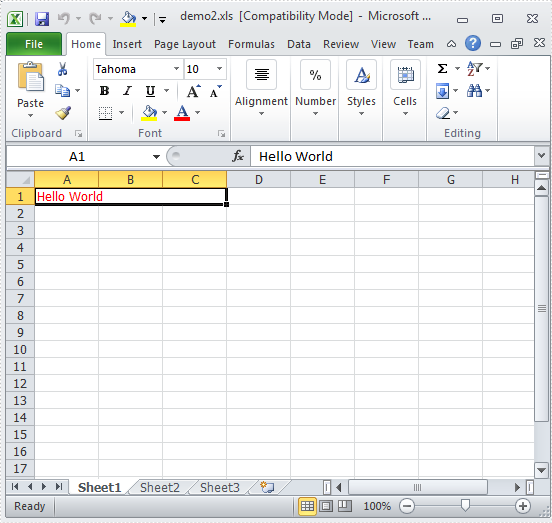
The sample demonstrates how to Create Excel file for Silverlight via Spire.XLS.

<Application xmlns="http://schemas.microsoft.com/winfx/2006/xaml/presentation"
xmlns:x="http://schemas.microsoft.com/winfx/2006/xaml"
x:Class="CreateWorkbook_xls.App">
<Application.Resources>
</Application.Resources>
</Application>
using System;
using System.Windows;
namespace CreateWorkbook_xls
{
public partial class App : Application
{
public App()
{
this.Startup += this.Application_Startup;
this.Exit += this.Application_Exit;
this.UnhandledException += this.Application_UnhandledException;
InitializeComponent();
}
private void Application_Startup(object sender, StartupEventArgs e)
{
this.RootVisual = new MainPage();
}
private void Application_Exit(object sender, EventArgs e)
{
}
private void Application_UnhandledException(object sender, ApplicationUnhandledExceptionEventArgs e)
{
// If the app is running outside of the debugger then report the exception using
// the browser's exception mechanism. On IE this will display it a yellow alert
// icon in the status bar and Firefox will display a script error.
if (!System.Diagnostics.Debugger.IsAttached)
{
// NOTE: This will allow the application to continue running after an exception has been thrown
// but not handled.
// For production applications this error handling should be replaced with something that will
// report the error to the website and stop the application.
e.Handled = true;
Deployment.Current.Dispatcher.BeginInvoke(delegate { ReportErrorToDOM(e); });
}
}
private void ReportErrorToDOM(ApplicationUnhandledExceptionEventArgs e)
{
try
{
string errorMsg = e.ExceptionObject.Message + e.ExceptionObject.StackTrace;
errorMsg = errorMsg.Replace('"', '\'').Replace("\r\n", @"\n");
System.Windows.Browser.HtmlPage.Window.Eval("throw new Error(\"Unhandled Error in Silverlight Application " + errorMsg + "\");");
}
catch (Exception)
{
}
}
}
}
Imports System.Windows
Namespace CreateWorkbook_xls
Partial Public Class App
Inherits Application
Public Sub New()
AddHandler Me.Startup, AddressOf Application_Startup
AddHandler Me.Exit, AddressOf Application_Exit
AddHandler Me.UnhandledException, AddressOf Application_UnhandledException
InitializeComponent()
End Sub
Private Sub Application_Startup(ByVal sender As Object, ByVal e As StartupEventArgs)
Me.RootVisual = New MainPage()
End Sub
Private Sub Application_Exit(ByVal sender As Object, ByVal e As EventArgs)
End Sub
Private Sub Application_UnhandledException(ByVal sender As Object, ByVal e As ApplicationUnhandledExceptionEventArgs)
' If the app is running outside of the debugger then report the exception using
' the browser's exception mechanism. On IE this will display it a yellow alert
' icon in the status bar and Firefox will display a script error.
If Not Debugger.IsAttached Then
' NOTE: This will allow the application to continue running after an exception has been thrown
' but not handled.
' For production applications this error handling should be replaced with something that will
' report the error to the website and stop the application.
e.Handled = True
Deployment.Current.Dispatcher.BeginInvoke(Sub() ReportErrorToDOM(e))
End If
End Sub
Private Sub ReportErrorToDOM(ByVal e As ApplicationUnhandledExceptionEventArgs)
Try
Dim errorMsg As String = e.ExceptionObject.Message + e.ExceptionObject.StackTrace
errorMsg = errorMsg.Replace(""""c, "'"c).Replace(vbCrLf, vbLf)
System.Windows.Browser.HtmlPage.Window.Eval("throw new Error(""Unhandled Error in Silverlight Application " & errorMsg & """);")
Catch e1 As Exception
End Try
End Sub
End Class
End Namespace
<UserControl x:Class="CreateWorkbook_xls.MainPage"
xmlns="http://schemas.microsoft.com/winfx/2006/xaml/presentation"
xmlns:x="http://schemas.microsoft.com/winfx/2006/xaml"
xmlns:d="http://schemas.microsoft.com/expression/blend/2008"
xmlns:mc="http://schemas.openxmlformats.org/markup-compatibility/2006"
mc:Ignorable="d"
d:DesignHeight="300" d:DesignWidth="400">
<Grid x:Name="LayoutRoot" Background="White">
<Button Content="RUN" Height="23" HorizontalAlignment="Left" Margin="313,254,0,0" Name="button1" VerticalAlignment="Top" Width="75" Click="button1_Click" />
</Grid>
</UserControl>
using System.Windows;
using System.Windows.Controls;
using System.Windows.Media;
using System.IO;
using Spire.Xls;
namespace CreateWorkbook_xls
{
public partial class MainPage : UserControl
{
private SaveFileDialog saveFile =null;
public MainPage()
{
InitializeComponent();
this.saveFile = new SaveFileDialog();
this.saveFile.Filter = "Excel Document(*.xls)|*.xls|Excel 2007-2010(*.xlsx)|*.xlsx";
}
private void button1_Click(object sender, RoutedEventArgs e)
{
//create a workbook
Workbook workbook = new Workbook();
//edit the created workbook
workbook.Worksheets[0].Range["A1:C1"].Merge();
workbook.Worksheets[0].Range["A1"].Text = "Hello World";
workbook.Worksheets[0].Range["A1"].Style.Font.Color = Colors.Red;
//save the workbook
bool? result = this.saveFile.ShowDialog();
if(result.HasValue&&result.Value)
{
using (Stream stream = this.saveFile.OpenFile())
{
workbook.SaveToStream(stream);
}
}
}
}
}
Imports System.Windows
Imports System.Windows.Controls
Imports System.Windows.Media
Imports System.IO
Imports Spire.Xls
Namespace CreateWorkbook_xls
Partial Public Class MainPage
Inherits UserControl
Private saveFile As SaveFileDialog =Nothing
Public Sub New()
InitializeComponent()
Me.saveFile = New SaveFileDialog()
Me.saveFile.Filter = "Excel Document(*.xls)|*.xls|Excel 2007-2010(*.xlsx)|*.xlsx"
End Sub
Private Sub button1_Click(ByVal sender As Object, ByVal e As RoutedEventArgs)
'create a workbook
Dim workbook As New Workbook()
'edit the created workbook
workbook.Worksheets(0).Range("A1:C1").Merge()
workbook.Worksheets(0).Range("A1").Text = "Hello World"
workbook.Worksheets(0).Range("A1").Style.Font.Color = Colors.Red
'save the workbook
Dim result? As Boolean = Me.saveFile.ShowDialog()
If result.HasValue AndAlso result.Value Then
Using stream As Stream = Me.saveFile.OpenFile()
workbook.SaveToStream(stream)
End Using
End If
End Sub
End Class
End Namespace
Published in
Misc
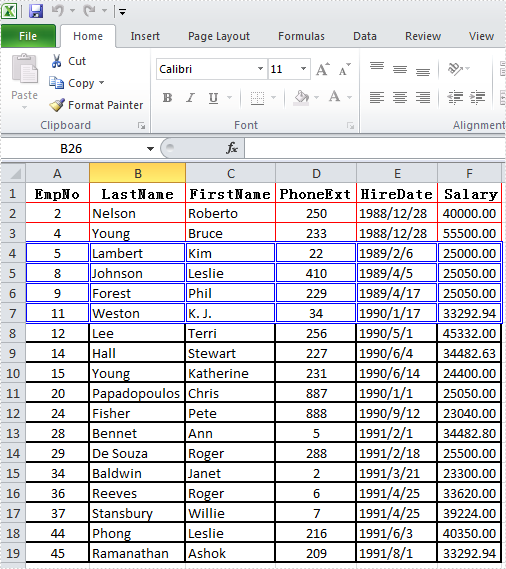
The sample demonstrates how to Design Excel Cell Borders in Silverlight via Spire.XLS.
<Application xmlns="http://schemas.microsoft.com/winfx/2006/xaml/presentation"
xmlns:x="http://schemas.microsoft.com/winfx/2006/xaml"
x:Class="Border_xls.App">
<Application.Resources>
</Application.Resources>
</Application>
using System;
using System.Windows;
namespace Border_xls
{
public partial class App : Application
{
public App()
{
this.Startup += this.Application_Startup;
this.Exit += this.Application_Exit;
this.UnhandledException += this.Application_UnhandledException;
InitializeComponent();
}
private void Application_Startup(object sender, StartupEventArgs e)
{
this.RootVisual = new MainPage();
}
private void Application_Exit(object sender, EventArgs e)
{
}
private void Application_UnhandledException(object sender, ApplicationUnhandledExceptionEventArgs e)
{
// If the app is running outside of the debugger then report the exception using
// the browser's exception mechanism. On IE this will display it a yellow alert
// icon in the status bar and Firefox will display a script error.
if (!System.Diagnostics.Debugger.IsAttached)
{
// NOTE: This will allow the application to continue running after an exception has been thrown
// but not handled.
// For production applications this error handling should be replaced with something that will
// report the error to the website and stop the application.
e.Handled = true;
Deployment.Current.Dispatcher.BeginInvoke(delegate { ReportErrorToDOM(e); });
}
}
private void ReportErrorToDOM(ApplicationUnhandledExceptionEventArgs e)
{
try
{
string errorMsg = e.ExceptionObject.Message + e.ExceptionObject.StackTrace;
errorMsg = errorMsg.Replace('"', '\'').Replace("\r\n", @"\n");
System.Windows.Browser.HtmlPage.Window.Eval("throw new Error(\"Unhandled Error in Silverlight Application " + errorMsg + "\");");
}
catch (Exception)
{
}
}
}
}
Imports System.Windows
Namespace Border_xls
Partial Public Class App
Inherits Application
Public Sub New()
AddHandler Me.Startup, AddressOf Application_Startup
AddHandler Me.Exit, AddressOf Application_Exit
AddHandler Me.UnhandledException, AddressOf Application_UnhandledException
InitializeComponent()
End Sub
Private Sub Application_Startup(ByVal sender As Object, ByVal e As StartupEventArgs)
Me.RootVisual = New MainPage()
End Sub
Private Sub Application_Exit(ByVal sender As Object, ByVal e As EventArgs)
End Sub
Private Sub Application_UnhandledException(ByVal sender As Object, ByVal e As ApplicationUnhandledExceptionEventArgs)
' If the app is running outside of the debugger then report the exception using
' the browser's exception mechanism. On IE this will display it a yellow alert
' icon in the status bar and Firefox will display a script error.
If Not Debugger.IsAttached Then
' NOTE: This will allow the application to continue running after an exception has been thrown
' but not handled.
' For production applications this error handling should be replaced with something that will
' report the error to the website and stop the application.
e.Handled = True
Deployment.Current.Dispatcher.BeginInvoke(Sub() ReportErrorToDOM(e))
End If
End Sub
Private Sub ReportErrorToDOM(ByVal e As ApplicationUnhandledExceptionEventArgs)
Try
Dim errorMsg As String = e.ExceptionObject.Message + e.ExceptionObject.StackTrace
errorMsg = errorMsg.Replace(""""c, "'"c).Replace(vbCrLf, vbLf)
System.Windows.Browser.HtmlPage.Window.Eval("throw new Error(""Unhandled Error in Silverlight Application " & errorMsg & """);")
Catch e1 As Exception
End Try
End Sub
End Class
End Namespace
<UserControl x:Class="Border_xls.MainPage"
xmlns="http://schemas.microsoft.com/winfx/2006/xaml/presentation"
xmlns:x="http://schemas.microsoft.com/winfx/2006/xaml"
xmlns:d="http://schemas.microsoft.com/expression/blend/2008"
xmlns:mc="http://schemas.openxmlformats.org/markup-compatibility/2006"
mc:Ignorable="d"
d:DesignHeight="300" d:DesignWidth="400" Loaded="UserControl_Loaded">
<Grid x:Name="LayoutRoot" Background="White">
<Button Content="Button" Height="23" HorizontalAlignment="Left" Margin="241,247,0,0" Name="button1" VerticalAlignment="Top" Width="75" Click="button1_Click" />
</Grid>
</UserControl>
using System.Windows;
using System.Windows.Controls;
using System.Windows.Media;
using System.IO;
using System.Reflection;
using Spire.Xls;
namespace Border_xls
{
public partial class MainPage : UserControl
{
private SaveFileDialog saveFiledialog = null;
private Workbook workbook = new Workbook();
public MainPage()
{
InitializeComponent();
this.saveFiledialog = new SaveFileDialog();
this.saveFiledialog.Filter = "Excel Document(*.xls)|*.xls";
}
private void UserControl_Loaded(object sender, RoutedEventArgs e)
{
//load the xls template
Assembly assembly = this.GetType().Assembly;
foreach (string name in assembly.GetManifestResourceNames())
{
if(name.EndsWith("data.xls"))
{
using(Stream fileStr=assembly.GetManifestResourceStream(name))
{
this.workbook.LoadFromStream(fileStr);
}
}
}
}
private void button1_Click(object sender, RoutedEventArgs e)
{
//get the first worksheet of the workbook
Worksheet worksheet = this.workbook.Worksheets[0];
//set the border of the first three rows
worksheet.Range["A1:F3"].Style.Borders.Color = Color.FromArgb(255, 255,0, 0);
worksheet.Range["A1:F3"].Style.Borders.LineStyle = LineStyleType.Thin;
worksheet.Range["A1:F3"].Style.Borders[BordersLineType.DiagonalDown].LineStyle = LineStyleType.None;
worksheet.Range["A1:F3"].Style.Borders[BordersLineType.DiagonalUp].LineStyle = LineStyleType.None;
//set the border of the fourth,fifth,sixth and seventh rows
worksheet.Range["A4:F7"].Style.Borders.Color = Color.FromArgb(255, 0, 0, 255);
worksheet.Range["A4:F7"].Style.Borders.LineStyle = LineStyleType.Double;
worksheet.Range["A4:F7"].Style.Borders[BordersLineType.DiagonalDown].LineStyle = LineStyleType.None;
worksheet.Range["A4:F7"].Style.Borders[BordersLineType.DiagonalUp].LineStyle = LineStyleType.None;
//set the border of other rows
worksheet.Range["A8:F19"].Style.Borders.Color = Color.FromArgb(255, 0, 0, 0);
worksheet.Range["A8:F19"].Style.Borders.LineStyle = LineStyleType.Medium;
worksheet.Range["A8:F19"].Style.Borders[BordersLineType.DiagonalDown].LineStyle = LineStyleType.None;
worksheet.Range["A8:F19"].Style.Borders[BordersLineType.DiagonalUp].LineStyle = LineStyleType.None;
//save the workbook
bool? result = this.saveFiledialog.ShowDialog();
if (result.HasValue && result.Value)
{
using (Stream stream = this.saveFiledialog.OpenFile())
{
this.workbook.SaveToStream(stream);
}
}
}
}
}
Imports System.Windows
Imports System.Windows.Controls
Imports System.Windows.Media
Imports System.IO
Imports System.Reflection
Imports Spire.Xls
Namespace Border_xls
Partial Public Class MainPage
Inherits UserControl
Private saveFiledialog As SaveFileDialog = Nothing
Private workbook As New Workbook()
Public Sub New()
InitializeComponent()
Me.saveFiledialog = New SaveFileDialog()
Me.saveFiledialog.Filter = "Excel Document(*.xls)|*.xls"
End Sub
Private Sub UserControl_Loaded(ByVal sender As Object, ByVal e As RoutedEventArgs)
'load the xls template
Dim [assembly] As System.Reflection.Assembly = Me.GetType().Assembly
For Each name As String In [assembly].GetManifestResourceNames()
If name.EndsWith("data.xls") Then
Using fileStr As Stream=[assembly].GetManifestResourceStream(name)
Me.workbook.LoadFromStream(fileStr)
End Using
End If
Next name
End Sub
Private Sub button1_Click(ByVal sender As Object, ByVal e As RoutedEventArgs)
'get the first worksheet of the workbook
Dim worksheet As Worksheet = Me.workbook.Worksheets(0)
'set the border of the first three rows
worksheet.Range("A1:F3").Style.Borders.Color = Color.FromArgb(255, 255,0, 0)
worksheet.Range("A1:F3").Style.Borders.LineStyle = LineStyleType.Thin
worksheet.Range("A1:F3").Style.Borders(BordersLineType.DiagonalDown).LineStyle = LineStyleType.None
worksheet.Range("A1:F3").Style.Borders(BordersLineType.DiagonalUp).LineStyle = LineStyleType.None
'set the border of the fourth,fifth,sixth and seventh rows
worksheet.Range("A4:F7").Style.Borders.Color = Color.FromArgb(255, 0, 0, 255)
worksheet.Range("A4:F7").Style.Borders.LineStyle = LineStyleType.Double
worksheet.Range("A4:F7").Style.Borders(BordersLineType.DiagonalDown).LineStyle = LineStyleType.None
worksheet.Range("A4:F7").Style.Borders(BordersLineType.DiagonalUp).LineStyle = LineStyleType.None
'set the border of other rows
worksheet.Range("A8:F19").Style.Borders.Color = Color.FromArgb(255, 0, 0, 0)
worksheet.Range("A8:F19").Style.Borders.LineStyle = LineStyleType.Medium
worksheet.Range("A8:F19").Style.Borders(BordersLineType.DiagonalDown).LineStyle = LineStyleType.None
worksheet.Range("A8:F19").Style.Borders(BordersLineType.DiagonalUp).LineStyle = LineStyleType.None
'save the workbook
Dim result? As Boolean = Me.saveFiledialog.ShowDialog()
If result.HasValue AndAlso result.Value Then
Using stream As Stream = Me.saveFiledialog.OpenFile()
Me.workbook.SaveToStream(stream)
End Using
End If
End Sub
End Class
End Namespace

Published in
Misc
Tagged under
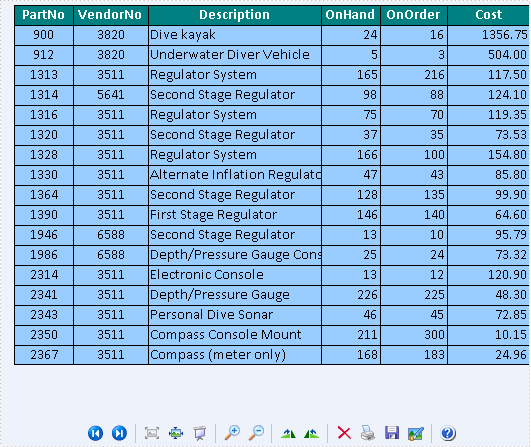
The sample demonstrates how to convert Excel workbook to Image file via Spire.XLS.

using Spire.Xls;
namespace ToImage
{
class Program
{
static void Main(string[] args)
{
Workbook workbook = new Workbook();
workbook.LoadFromFile(@"..\..\..\..\Data\parts.xls",ExcelVersion.Version97to2003);
Worksheet sheet = workbook.Worksheets[0];
sheet.SaveToImage("sample.bmp");
System.Diagnostics.Process.Start("sample.bmp");
}
}
}
Imports Spire.Xls
Namespace ToImage
Friend Class Program
Shared Sub Main(ByVal args() As String)
Dim workbook As New Workbook()
workbook.LoadFromFile("..\..\..\..\Data\parts.xls",ExcelVersion.Version97to2003)
Dim sheet As Worksheet = workbook.Worksheets(0)
sheet.SaveToImage("sample.bmp")
System.Diagnostics.Process.Start("sample.bmp")
End Sub
End Class
End Namespace
Published in
Misc
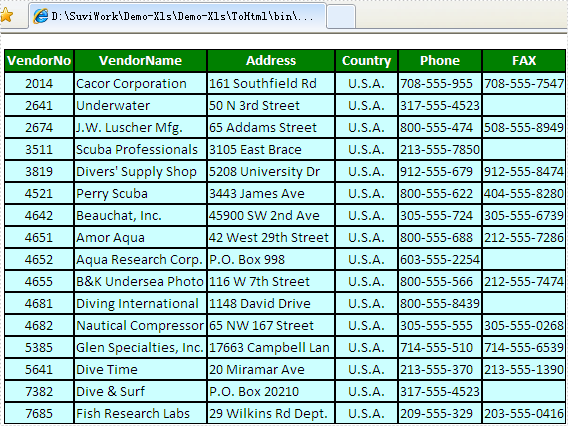
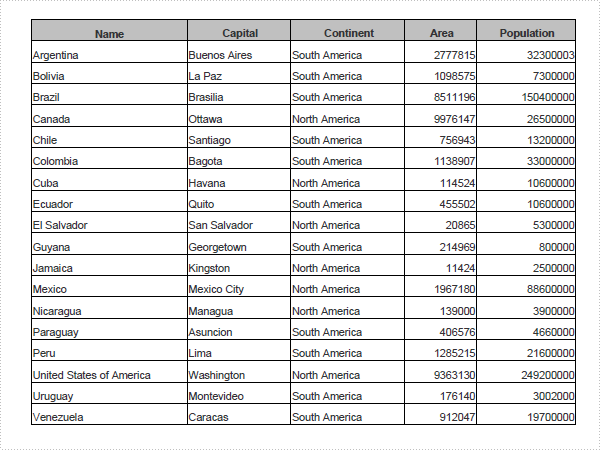
The sample demonstrates how to convert Excel workbook to HTML file via Spire.XLS.

using Spire.Xls;
namespace ToHtml
{
class Program
{
static void Main(string[] args)
{
Workbook workbook = new Workbook();
workbook.LoadFromFile(@"..\..\..\..\Data\vendors.xls",ExcelVersion.Version97to2003);
Worksheet sheet = workbook.Worksheets[0];
sheet.SaveToHtml("sample.html");
System.Diagnostics.Process.Start("sample.html");
}
}
}
Imports Spire.Xls
Namespace ToHtml
Friend Class Program
Shared Sub Main(ByVal args() As String)
Dim workbook As New Workbook()
workbook.LoadFromFile("..\..\..\..\Data\vendors.xls",ExcelVersion.Version97to2003)
Dim sheet As Worksheet = workbook.Worksheets(0)
sheet.SaveToHtml("sample.html")
System.Diagnostics.Process.Start("sample.html")
End Sub
End Class
End Namespace
Published in
Misc
The sample demonstrates how to convert Excel workbook to PDF file via Spire.XLS.

static void Main()
{
Spire.Xls.Workbook workbook = new Spire.Xls.Workbook();
workbook.LoadFromFile(@"DataTableSample.xls");
Spire.Xls.Converter.PdfConverter pdfConverter
= new Spire.Xls.Converter.PdfConverter(workbook);
Spire.Pdf.PdfDocument pdfDocument = new Spire.Pdf.PdfDocument();
Spire.Xls.Converter.PdfConverterSettings settings
= new Spire.Xls.Converter.PdfConverterSettings();
settings.EmbedFonts = true;
settings.TemplateDocument = pdfDocument;
pdfDocument = pdfConverter.Convert(settings);
pdfDocument.SaveToFile("XLS-to-PDF.pdf");
pdfDocument.Close();
}
Shared Sub Main()
Dim workbook As New Spire.Xls.Workbook()
workbook.LoadFromFile("DataTableSample.xls")
Dim pdfConverter As New Spire.Xls.Converter.PdfConverter(workbook)
Dim pdfDocument As New Spire.Pdf.PdfDocument()
Dim settings As New Spire.Xls.Converter.PdfConverterSettings()
settings.EmbedFonts = True
settings.TemplateDocument = pdfDocument
pdfDocument = pdfConverter.Convert(settings)
pdfDocument.SaveToFile("XLS-to-PDF.pdf")
pdfDocument.Close()
End Sub